¥To insert only processing orders into Airtable we need to filter our data by orderStatus. Basically, we want to tell the program that if the orderStatus is processing, then insert all records with this status into Airtable; else, for example, if the orderStatus isn't processing, calculate the sum of all orders with the other orderStatus (booked).
¥This if-then-else command is conditional logic. In n8n workflows, you can add conditional logic with the If node, which splits a workflow conditionally based on comparison operations.
If vs. Switch
如果你需要根据布尔值(true 和 false)以外的值过滤数据,请使用 切换节点 节点。Switch 节点类似于 If 节点,但支持多个输出连接器。
¥If you need to filter data on more than boolean values (true and false), use the Switch node. The Switch node is similar to the If node, but supports multiple output connectors.
¥An expression is a string of characters and symbols in a programming language that can be evaluated to get a value, often according to its input. In n8n workflows, you can use expressions in a node to refer to another node for input data. In our example, the If node references the data output by the HTTP Request node.
在“如果”节点窗口中,配置以下参数:
¥In the If node window, configure the parameters:
按照以下步骤将 value1 占位符设置为 {{ $json.orderStatus }}:
¥Set the value1 placeholder to {{ $json.orderStatus }} with the following steps:
1. 将鼠标悬停在 value1 字段上。
1
¥Hover over the value1 field.
选择“value1”字段右侧的“表达式”选项卡。
¥Select the Expression tab on the right side of the value1 field.
3. 接下来,点击链接图标打开表达式编辑器:
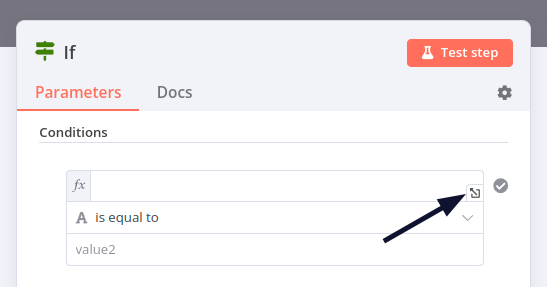
¥Next, open the expression editor by selecting the link icon:
Opening the Expression Editor
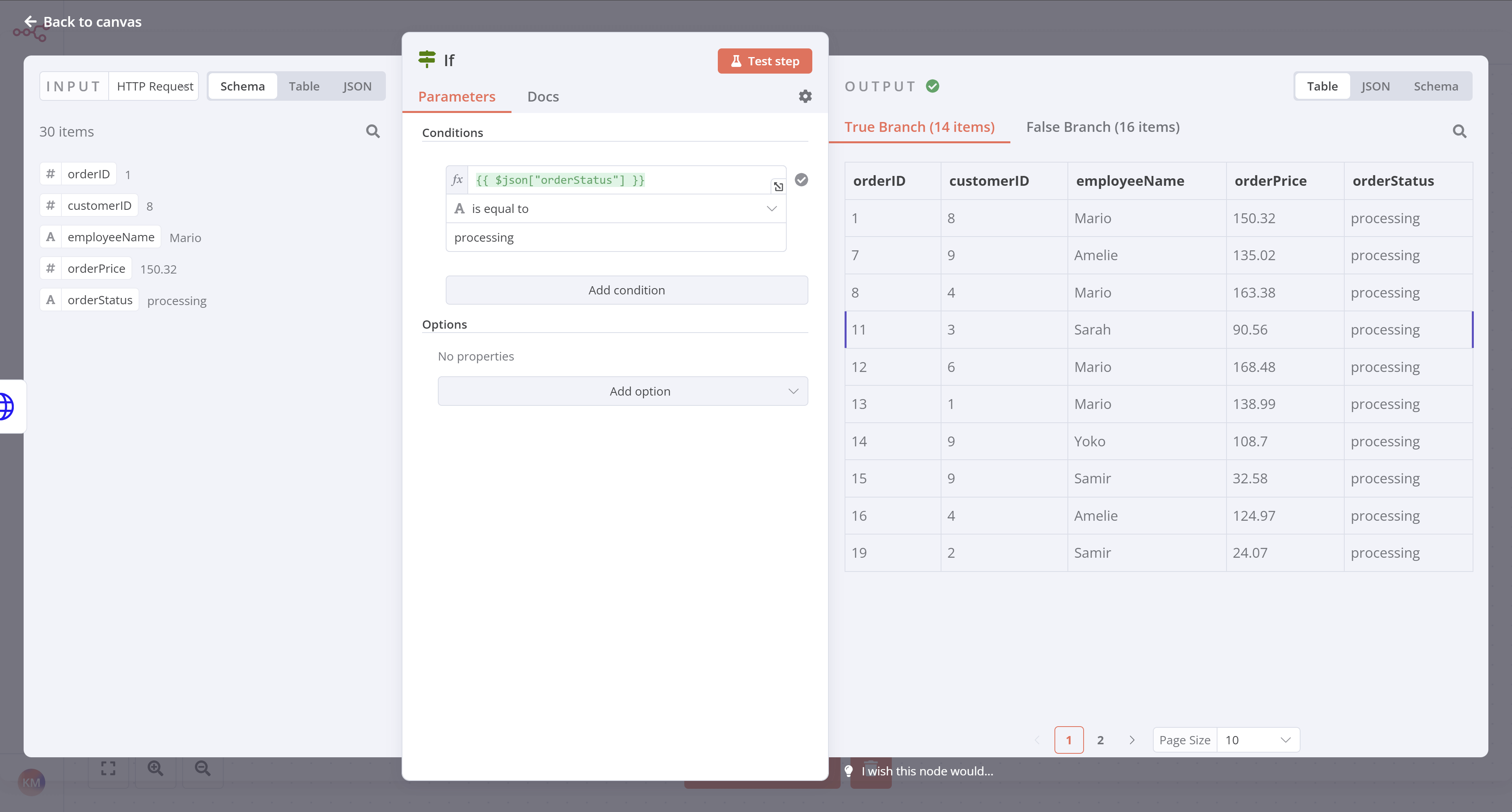
4. Use the left-side panel to select HTTP Request > orderStatus and drag it into the Expression field in the center of the window.
Expression Editor in the If node
6. Once you add the expression, close the Edit Expression dialog.
操作:选择“字符串 > 等于”
¥Operation: Select String > is equal to
将 value2 占位符设置为 processing。
¥Set the value2 placeholder to processing.
Data Type
选择操作时,请务必选择正确的数据类型(布尔值、日期和时间、数字或字符串)。
¥Make sure to select the correct data type (boolean, date & time, number, or string) when you select the Operation.
¥Note that the orders with a processing order status should show for the True Branch output, while the orders with a booked order status should show in the False Branch output.
完成后,关闭“如果”节点详细信息视图。
¥Close the If node detail view when you're finished.
¥It's a good idea at this point to retest the Airtable node. Before you do, open your table in Airtable and delete all existing rows. Then open the Airtable node window in n8n and select Execute step.
¥Review your data in Airtable to be sure your workflow only added the correct orders (those with orderStatus of processing). There should be 14 records now instead of 30.
此时,你的工作流程应如下所示:
¥At this stage, your workflow should look like this:
¥Nathan 🙋: This If node is so useful for filtering data! Now I have all the information about processing orders. I actually only need the employeeName and orderID, but I guess I can keep all the other fields just in case.
¥You 👩🔧: Actually, I wouldn't recommend doing that. Inserting more data requires more computational power, the data transfer is slower and takes longer, and takes up more storage resources in your table. In this particular case, 14 records with 5 fields might not seem like it'd make a significant difference, but if your business grows to thousands of records and dozens of fields, things add up and even one extra column can affect performance.
Nathan 🙋:哦,这很有用。能否仅从处理顺序中选择两个字段?
¥Nathan 🙋: Oh, that's good to know. Can you select only two fields from the processing orders?