AI 助手(AI Assistant)#
n8n AI 助手可以帮助你无缝地构建、调试和优化工作流。从回答关于 n8n 的问题,到提供编码和表达式方面的帮助,AI 助手可以简化你的工作流构建过程,并在你使用 n8n 的功能时提供支持。
🌐 The n8n AI Assistant helps you build, debug, and optimize your workflows seamlessly. From answering questions about n8n to providing help with coding and expressions, the AI Assistant can streamline your workflow-building process and support you as you navigate n8n's capabilities.
当前功能(Current capabilities)#
AI 助手提供一系列工具来支持你:
🌐 The AI Assistant offers a range of tools to support you:
- 调试助手:识别并排查工作流中节点的执行问题,确保其顺利运行。
- 回答 n8n 问题:即时获取有关 n8n 的问题答案,无论是关于特定功能还是一般功能。
- 编码支持:获得有关编码的指导,包括 SQL 和 JSON,以优化你的节点和数据处理。
- 表达式帮助:学习如何创建和完善表达式,以充分利用你的工作流程。
- 凭证设置技巧:了解如何安全高效地设置和管理节点凭证。
充分利用 Assistant 的提示(Tips for getting the most out of the Assistant)#
- 进行对话:AI 助手可以与你逐步协作。如果某个建议不符合你的需求,请告知它!你提供的上下文越多,推荐就会越精准。
- 提出具体问题:为了获得最佳效果,请提出针对性的问题(例如,“我如何为 Google 表格设置凭证?”)。助手在处理清晰的问题时效果最好。
- 迭代建议:不要犹豫去在助手的回答基础上进行扩展。尝试不同的方法,并根据助手的反馈不断改进,以更接近你理想的解决方案。
- 可以尝试的事情:
- 调试你遇到的任何错误
- 询问如何设置凭据
- 解释这个工作流程的功能。
- 我需要你的帮助来编写代码:[在这里解释你的代码]
- 我如何在 n8n 中构建 X?
人工智能使用设置(AI usage settings)#
/// 信息 在 n8n v2.7.0 及以上版本可用。 ///
你可以通过在你的 n8n 实例中导航至 设置 > AI 使用 来管理你的 AI 使用设置。在这里,你可以控制与 AI 助手共享的数据。
🌐 You can manage your AI usage settings by navigating to Settings > AI Usage in your n8n instance. Here, you can control what data is shared with the AI Assistant.
这些设置仅对实例所有者和管理员可用,并将适用于实例上的所有用户。
🌐 These settings are only available to the instance owners and administrators, and will apply to all users on the instance.
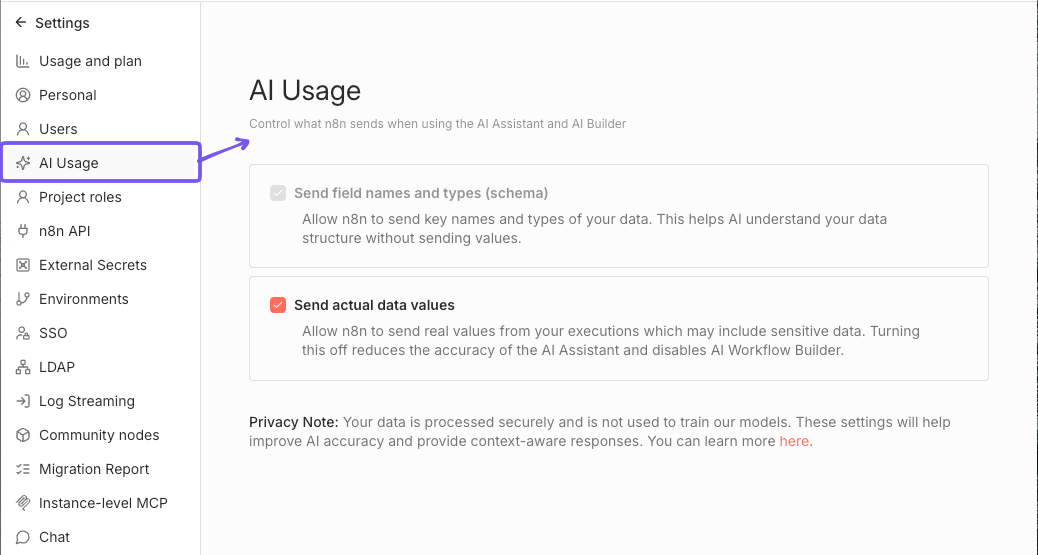
切换是否与 AI 助手共享实际工作流数据(如节点名称、参数和结构)。禁用此选项将限制助手根据你的工作流提供上下文相关帮助的能力。
🌐 Toggle whether to share actual workflow data (like node names, parameters, and structure) with the AI Assistant. Disabling this option will limit the assistant's ability to provide context-aware help based on your workflows.
由于访问工作流数据对 AI 工作流构建器的功能至关重要,禁用此选项也将禁用 AI 工作流构建器功能。
🌐 Since access to workflow data is essential for the AI Workflow builder to function, disabling this option will also disable the AI Workflow builder feature.
禁用发送数据(Disable sending data)#
要停止向 AI 助手发送实际数据值,请在 AI 使用 设置页面关闭 发送实际数据值 复选框。
🌐 To stop sending actual data values to the AI Assistant, turn off the Send actual data values checkbox on the AI Usage settings page.
常见问题(FAQs)#
助手在什么上下文中运行?(What context does the Assistant have?)#
AI 助手可以访问你 n8n 屏幕上显示的所有元素,但不包括实际的输入和输出数据值(例如客户信息)。要了解更多关于 n8n 与助手共享的数据,请参阅 n8n 中的 AI。
🌐 The AI Assistant has access to all elements displayed on your n8n screen, excluding actual input and output data values (like customer information). To learn more about what data n8n shares with the Assistant, refer to AI in n8n.
谁可以使用助手?(Who can use the Assistant?)#
任何云计划用户均可使用助手。
🌐 Any user on a Cloud plan can use the assistant.
助手如何运作?(How does the Assistant work?)#
该助手的底层逻辑是基于 n8n 的先进人工智能能力构建的。它使用了不同 代理 的组合,这些代理专注于 n8n 的不同字段,RAG 用于从文档和社区论坛获取知识,以及自定义提示、记忆 和上下文。