数据转换的表达式(Expressions for data transformation)#
你可以在 n8n 支持表达式的任何地方使用表达式转换函数。
🌐 You can use expression transformation functions anywhere expressions are supported in n8n.
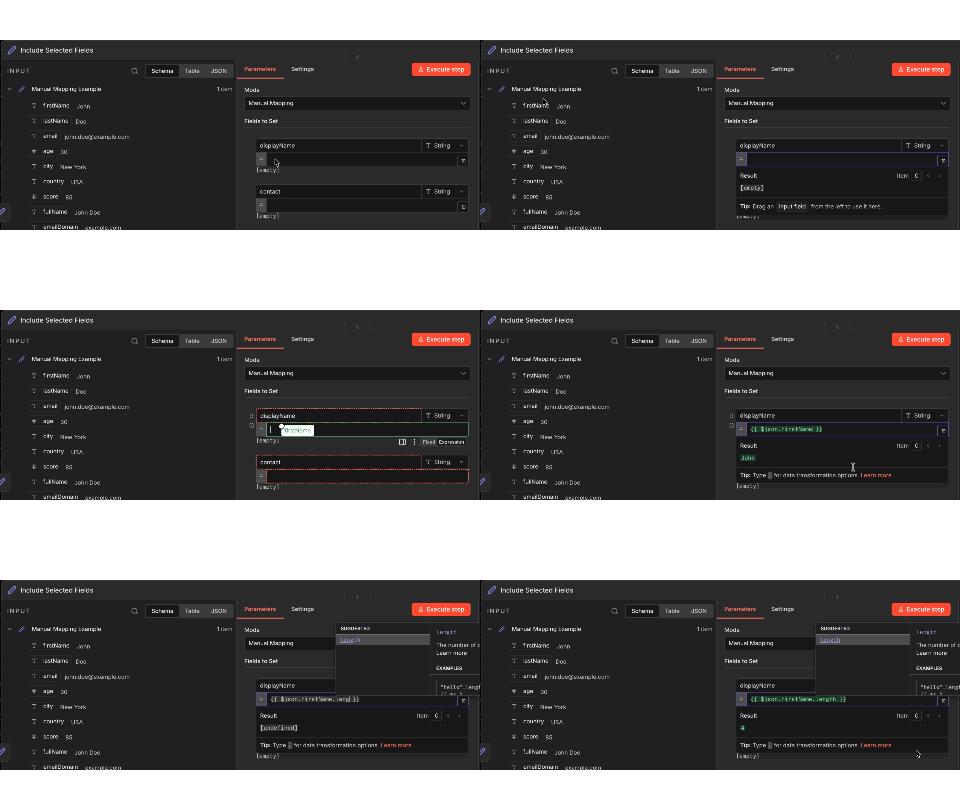
但是,如果你的主要目标是使用表达式转换数据而不执行其他操作,请使用 编辑字段(设置) 节点。该节点专为数据转换设计,提供一个干净的界面来:
🌐 However, if your main goal is to transform data using expressions without performing any other operations, use the Edit Fields (Set) node. This node is designed specifically for data transformation, providing a clean interface to:
- 添加具有表达式值的新字段
- 使用转换函数修改现有字段值
- 删除或重命名字段
这通过将数据转换与业务逻辑分开来保持工作流程的有序,使其更容易理解和维护。
🌐 This keeps your workflow organized by separating data transformation from business logic, making it easier to understand and maintain.
最佳实践:与其在不同节点的多个参数上添加复杂表达式,不如先使用编辑字段准备你的数据,然后将转换后的数据传递给后续节点。
有关更多信息和示例,请参阅表达式参考。
🌐 See Expression reference for more information and examples.
示例:从 webhook 正文获取数据(Example: Get data from webhook body)#
考虑以下情景:你有一个通过 webhook 接收数据的 webhook 触发器。你想从中提取一些数据以在工作流中使用。
🌐 Consider the following scenario: you have a webhook trigger that receives data through the webhook body. You want to extract some of that data for use in the workflow.
你的 Webhook 数据类似于以下内容:
🌐 Your webhook data looks similar to this:
1 2 3 4 5 6 7 8 9 10 11 12 13 14 15 | |
在工作流的下一个节点中,你只想获取 city 的值。你可以使用以下表达式:
🌐 In the next node in the workflow, you want to get just the value of city. You can use the following expression:
1 | |
此表达式:
🌐 This expression:
- 使用 n8n 的自定义
$json变量访问传入的 JSON 格式数据。 - 查找
city的值(在此示例中为“纽约”)。请注意,此示例使用 JMESPath 语法来查询 JSON 数据。你也可以将此表达式写为{{$json['body']['city']}}。
在凭证中使用表达式(Using expressions in credentials)#
你也可以在凭证字段中使用表达式。当你使用表达式引用数据时(例如,{{$json.body.city}} 或 {{ $('Webhook').item.json.headers.authorization }}),n8n 会在当前工作流执行的上下文中评估该表达式。
🌐 You can also use expressions in credential fields. When you reference data using expressions (for example, {{$json.body.city}} or {{ $('Webhook').item.json.headers.authorization }}), n8n evaluates the expression within the context of the current workflow execution.
这意味着:
🌐 This means that:
- 凭证中的表达式可以访问当前执行上下文中可用的数据,包括来自先前节点的数据。
- 每个工作流执行都有其自己的数据上下文。
- 表达式在每次执行时都会被求值,因此不同的执行之间不会共享数据。
例如,如果一个 webhook 节点接收到访问令牌,并且你在凭证字段中使用表达式引用它,该值将使用特定工作流运行的执行数据来解析。
🌐 For example, if a webhook node receives an access token and you reference it in a credential field using an expression, the value is resolved using the execution data of that specific workflow run.
示例:将较长的 JavaScript 写成表达式(Example: Writing longer JavaScript as expressions)#
你可以在一个表达式中执行变量赋值或多个语句之类的操作,但你需要使用立即调用函数表达式(IIFE)的语法来封装你的代码。
🌐 You can do things like variable assignments or multiple statements in an expression, but you need to wrap your code using the syntax for an Immediately Invoked Function Expression (IIFE).
以下代码使用 Luxon 日期和时间库来计算两个日期之间的月份数。我们将代码同时用大括号封装以形成表达式,并使用 IIFE 语法。
🌐 The following code use the Luxon date and time library to find the time between two dates in months. We surround the code in both the handlebar brackets for an expression and the IIFE syntax.
1 2 3 4 5 6 | |
常见问题(Common issues)#
以下是一些与表达式相关的常见错误和问题,以及解决或排查它们的步骤。
🌐 Here are some common errors and issues related to expressions and steps to resolve or troubleshoot them.
项目 0 中的“JSON 输出”包含无效的 JSON(The 'JSON Output' in item 0 contains invalid JSON)#
当你使用 JSON 模式但没有提供有效的 JSON 对象时,会出现此错误。根据 JSON 对象的问题,错误有时会显示为 The 'JSON Output' in item 0 does not contain a valid JSON object。
🌐 This error occurs when you use JSON mode but don't provide a valid JSON object. Depending on the problem with the JSON object, the error sometimes displays as The 'JSON Output' in item 0 does not contain a valid JSON object.
要解决此问题,请确保你提供的代码是有效的 JSON:
🌐 To resolve this, make sure that the code you provide is valid JSON:
- 使用 JSON 验证器 检查 JSON。
- 检查你的 JSON 对象是否引用了未定义的输入数据。如果传入的数据不总是包含相同的字段,可能会出现这种情况。
无法获取表达式的数据(Can't get data for expression)#
当 n8n 无法获取表达式引用的数据时,会发生此错误。通常,这种情况发生在前一个节点尚未运行时。
🌐 This error occurs when n8n can't retrieve the data referenced by an expression. Often, this happens when the preceding node hasn't been run yet.
这种情况的另一种变体可能会显示为 Referenced node is unexecuted。在这种情况下,该错误的完整文本将告诉你哪个节点在此格式下未执行:
🌐 Another variation of this may appear as Referenced node is unexecuted. In that case, the full text of this error will tell you the exact node that isn't executing in this format:
一个表达式引用了节点 '<node-name>',但它尚未执行。要么修改表达式,要么重新布线你的工作流以确保该节点先执行。
要开始故障排除,请测试工作流直至指定节点。
🌐 To begin troubleshooting, test the workflow up to the named node.
对于使用 JavaScript 或其他自定义代码的节点,你可以通过检查以下内容来判断之前的节点是否已执行,然后再尝试使用其值:
🌐 For nodes that use JavaScript or other custom code, you can check if a previous node has executed before trying to use its value by checking the following:
1 | |
例如,这个 JSON 引用了输入数据的参数。如果在未将此步骤连接到其他节点的情况下进行测试,就会显示此错误:
🌐 As an example, this JSON references the parameters of the input data. This error will display if you test this step without connecting it to another node:
1 2 3 | |
无效的语法(Invalid syntax)#
当你使用的表达式存在语法错误时,会发生此错误。
🌐 This error occurs when you use an expression that has a syntax error.
例如,此 JSON 中的表达式包含尾随句点,这会导致语法错误:
🌐 For example, the expression in this JSON includes a trailing period, which results in an invalid syntax error:
1 2 3 4 | |
要解决此错误,请检查你的表达式语法以确保其符合预期格式。
🌐 To resolve this error, check your expression syntax to make sure it follows the expected format.