5. 计算已预订订单#
¥ Calculating Booked Orders
在本工作流程步骤中,你将学习 n8n 如何构建数据结构,以及如何使用“代码”节点添加自定义 JavaScript 代码以执行计算。完成此步骤后,你的工作流应如下所示:
¥In this step of the workflow you will learn how n8n structures data and how to add custom JavaScript code to perform calculations using the Code node. After this step, your workflow should look like this:
Workflow preview placeholder.
Nathan 工作流程的下一步是根据已预订的订单计算两个值:
¥The next step in Nathan's workflow is to calculate two values from the booked orders:
- 已预订订单总数
¥The total number of booked orders
- 所有已预订订单的总价值
¥The total value of all booked orders
要计算数据并为你的工作流添加更多功能,你可以使用代码节点,该节点允许你编写自定义 JavaScript 代码。
¥To calculate data and add more functionality to your workflows you can use the Code node, which lets you write custom JavaScript code.
关于代码节点#
¥About the Code node
Code node modes
代码节点有两种操作模式,具体取决于你希望如何处理项目:
¥The Code node has two operational modes, depending on how you want to process items:
- “对所有项目运行一次”允许你编写代码,一次性处理所有输入项目。
¥Run Once for All Items allows you to write code to process all input items at once, as a group.
- “对每个项目运行一次”会为每个输入项目执行一次你的代码。
¥Run Once for Each Item executes your code once for each input item.
了解更多关于如何使用 代码节点 的信息。
¥Learn more about how to use the Code node.
在 n8n 中,节点间传递的数据是一个对象数组,其 JSON 结构如下:
¥In n8n, the data that's passed between nodes is an array of objects with the following JSON structure:
1 2 3 4 5 6 7 8 9 10 11 12 13 14 15 16 17 18 19 | |
- (必需)n8n 将实际数据存储在嵌套的
json键中。此属性为必填项,但可以设置为从空对象(例如{})到数组和深度嵌套数据的任何值。如果缺少父数组 ([]),代码节点会自动将数据封装在json对象和父数组 ([]) 中。
¥(required) n8n stores the actual data within a nested json key. This property is required, but can be set to anything from an empty object (like {}) to arrays and deeply nested data. The code node automatically wraps the data in a json object and parent array ([]) if it's missing.
2. (可选)项目的二进制数据。n8n 中的大多数项目不包含二进制数据。
¥(optional) Binary data of item. Most items in n8n don't contain binary data. 3. (必需的)二进制数据的任意键名。
¥(required) Arbitrary key name for the binary data. 4. (必需的)Base64 编码的二进制数据。
¥(required) Base64-encoded binary data. 5. (可选)如果可以,请设置。
¥(optional) Should set if possible. 6. (可选)如果可以,请设置。
¥(optional) Should set if possible. 7. (可选)如果可以,请设置。
¥(optional) Should set if possible.
你可以在 n8n 数据结构 页面上了解更多关于预期格式的信息。
¥You can learn more about the expected format on the n8n data structure page.
配置代码节点#
¥Configure the Code node
现在,让我们看看如何使用代码节点完成 Nathan 的任务。
¥Now let's see how to accomplish Nathan's task using the Code node.
在你的工作流中,添加一个连接到“If”节点 false 分支的“代码”节点。
¥In your workflow, add a Code node connected to the false branch of the If node.
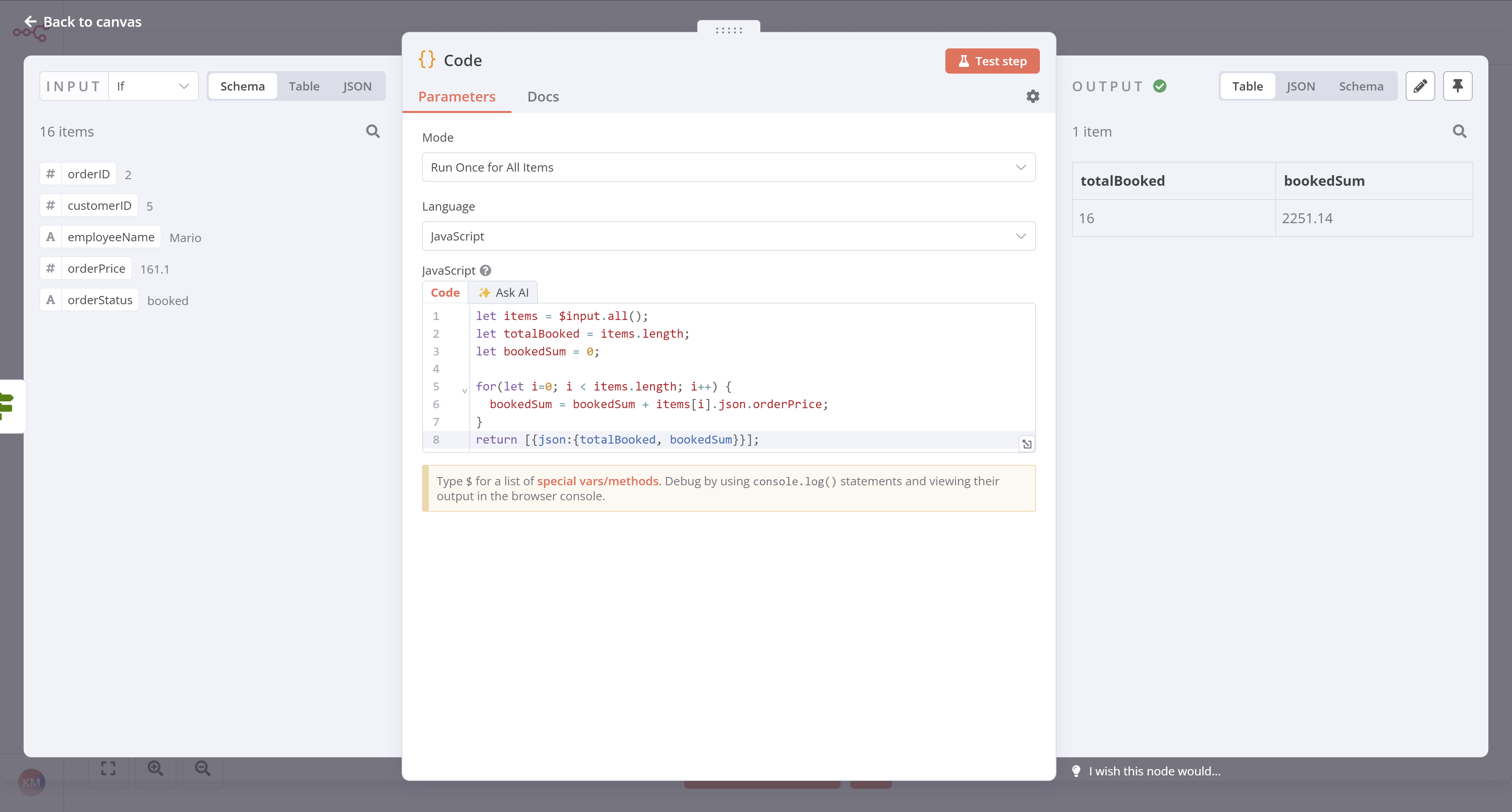
打开“代码”节点窗口,配置以下参数:
¥With the Code node window open, configure these parameters:
- 模式:选择“对所有项目运行一次”。
¥Mode: Select Run Once for All Items.
- 语言:选择“JavaScript”。
¥Language: Select JavaScript.
Using Python in code nodes
1 | |
- 复制以下代码并将其粘贴到代码框中以替换现有代码:
¥Copy the Code below and paste it into the Code box to replace the existing code:
1 2 3 4 5 6 7 8 9 | |
请注意我们返回计算结果的格式:
¥Notice the format in which we return the results of the calculation:
1 | |
Data structure error
如果你未使用正确的数据结构,将会收到错误消息:Error: Always an Array of items has to be returned!
¥If you don't use the correct data structure, you will get an error message: Error: Always an Array of items has to be returned!
现在选择“执行”步骤,你应该会看到以下结果:
¥Now select Execute step and you should see the following results:
下一步是什么?#
¥What's next?
Nathan 🙋:哇,代码节点真强大!这意味着如果我具备一些基本的 JavaScript 技能,我就可以增强我的工作流。
¥Nathan 🙋: Wow, the Code node is powerful! This means that if I have some basic JavaScript skills I can power up my workflows.
你 👩🔧:是的!你可以从无代码过渡到低代码!
¥You 👩🔧: Yes! You can progress from no-code to low-code!
Nathan 🙋:现在,如何将已预订订单的计算结果发送到团队的 Discord 通道?
¥Nathan 🙋: Now, how do I send the calculations for the booked orders to my team's Discord channel?
你 👩🔧:有一个 n8n 节点可以实现这个功能。我将在下一步中进行设置。
¥You 👩🔧: There's an n8n node for that. I'll set it up in the next step.