6. 通知团队#
¥ Notifying the Team
在本工作流程步骤中,你将学习如何使用 Discord 节点 向 Discord 通道发送消息。完成此步骤后,你的工作流应如下所示:
¥In this step of the workflow, you will learn how to send messages to a Discord channel using the Discord node. After this step, your workflow should look like this:
Workflow preview placeholder.
既然你已经计算出了已预订订单的汇总信息,就需要通过 Discord 通道通知 Nathan 的团队。在本工作流程中,你将向 Discord 上的 n8n 服务器 发送消息。
¥Now that you have a calculated summary of the booked orders, you need to notify Nathan's team in their Discord channel. For this workflow, you will send messages to the n8n server on Discord.
开始以下步骤前,请使用上方链接连接到 Discord 上的 n8n 服务器。确保你可以访问 #course-level-1 通道。
¥Before you begin the steps below, use the link above to connect to the n8n server on Discord. Be sure you can access the #course-level-1 channel.
Communication app nodes
你可以将 Discord 节点替换为其他通讯应用。例如,n8n 还包含用于 Slack 和 Mattermost 的节点。
¥You can replace the Discord node with another communication app. For example, n8n also has nodes for Slack and Mattermost.
在你的工作流中,添加一个连接到“代码”节点的“Discord”节点。
¥In your workflow, add a Discord node connected to the Code node.
搜索 Discord 节点时,找到“消息操作”并选择“发送消息”以添加该节点。
¥When you search for the Discord node, look for Message Actions and select Send a message to add the node.
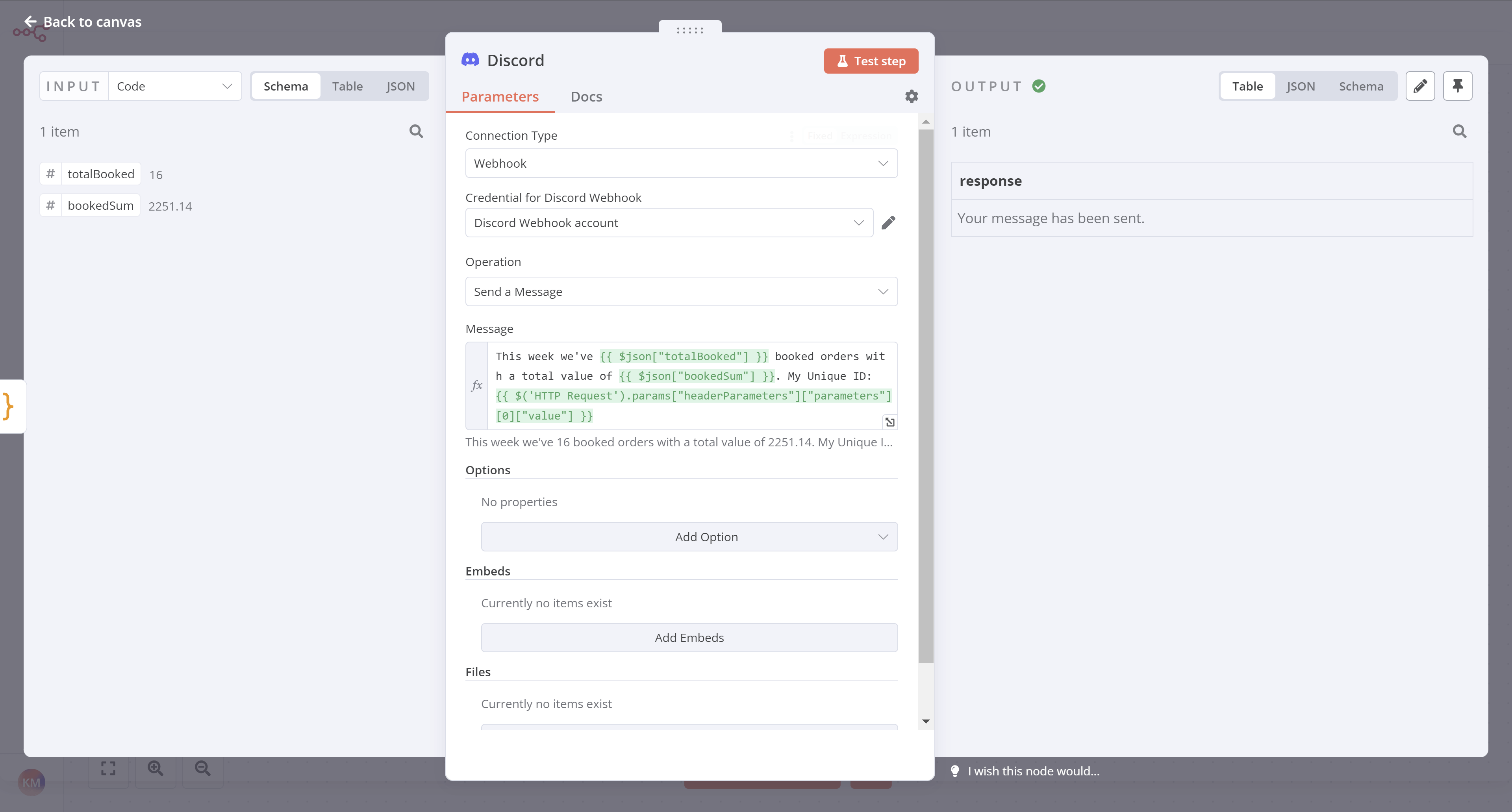
在 Discord 节点窗口中,配置以下参数:
¥In the Discord node window, configure these parameters:
- 连接类型:选择“Webhook”。
¥Connection Type: Select Webhook.
- Discord Webhook 凭据:选择 - 创建新凭据 -。
¥Credential for Discord Webhook: Select - Create New Credential -.
-
从你注册此课程时收到的电子邮件中复制 Webhook URL,并将其粘贴到凭据的 Webhook URL 字段中。
¥Copy the Webhook URL from the email you received when you signed up for this course and paste it into the Webhook URL field of the credentials.
-
选择“保存”,然后关闭凭据对话框。
¥Select Save and then close the credentials dialog.
-
操作:选择“发送消息”。
¥Operation: Select Send a Message.
- 消息:
¥Message:
-
选择“消息”字段右侧的“表达式”选项卡。
¥Select the Expression tab on the right side of the Message field.
-
复制以下文本并将其粘贴到表达式窗口中,或者使用表达式编辑器手动构建。
¥Copy the text below and paste it into the Expression window, or construct it manually using the Expression Editor.
1This week we've {{$json["totalBooked"]}} booked orders with a total value of {{$json["bookedSum"]}}. My Unique ID: {{ $('HTTP Request').params["headerParameters"]["parameters"][0]["value"] }}
现在选择 Discord 节点中的“执行”步骤。如果一切正常,你应该在 n8n 中看到以下输出:
¥Now select Execute step in the Discord node. If all works well, you should see this output in n8n:
你的消息应该会出现在 Discord 通道 #course-level-1 中:
¥And your message should appear in the Discord channel #course-level-1:

下一步是什么?#
¥What's next?
Nathan 🙋:太棒了,你已经帮我节省了好几个小时的繁琐工作!现在我可以根据需要执行此工作流程。我只需要记住每周一早上 9 点运行它。
¥Nathan 🙋: Incredible, you've saved me hours of tedious work already! Now I can execute this workflow when I need it. I just need to remember to run it every Monday morning at 9 AM.
你 👩🔧:不用担心,你可以安排工作流在特定日期、时间或时间间隔运行。我将在下一步中进行设置。
¥You 👩🔧: Don't worry about that, you can actually schedule the workflow to run on a specific day, time, or interval. I'll set this up in the next step.