8. 激活和检查工作流#
¥ Activating and Examining the Workflow
在本工作流程步骤中,你将学习如何激活工作流程并更改默认工作流程设置。
¥In this step of the workflow, you will learn how to activate your workflow and change the default workflow settings.
激活工作流意味着它会在每次触发节点收到输入或满足条件时自动运行。默认情况下,所有新建的工作流都处于停用状态。
¥Activating a workflow means that it will run automatically every time a trigger node receives input or meets a condition. By default, all newly created workflows start deactivated.
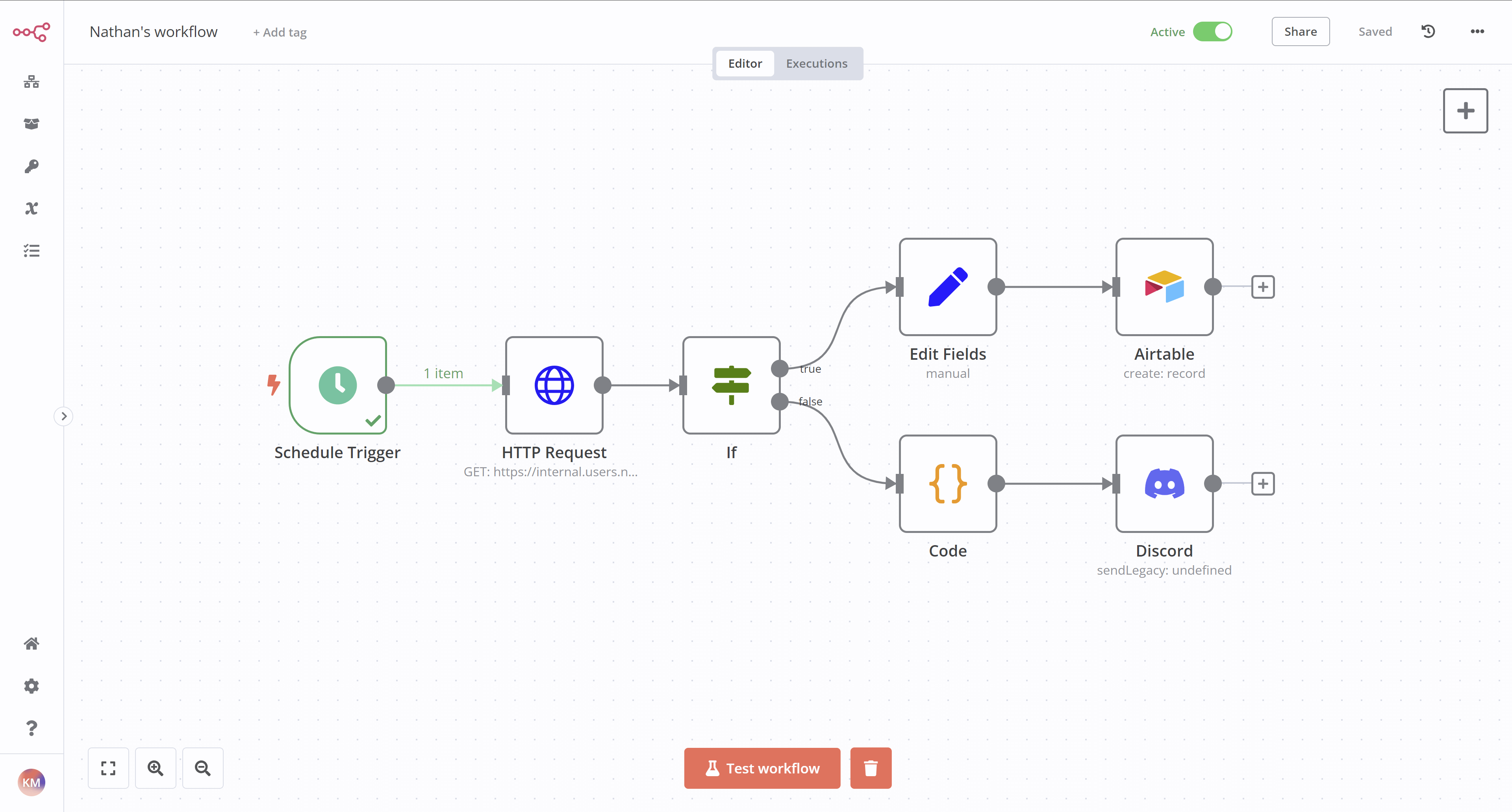
要激活你的工作流,请在编辑器 UI 顶部导航栏中将“非激活”开关切换为“激活”。Nathan 的工作流现在将于每周一上午 9 点自动执行:
¥To activate your workflow, set the Inactive toggle in the top navigation of the Editor UI to be Activated. Nathan's workflow will now be executed automatically every Monday at 9 AM:
工作流执行#
¥Workflow Executions
执行表示工作流的完整运行,从第一个节点到最后一个节点。n8n 会记录工作流执行情况,方便你查看工作流是否成功。执行日志有助于调试你的工作流,并查看其在哪个阶段遇到问题。
¥An execution represents a completed run of a workflow, from the first to the last node. n8n logs workflow executions, allowing you to see if the workflow succeeded or not. The execution log is useful for debugging your workflow and seeing at what stage it runs into issues.
要查看特定工作流的执行情况,可以在工作流在画布上打开时切换到“执行”选项卡。使用“编辑器”选项卡切换回节点编辑器。
¥To view the executions for a specific workflow, you can switch to the Executions tab when the workflow is open on the canvas. Use the Editor tab to swap back to the node editor.
要查看整个 n8n 实例的执行日志,请在编辑器 UI 中选择“概览”,然后在主面板中选择“执行”选项卡。
¥To see the execution log for the entire n8n instance, in your Editor UI, select Overview and then select the Executions tab in the main panel.
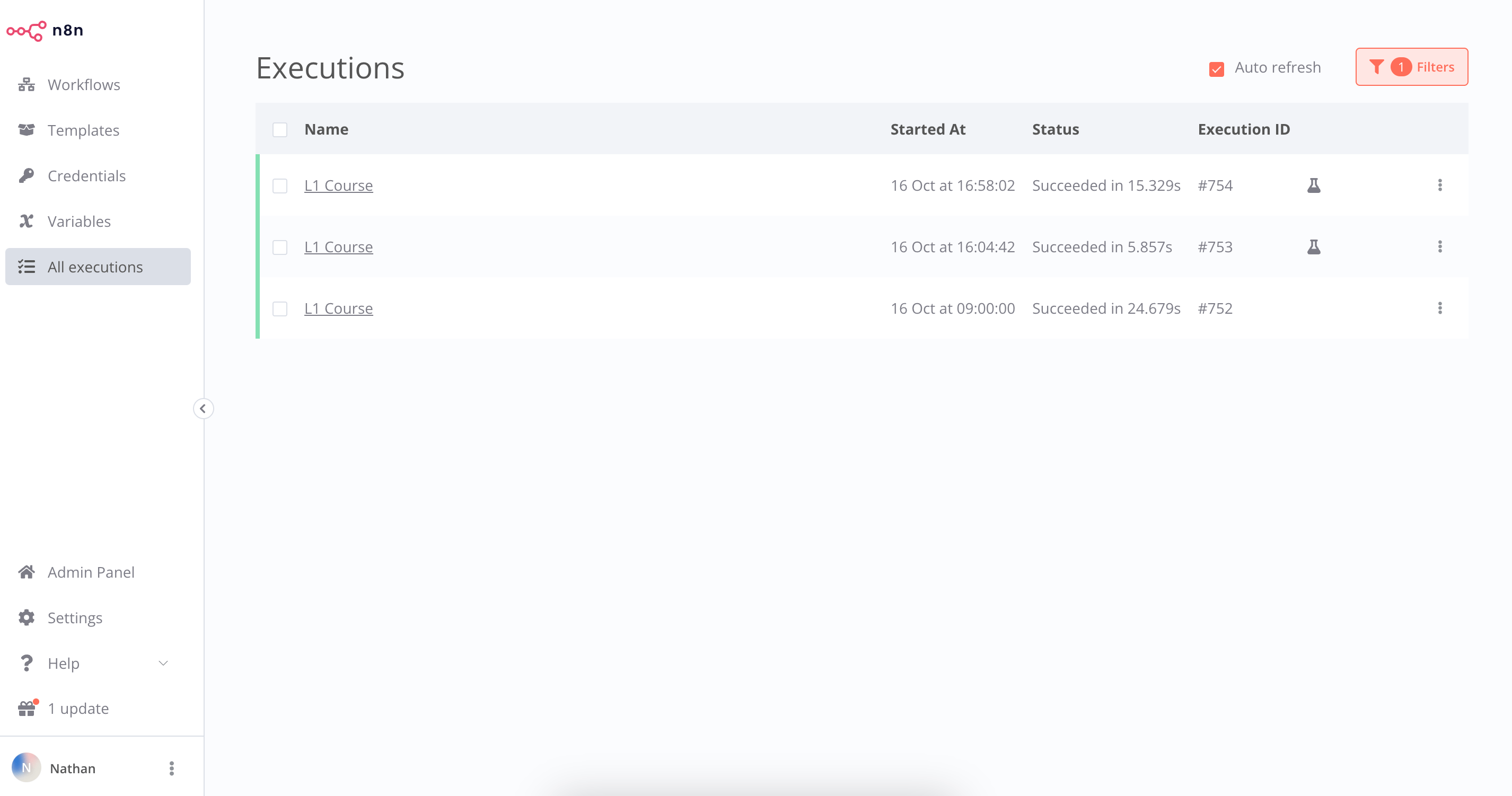
“执行”窗口显示一个包含以下信息的表格:
¥The Executions window displays a table with the following information:
- 名称:工作流的名称。
¥Name: The name of the workflow
- 开始时间:工作流启动的日期和时间。
¥Started At: The date and time when the workflow started
- 状态:工作流状态(等待、运行、成功、已取消或失败)以及工作流执行所花费的时间
¥Status: The status of the workflow (Waiting, Running, Succeeded, Cancelled, or Failed) and the amount of time it took the workflow to execute
- 执行 ID:此工作流执行的 ID。
¥Execution ID: The ID of this workflow execution
Workflow execution status
你可以按工作流和状态(任意状态、失败、已取消、运行中、成功或等待)筛选显示的执行结果。此处显示的信息取决于你配置要保存到 工作流设置 中的执行情况。
¥You can filter the displayed Executions by workflow and by status (Any Status, Failed, Cancelled, Running, Success, or Waiting). The information displayed here depends on which executions you configure to save in the Workflow Settings.
工作流设置#
¥Workflow Settings
你可以自定义工作流和执行,或者覆盖 工作流设置 中的一些全局默认设置。
¥You can customize your workflows and executions, or overwrite some global default settings in Workflow Settings.
在工作流于画布上打开时,选择编辑器 UI 右上角的三个点,然后选择“设置”即可访问这些设置。
¥Access these settings by selecting the three dots in the upper right corner of the Editor UI when the workflow is open on the canvas, then select Settings.
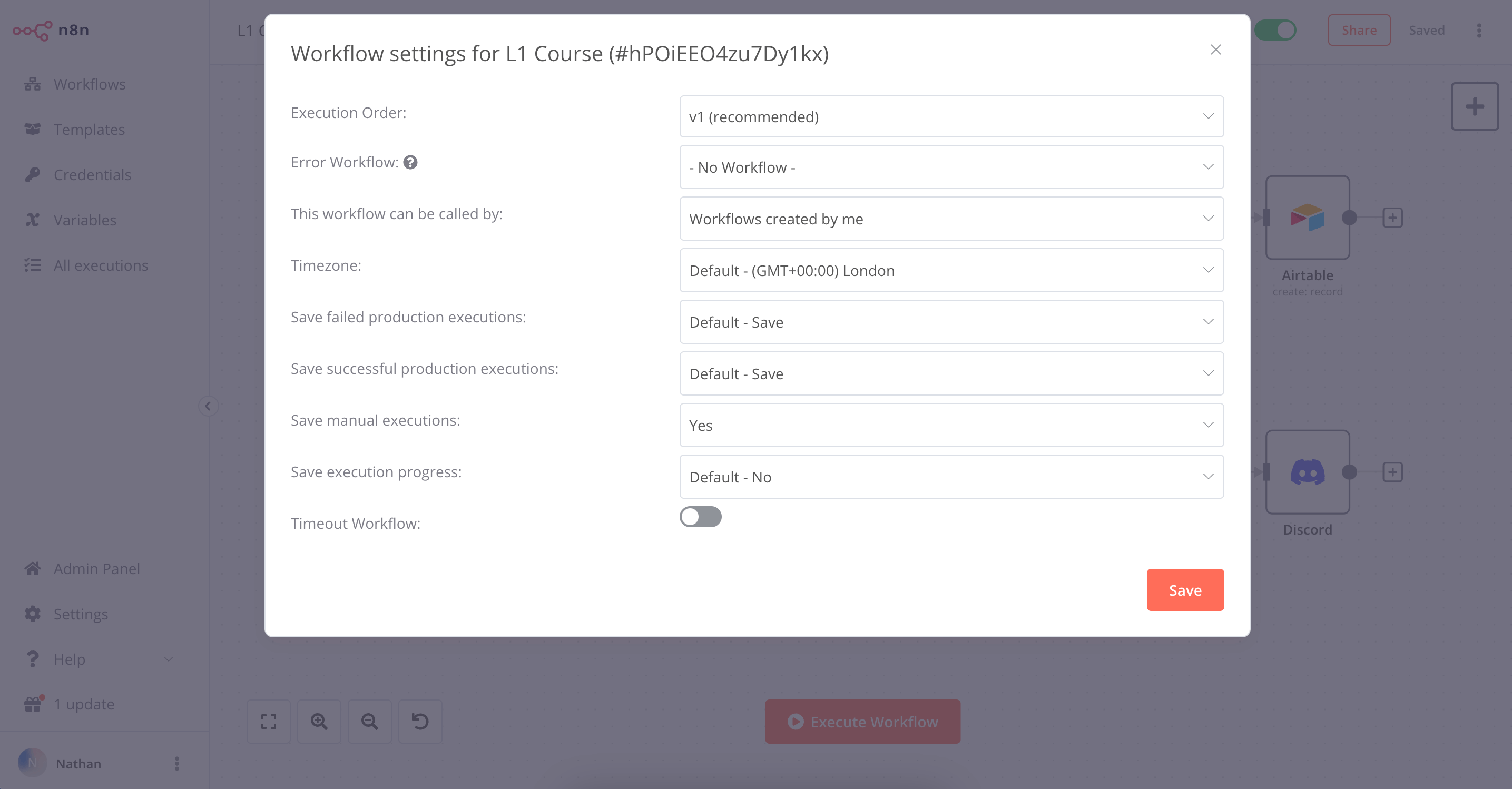
在“工作流设置”窗口中,你可以配置以下设置:
¥In the Workflow Settings window you can configure the following settings:
- 执行顺序:选择多分支工作流的执行逻辑。如果你没有依赖于旧版执行顺序的工作流,则应将其设置为
v1。
¥Execution Order: Choose the execution logic for multi-branch workflows. You should leave this set to v1 if you don't have workflows that rely on the legacy execution ordering.
- 错误工作流:当前工作流执行失败时运行的工作流。
¥Error Workflow: A workflow to run if the execution of the current workflow fails.
- 可以通过以下方式调用此工作流:允许使用 执行子工作流节点 调用此工作流的工作流。
¥This workflow can be called by: Workflows allowed to call this workflow using the Execute Sub-workflow node.
- 时区:当前工作流中使用的时区。如果未设置,则为全局时区。特别是,此设置对于 调度触发器节点 至关重要,因为你需要确保工作流程在正确的时间执行。
¥Timezone: The timezone to use in the current workflow. If not set, the global timezone. In particular, this setting is important for the Schedule Trigger node, as you want to make sure that the workflow gets executed at the right time.
- 保存失败的生产执行:n8n 是否应在工作流失败时保存其执行数据。默认值为保存。
¥Save failed production executions: If n8n should save the Execution data of the workflow when it fails. Default is to save.
- 保存成功的生产执行:n8n 是否应在工作流成功时保存其执行数据。默认值为保存。
¥Save successful production executions: If n8n should save the Execution data of the workflow when it succeeds. Default is to save.
- 保存手动执行:n8n 是否应保存从编辑器 UI 启动的执行。默认值为保存。
¥Save manual executions: If n8n should save executions started from the Editor UI. Default is to save.
- 保存执行进度:n8n 是否应保存每个节点的执行数据。如果设置为“保存”,则可以在发生错误时从中断处恢复工作流程,但请注意,这可能会降低执行速度。默认设置为不保存。
¥Save execution progress: If n8n should save the execution data of each node. If set to Save, you can resume the workflow from where it stopped in case of an error, though keep in mind that this might make the execution slower. Default is to not save.
- 超时工作流:是否在特定时间段后取消工作流执行。默认设置为不超时。
¥Timeout Workflow: Whether to cancel a workflow execution after a specific period of time. Default is to not timeout.
下一步是什么?#
¥What's next?
你 👩🔧:以上内容搞定!现在你拥有一个 7 节点的工作流,它将在每周一早上自动运行。你无需担心数据整理问题。你可以开始一周中更有意义或更令人兴奋的工作。
¥You 👩🔧: That was it! Now you have a 7-node workflow that will run automatically every Monday morning. You don't have to worry about remembering to wrangle the data. Instead, you can start your week with more meaningful or exciting work.
Nathan 🙋:此工作流非常有用,谢谢!接下来该做什么呢?
¥Nathan 🙋: This workflow is incredibly helpful, thank you! Now, what's next for you?
你 👩🔧:我想创建更多工作流,与他人共享,并使用其他人创建的一些工作流。
¥You 👩🔧: I'd like to build more workflows, share them with others, and use some workflows built by other people.