了解数据结构(Understanding the data structure)#
在本章中,你将学习 n8n 的数据结构,以及如何使用 代码节点 来转换数据和模拟节点输出。
🌐 In this chapter, you will learn about the data structure of n8n and how to use the Code node to transform data and simulate node outputs.
n8n 的数据结构(Data structure of n8n)#
从基本意义上讲,n8n 节点的功能类似于提取、转换、加载(ETL)工具。这些节点允许你从多个不同来源访问(提取)数据,以特定方式修改(转换)数据,并将其传递(加载)到需要的地方。
🌐 In a basic sense, n8n nodes function as an Extract, Transform, Load (ETL) tool. The nodes allow you to access (extract) data from multiple disparate sources, modify (transform) that data in a particular way, and pass (load) it along to where it needs to be.
在工作流中从一个节点传递到另一个节点的数据必须采用每个节点都能识别和解析的格式(结构)。在 n8n 中,这种所需的结构是一个对象数组。
🌐 The data that moves along from node to node in your workflow must be in a format (structure) that can be recognized and interpreted by each node. In n8n, this required structure is an array of objects.
About array of objects
An array is a list of values. The array can be empty or contain several elements. Each element is stored at a position (index) in the list, starting at 0, and can be referenced by the index number. For example, in the array ["Leonardo", "Michelangelo", "Donatello", "Raphael"]; the element Donatello is stored at index 2.
An object stores key-value pairs, instead of values at numbered indexes as in arrays. The order of the pairs isn't important, as the values can be accessed by referencing the key name. For example, the object below contains two properties (name and color):
1 2 3 4 | |
An array of objects is an array that contains one or more objects. For example, the array turtles below contains four objects:
1 2 3 4 5 6 7 8 9 10 11 12 13 14 15 16 17 18 | |
You can access the properties of an object using dot notation with the syntax object.property. For example, turtles[1].color gets the color of the second turtle.
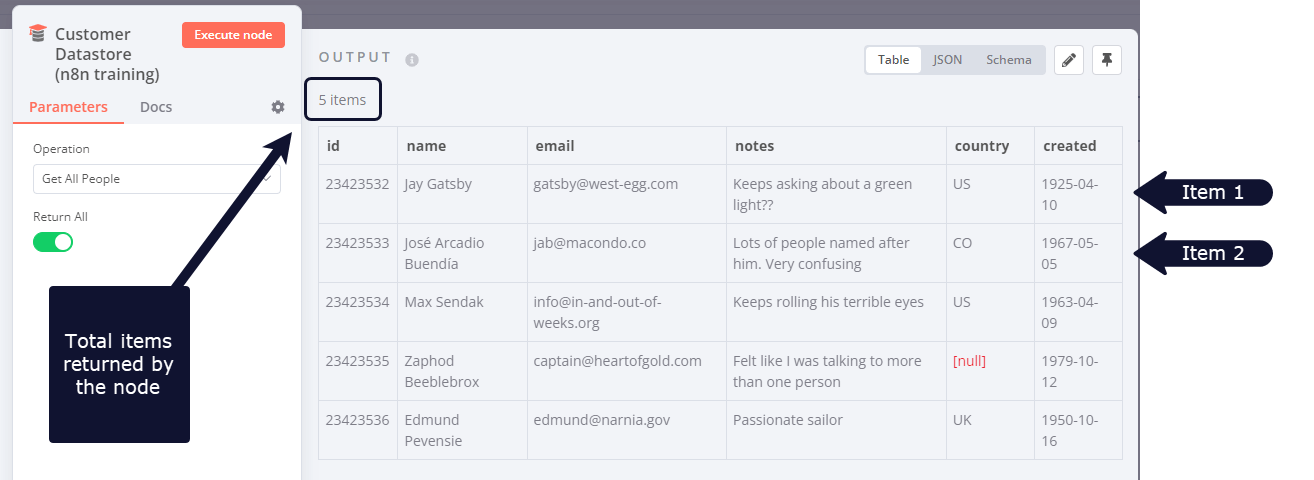
从一个节点发送到另一个节点的数据是以 JSON 对象数组的形式发送的。该集合中的元素称为项。
🌐 Data sent from one node to another is sent as an array of JSON objects. The elements in this collection are called items.
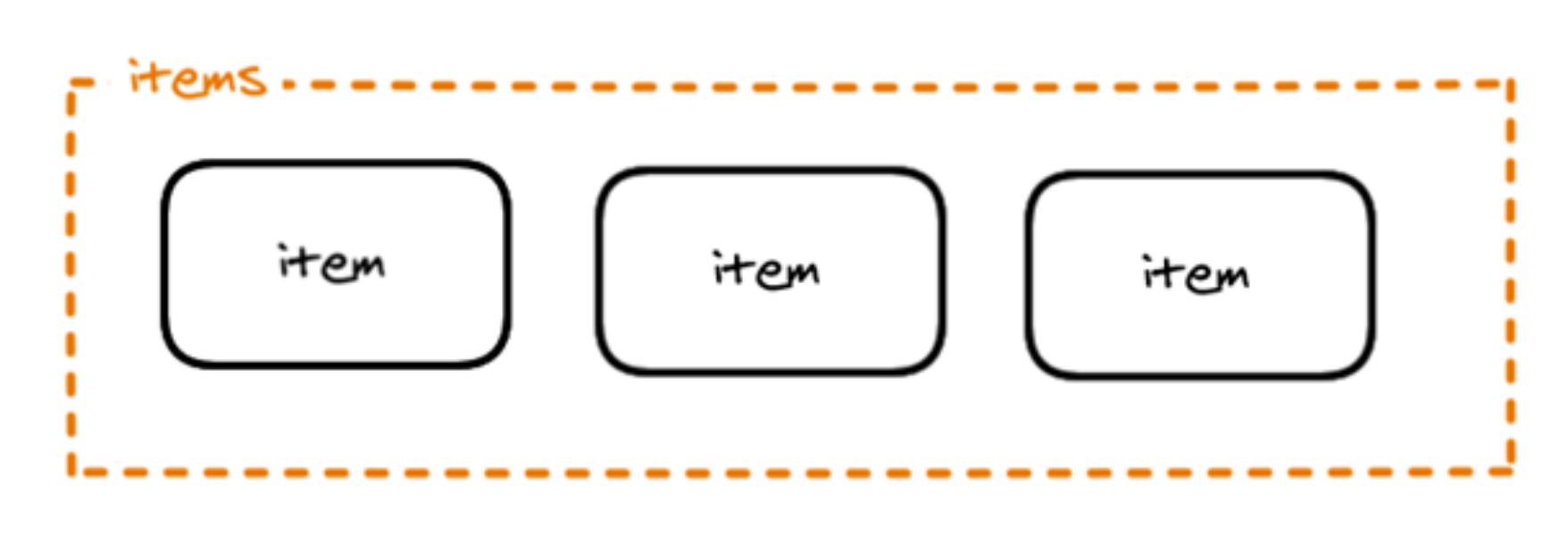
n8n 节点对传入的每个数据项执行操作。
🌐 An n8n node performs its action on each item of incoming data.
使用代码节点创建数据集(Creating data sets with the Code node)#
既然你已经熟悉了 n8n 数据结构,你可以使用它来创建自己的数据集或模拟节点输出。为此,请使用 代码节点 编写 JavaScript 代码,定义具有以下结构的对象数组:
🌐 Now that you are familiar with the n8n data structure, you can use it to create your own data sets or simulate node outputs. To do this, use the Code node to write JavaScript code defining your array of objects with the following structure:
1 2 3 4 5 6 7 | |
例如,表示忍者神龟的对象数组在代码节点中如下所示:
🌐 For example, the array of objects representing the Ninja turtles would look like this in the Code node:
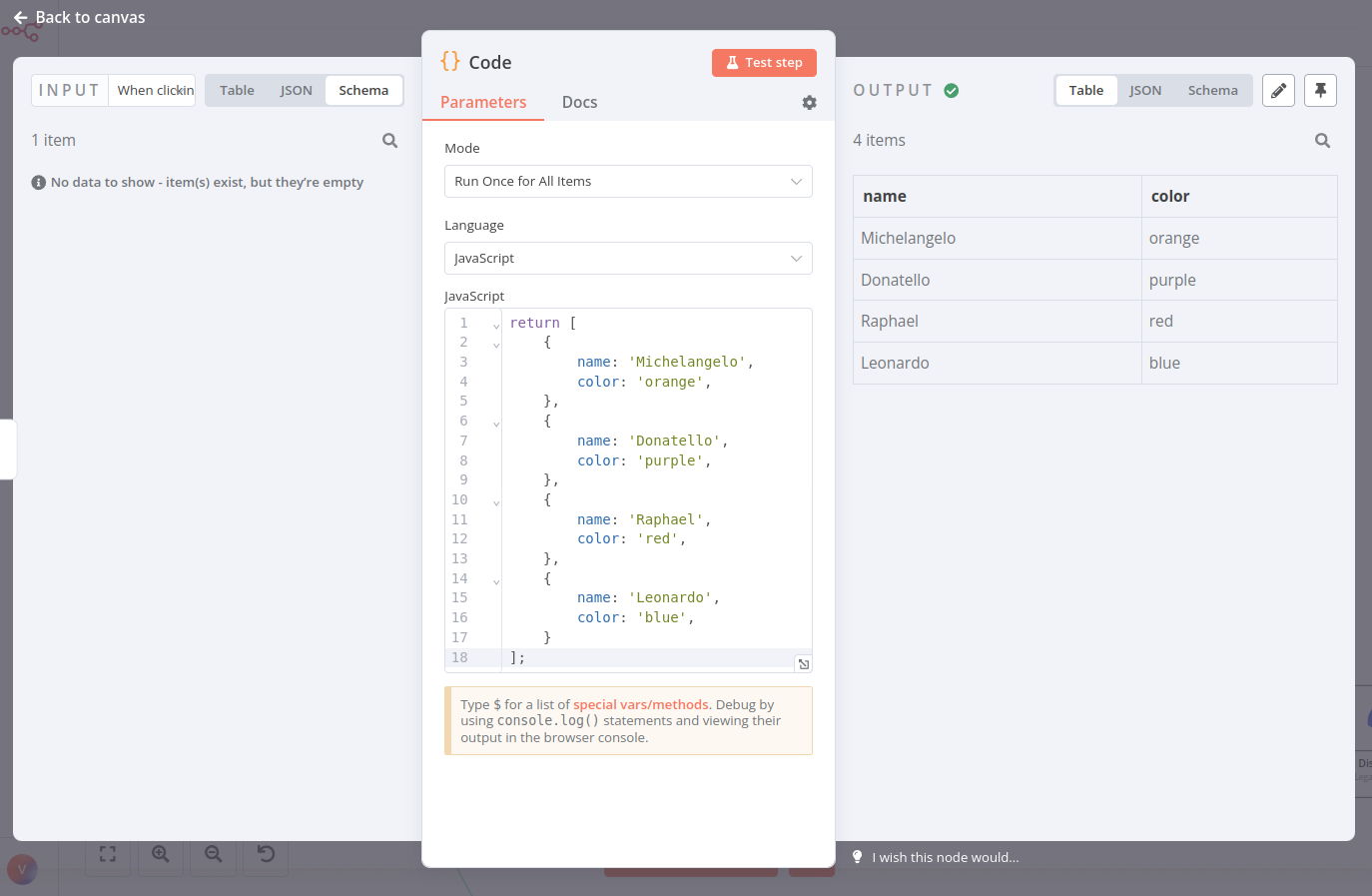
JSON 对象
请注意,这个对象数组包含一个额外的键:json。n8n 期望你将数组中的每个对象封装在另一个对象中,并使用键 json。
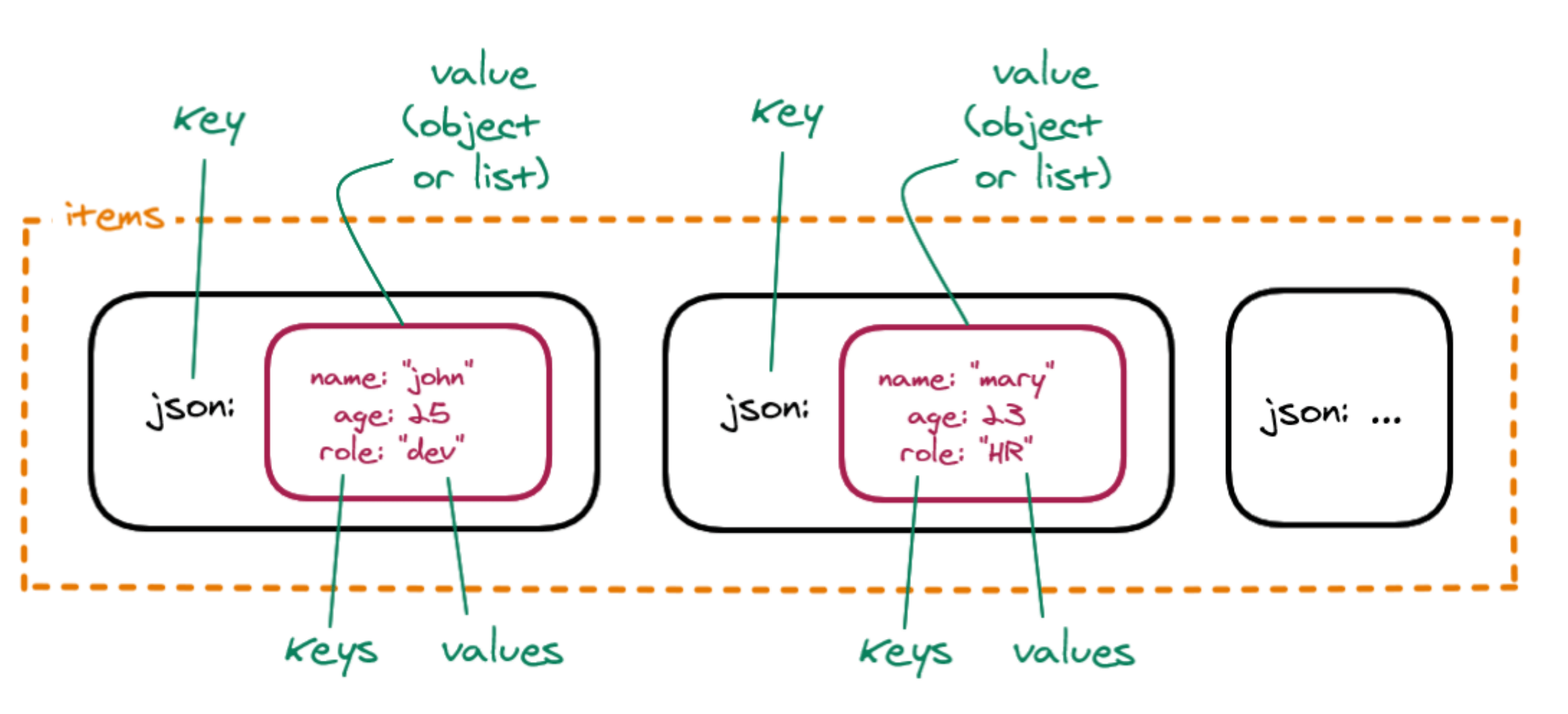
按照 n8n 使用的正确结构传递数据是一种好习惯。但如果你忘记在某个项目中添加 json 键,也不用担心,n8n(0.166.0 及以上版本)会自动添加。
你也可以使用嵌套对,例如如果你想定义一个主颜色和一个辅助颜色。在这种情况下,你需要将键值对进一步用大括号 {} 封装起来。
🌐 You can also have nested pairs, for example if you want to define a primary and a secondary color. In this case, you need to further wrap the key-value pairs in curly braces {}.
n8n 数据结构视频
这次演讲 提供了关于 n8n 中数据结构的更详细解释。
练习(Exercise)#
在一个代码节点中,创建一个名为 myContacts 的对象数组,该数组包含属性 name 和 email,并且 email 属性进一步拆分为 personal 和 work。
🌐 In a Code node, create an array of objects named myContacts that contains the properties name and email, and the email property is further split into personal and work.
??? 注意 “给我看解决方案”
1 2 3 4 5 6 7 8 9 10 11 12 13 14 15 16 17 18 19 20 21 22 23 24 25 26 27 28 29 30 | |
使用代码节点引用节点数据(Referencing node data with the Code node)#
就像你可以使用表达式引用其他节点的数据一样,你也可以在代码节点中使用一些方法和变量。
🌐 Just like you can use expressions to reference data from other nodes, you can also use some methods and variables in the Code node.
请务必在继续下一个练习之前阅读这些页面。
🌐 Please make sure you read these pages before continuing to the next exercise.
练习(Exercise)#
让我们在之前的练习基础上继续,在那个练习中,你使用代码节点创建了一个包含两位联系人名称和电子邮件的数据集。现在,将第二个代码节点连接到第一个节点。在新节点中,编写代码创建一个名为 workEmail 的新列,该列引用第一位联系人的工作邮箱。
🌐 Let's build on the previous exercise, in which you used the Code node to create a data set of two contacts with their names and emails. Now, connect a second Code node to the first one. In the new node, write code to create a new column named workEmail that references the work email of the first contact.
??? 注意 “显示解决方案” 在 代码节点 的 JavaScript 代码字段中,你需要编写以下代码:
1 2 3 4 5 6 7 8 9 | |
转换数据(Transforming data)#
来自某些节点的传入数据可能与 n8n 使用的数据结构不同。在这种情况下,你需要转换数据,以便可以单独处理每个项目。
🌐 The incoming data from some nodes may have a different data structure than the one used in n8n. In this case, you need to transform the data, so that each item can be processed individually.
数据转换的两个最常用操作是:
🌐 The two most common operations for data transformation are:
- 从单个项目创建多个项目
- 从多个项目创建单个项目
有几种方法可以转换数据以实现上述目的:
🌐 There are several ways to transform data for the purposes mentioned above:
- 使用 n8n 的 数据转换节点。使用这些节点可以修改包含列表(数组)的传入数据的结构,而无需在 代码节点 中使用 JavaScript 代码:
-
使用 Code 节点 编写 JavaScript 函数,通过 一次运行处理所有项目 模式修改传入数据的结构:
- 要从单个项目创建多个项目,你可以使用这样的 JavaScript 代码。此示例假设该项目有一个名为
data的键,其值为一个项目数组,形式如下:[{ "data": [{<item_1>}, {<item_2>}, ...] }]:
1
2
3
4
5
return $input.first().json.data.map(item => { return { json: item } });- 要从多个项目创建单个项目,你可以使用以下 JavaScript 代码:
1
2
3
4
5
6
7
return [ { json: { data_object: $input.all().map(item => item.json) } } ]; - 要从单个项目创建多个项目,你可以使用这样的 JavaScript 代码。此示例假设该项目有一个名为
这些 JavaScript 示例假设你的整个输入都是你想要转换的内容。正如上面的练习一样,你也可以通过在项目列表中标识某个字段来对特定字段执行任一操作,例如,如果我们的 workEmail 示例在一个字段中包含多个电子邮件,我们可以运行如下代码:
🌐 These JavaScript examples assume your entire input is what you want to transform. As in the exercise above, you can also execute either operation on a specific field by identifying that in the items list, for example, if our workEmail example had multiple emails in a single field, we could run some code like this:
1 2 3 4 5 6 | |
练习(Exercise)#
- 使用 HTTP Request 节点 对 PokéAPI
https://pokeapi.co/api/v2/pokemon进行 GET 请求。(此 API 无需身份验证)。 - 使用 Split Out 节点 转换
results字段中的数据。 - 使用 代码节点 转换
results字段中的数据。
??? 注意 “给我看解决方案”
1 2 3 4 5 6 7 8 9 10 11 12 13 14 15 16 17 | |