合并和拆分数据(Merging and splitting data)#
本章将介绍如何合并和拆分数据,以及在哪些情况下执行这些操作会很有用。
🌐 In this chapter, you will learn how to merge and split data, and in what cases it might be useful to perform these operations.
合并数据(Merging data)#
在某些情况下,你可能需要合并(组合)并处理来自不同来源的数据。
🌐 In some cases, you might need to merge (combine) and process data from different sources.
数据合并可能涉及:
🌐 Merging data can involve:
- 从多个来源创建一个数据集。
- 在多个系统之间同步数据。这可能包括删除重复数据或在一个系统中的数据发生变化时更新另一个系统中的数据。
单向同步 vs 双向同步
在单向同步中,数据只会朝一个方向进行同步。一个系统作为唯一的真实来源。当主系统中的信息发生变化时,次级系统会自动更新;但如果次级系统中的信息发生变化,这些变化不会反映到主系统中。
在双向同步中,数据在两个系统之间进行双向同步。当任一系统中的信息发生变化时,另一个系统也会自动更新。
这篇博客教程 解释了如何在两个 CRM 之间进行单向和双向数据同步。
在 n8n 中,你可以使用 合并节点 来合并来自两个不同节点的数据,该节点提供多种合并选项:
🌐 In n8n, you can merge data from two different nodes using the Merge node, which provides several merging options:
请注意,Combine > Merge by Fields 需要你输入用来匹配的字段。这些字段应在数据源之间包含相同的值,以便 n8n 可以正确地将数据匹配在一起。在 Merge 节点 中,这些字段被称为 Input 1 Field 和 Input 2 Field。
🌐 Notice that Combine > Merge by Fields requires you enter input fields to match on. These fields should contain identical values between the data sources so n8n can properly match data together. In the Merge node, they're called Input 1 Field and Input 2 Field.
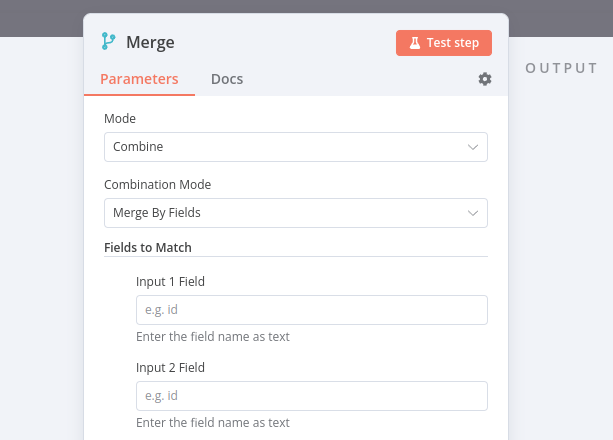
点符号表示的属性输入
如果你想在 Merge 节点 的参数 Input 1 Field 和 Input 2 Field 中引用嵌套值,你需要以点表示法的格式输入属性键(作为文本,而不是表达式)。
/// 注意 你也可以在别名 Join 下找到 合并节点。如果你熟悉 SQL 的连接,这可能会更直观。///
合并练习(Merge Exercise)#
构建一个工作流,合并来自“客户数据存储”节点和“代码”节点的数据。
🌐 Build a workflow that merges data from the Customer Datastore node and Code node.
- 添加一个 合并节点,它从 客户数据存储节点 获取
Input 1,从 代码节点 获取Input 2。 - 在 客户数据存储节点 中,运行操作 获取所有人。
- 在代码节点中,创建一个包含两个对象的数组,每个对象有三个属性:
name、language和country,其中属性country有两个子属性code和name。- 使用客户数据库中的两个字符的信息填写这些属性的值。
- 例如,Jay Gatsby 的语言是英语,国家/地区名称是美国。
- 在 合并节点 中,尝试不同的合并选项。
??? 注意 “给我看解决方案”
1 2 3 4 5 6 7 8 9 10 11 12 13 14 15 16 17 18 19 20 21 22 23 24 25 26 27 28 29 30 31 32 33 34 35 36 37 38 39 40 41 42 43 44 45 46 47 48 49 50 51 52 53 54 55 56 57 58 59 60 61 62 63 64 65 66 67 68 69 70 71 72 73 74 75 76 77 78 79 80 81 82 83 84 85 86 87 88 89 90 91 92 93 94 95 96 97 98 99 100 101 102 103 104 105 106 107 108 109 110 111 112 113 114 115 116 117 118 119 120 | |
循环(Looping)#
在某些情况下,你可能需要对数组的每个元素或每条数据执行相同的操作(例如向通讯录中的每个联系人发送消息)。用技术术语来说,你需要遍历数据(使用循环)。
🌐 In some cases, you might need to perform the same operation on each element of an array or each data item (for example sending a message to every contact in your address book). In technical terms, you need to iterate through the data (with loops).
n8n 通常会自动处理这种重复性操作,因为每个节点对每个项目只运行一次,所以你无需在工作流中构建循环。
🌐 n8n generally handles this repetitive processing automatically, as the nodes run once for each item, so you don't need to build loops into your workflows.
然而,有一些节点和操作的例外情况会要求你在工作流中构建一个循环。
🌐 However, there are some exceptions of nodes and operations that will require you to build a loop into your workflow.
要在 n8n 工作流中创建循环,你需要将一个节点的输出连接到前一个节点的输入,并添加一个 If 节点 来检查何时停止循环。
🌐 To create a loop in an n8n workflow, you need to connect the output of one node to the input of a previous node, and add an If node to check when to stop the loop.
分批拆分数据(Splitting data in batches)#
如果你需要处理大量传入数据、多次执行代码节点,或避免 API 速率限制,最好将数据拆分成批次(组)进行处理。
🌐 If you need to process large volumes of incoming data, execute the Code node multiple times, or avoid API rate limits, it's best to split the data into batches (groups) and process these batches.
对于这些流程,请使用 循环处理项目节点。该节点将输入数据拆分为指定的批量大小,并在每次迭代时返回预定义数量的数据。
🌐 For these processes, use the Loop Over Items node. This node splits input data into a specified batch size and, with each iteration, returns a predefined amount of data.
执行循环遍历项目节点
循环遍历项目节点在所有传入项目被分批并传递到工作流中的下一个节点后会停止执行,因此无需添加条件节点来停止循环。
循环/批处理练习(Loop/Batch Exercise)#
构建一个工作流,从 Medium 和 dev.to 读取 RSS Feed。该工作流应由三个节点组成:
🌐 Build a workflow that reads the RSS feed from Medium and dev.to. The workflow should consist of three nodes:
- 一个代码节点,返回 Medium(
https://medium.com/feed/n8n-io)和 dev.to(https://dev.to/feed/n8n)的 RSS 订阅链接。 - 一个带有
Batch Size: 1的 循环遍历项节点,它接收来自 代码节点 和 RSS 读取节点 的输入,并对这些项进行迭代。 - 一个RSS 读取节点,用于获取 Medium RSS 源的 URL,通过表达式传递:
{{ $json.url }}。- RSS 读取节点 是 例外节点 之一,它只处理收到的第一个条目,因此需要使用 循环处理条目节点 来迭代多个条目。
??? 注意 “给我看解决方案”
1 2 3 4 5 6 7 8 9 10 11 12 13 14 15 16 17 18 19 20 21 22 23 24 25 26 27 28 29 30 31 32 33 34 35 36 37 38 39 40 41 42 43 44 45 46 47 48 49 50 51 52 53 54 55 56 57 58 59 60 61 62 63 64 65 66 67 68 69 70 71 72 73 74 75 76 77 78 79 80 81 82 83 84 85 86 87 88 89 90 91 92 93 94 95 96 97 98 99 100 101 102 103 104 105 106 107 108 109 110 111 112 113 114 115 116 117 118 119 120 121 122 123 124 125 126 127 128 129 130 131 132 133 134 135 136 137 138 139 140 141 | |