LangChain 代码节点#
¥LangChain Code node
使用 LangChain Code 节点导入 LangChain。这意味着如果你需要的功能 n8n 尚未创建相应的节点,你仍然可以使用它。通过配置 LangChain 代码节点连接器,你可以将其用作普通节点、根节点或子节点。
¥Use the LangChain Code node to import LangChain. This means if there is functionality you need that n8n hasn't created a node for, you can still use it. By configuring the LangChain Code node connectors you can use it as a normal node, root node or sub-node.
在此页面,你可以找到节点参数、节点配置指南以及更多资源的链接。
¥On this page, you'll find the node parameters, guidance on configuring the node, and links to more resources.
Not available on Cloud
此节点仅适用于自托管的 n8n。
¥This node is only available on self-hosted n8n.
节点参数#
¥Node parameters
添加代码#
¥Add Code
添加你的自定义代码。选择“执行”或“提供数据”模式。你只能使用一种模式。
¥Add your custom code. Choose either Execute or Supply Data mode. You can only use one mode.
与 代码节点 节点不同,LangChain 代码节点不支持 Python。
¥Unlike the Code node, the LangChain Code node doesn't support Python.
- 执行:像使用 n8n 自身的 Code 节点一样使用 LangChain Code 节点。此步骤从工作流中获取输入数据,对其进行处理,并将其作为节点输出返回。此模式需要一个主输入和一个主输出。你必须在“输入”和“输出”中创建这些连接。
¥Execute: use the LangChain Code node like n8n's own Code node. This takes input data from the workflow, processes it, and returns it as the node output. This mode requires a main input and output. You must create these connections in Inputs and Outputs.
- 提供数据:将 LangChain Code 节点用作子节点,并将数据发送到根节点。此用例使用除 main 之外的输出。
¥Supply Data: use the LangChain Code node as a sub-node, sending data to a root node. This uses an output other than main.
默认情况下,你无法在此节点中加载内置或外部模块。自托管用户可以 启用内置和外部模块。
¥By default, you can't load built-in or external modules in this node. Self-hosted users can enable built-in and external modules.
输入#
¥Inputs
选择输入类型。
¥Choose the input types.
主要输入是所有 n8n 工作流中都存在的普通连接器。如果你在节点中设置了主输入和输出,则必须执行代码。
¥The main input is the normal connector found in all n8n workflows. If you have a main input and output set in the node, Execute code is required.
输出#
¥Outputs
选择输出类型。
¥Choose the output types.
主要输出是所有 n8n 工作流中常见的标准连接器。如果你在节点中设置了主输入和输出,则必须执行代码。
¥The main output is the normal connector found in all n8n workflows. If you have a main input and output set in the node, Execute code is required.
节点输入输出配置#
¥Node inputs and outputs configuration
通过配置 LangChain 代码节点连接器(输入和输出),你可以将其用作应用节点、根节点或子节点。
¥By configuring the LangChain Code node connectors (inputs and outputs) you can use it as an app node, root node or sub-node.
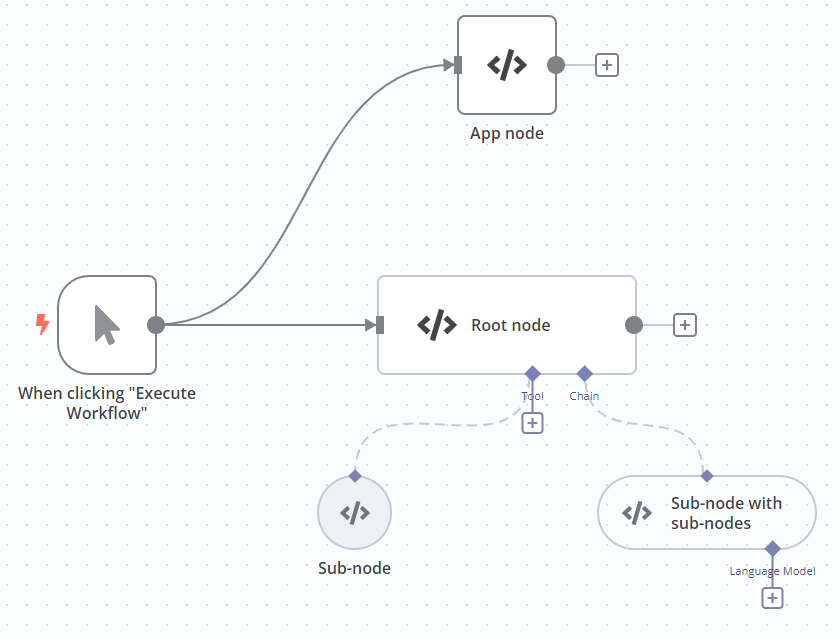
| 节点类型 | 输入 | 输出 | 代码模式 |
|---|---|---|---|
| 应用节点类似于 代码节点。 | Main | Main | 执行 |
| 根节点 | Main;至少一种其他类型的 | Main | 执行 |
| 子节点 | * | 非主节点类型。必须与要连接的输入类型匹配。 | 提供数据 |
| 包含子节点的子节点 | 非主节点类型 | 非主节点类型。必须与要连接的输入类型匹配。 | 提供数据 |
内置方法#
¥Built-in methods
n8n 提供以下方法,以便更轻松地在 LangChain 代码节点中执行常见任务。
¥n8n provides these methods to make it easier to perform common tasks in the LangChain Code node.
| Method | Description |
|---|---|
this.addInputData(inputName, data) |
Populate the data of a specified non-main input. Useful for mocking data.
|
this.addOutputData(outputName, data) |
Populate the data of a specified non-main output. Useful for mocking data.
|
this.getInputConnectionData(inputName, itemIndex, inputIndex?) |
Get data from a specified non-main input.
|
this.getInputData(inputIndex?, inputName?) |
Get data from the main input. |
this.getNode() |
Get the current node. |
this.getNodeOutputs() |
Get the outputs of the current node. |
this.getExecutionCancelSignal() |
Use this to stop the execution of a function when the workflow stops. In most cases n8n handles this, but you may need to use it if building your own chains or agents. It replaces the Cancelling a running LLMChain code that you'd use if building a LangChain application normally. |
模板和示例#
¥Templates and examples
相关资源#
¥Related resources
View n8n's Advanced AI documentation.