如果#
¥If
使用“如果”节点,根据比较操作条件拆分工作流。
¥Use the If node to split a workflow conditionally based on comparison operations.
添加条件#
¥Add conditions
为你的 If 节点创建比较条件。
¥Create comparison Conditions for your If node.
- 使用数据类型下拉菜单选择条件的数据类型和比较操作类型。例如,要筛选特定日期之后的日期,请选择“日期和时间”>“之后”。
¥Use the data type dropdown to select the data type and comparison operation type for your condition. For example, to filter for dates after a particular date, select Date & Time > is after.
- 要输入到条件中的字段和值会根据你选择的数据类型和比较而变化。请参阅 可用数据类型比较 获取按数据类型划分的所有比较的完整列表。
¥The fields and values to enter into the condition change based on the data type and comparison you select. Refer to Available data type comparisons for a full list of all comparisons by data type.
选择“添加条件”以创建更多条件。
¥Select Add condition to create more conditions.
合并条件#
¥Combining conditions
你可以选择保留数据:
¥You can choose to keep data:
- 当满足所有条件时:创建两个或多个条件,并在它们之间的下拉列表中选择“与”。
¥When it meets all conditions: Create two or more conditions and select AND in the dropdown between them.
- 当满足以下任一条件时:创建两个或多个条件,并在它们之间的下拉列表中选择“或”。
¥When it meets any of the conditions: Create two or more conditions and select OR in the dropdown between them.
模板和示例#
¥Templates and examples
使用 If 和 Merge 节点执行分支#
¥Branch execution with If and Merge nodes
0.236.0 and below
n8n removed this execution behavior in version 1.0. This section applies to workflows using the v0 (legacy) workflow execution order. By default, this is all workflows built before version 1.0. You can change the execution order in your workflow settings.
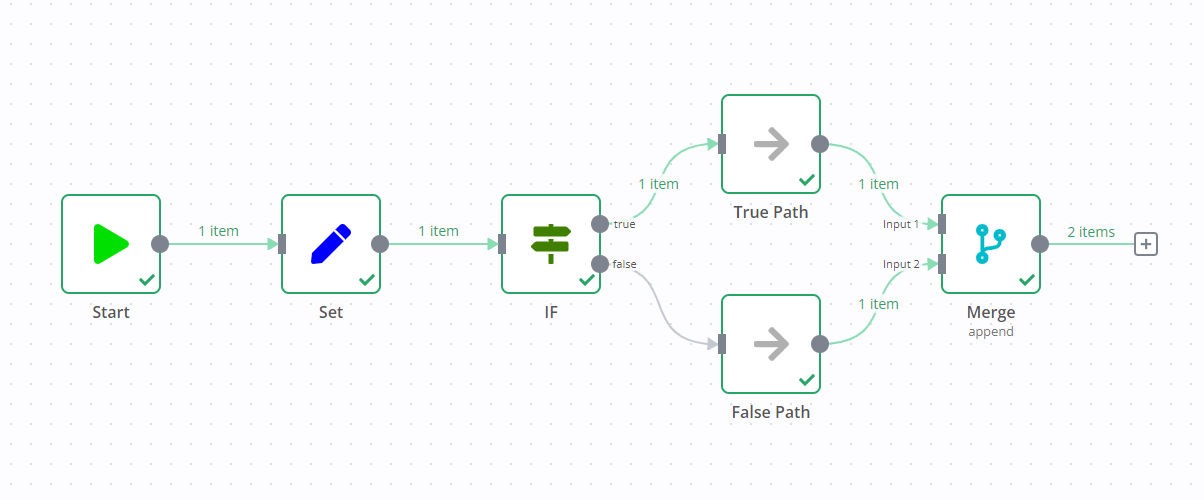
If you add a Merge node to a workflow containing an If node, it can result in both output data streams of the If node executing.
One data stream triggers the Merge node, which then goes and executes the other data stream.
For example, in the screenshot below there's a workflow containing an Edit Fields node, If node, and Merge node. The standard If node behavior is to execute one data stream (in the screenshot, this is the true output). However, due to the Merge node, both data streams execute, despite the If node not sending any data down the false data stream.
相关资源#
¥Related resources
有关在 n8n 中使用条件语句创建复杂逻辑的更多信息,请参阅 使用条件拆分。
¥Refer to Splitting with conditionals for more information on using conditionals to create complex logic in n8n.
如果你需要两个以上的条件输出,请使用 切换节点。
¥If you need more than two conditional outputs, use the Switch node.
Available data type comparisons#
String#
String data type supports these comparisons:
- exists
- does not exist
- is empty
- is not empty
- is equal to
- is not equal to
- contains
- does not contain
- starts with
- does not start with
- ends with
- does not end with
- matches regex
- does not match regex
Number#
Number data type supports these comparisons:
- exists
- does not exist
- is empty
- is not empty
- is equal to
- is not equal to
- is greater than
- is less than
- is greater than or equal to
- is less than or equal to
Date & Time#
Date & Time data type supports these comparisons:
- exists
- does not exist
- is empty
- is not empty
- is equal to
- is not equal to
- is after
- is before
- is after or equal to
- is before or equal to
Boolean#
Boolean data type supports these comparisons:
- exists
- does not exist
- is empty
- is not empty
- is true
- is false
- is equal to
- is not equal to
Array#
Array data type supports these comparisons:
- exists
- does not exist
- is empty
- is not empty
- contains
- does not contain
- length equal to
- length not equal to
- length greater than
- length less than
- length greater than or equal to
- length less than or equal to
Object#
Object data type supports these comparisons:
- exists
- does not exist
- is empty
- is not empty