编辑字段(设置)#
¥Edit Fields (Set)
使用“编辑字段”节点设置工作流数据。此节点可以设置新数据,也可以覆盖现有数据。此节点在需要从先前节点接收传入数据的工作流中至关重要,例如将值插入 Google 表格或数据库时。
¥Use the Edit Fields node to set workflow data. This node can set new data as well as overwrite data that already exists. This node is crucial in workflows which expect incoming data from previous nodes, such as when inserting values to Google Sheets or databases.
节点参数#
¥Node parameters
以下是“编辑字段”节点中可用的设置和选项。
¥These are the settings and options available in the Edit Fields node.
模式#
¥Mode
你可以使用手动映射通过图形用户界面 (GUI) 编辑字段,或者使用 JSON 输出写入 n8n 添加到输入数据的 JSON。
¥You can either use Manual Mapping to edit fields using the GUI or JSON Output to write JSON that n8n adds to the input data.
要设置的字段#
¥Fields to Set
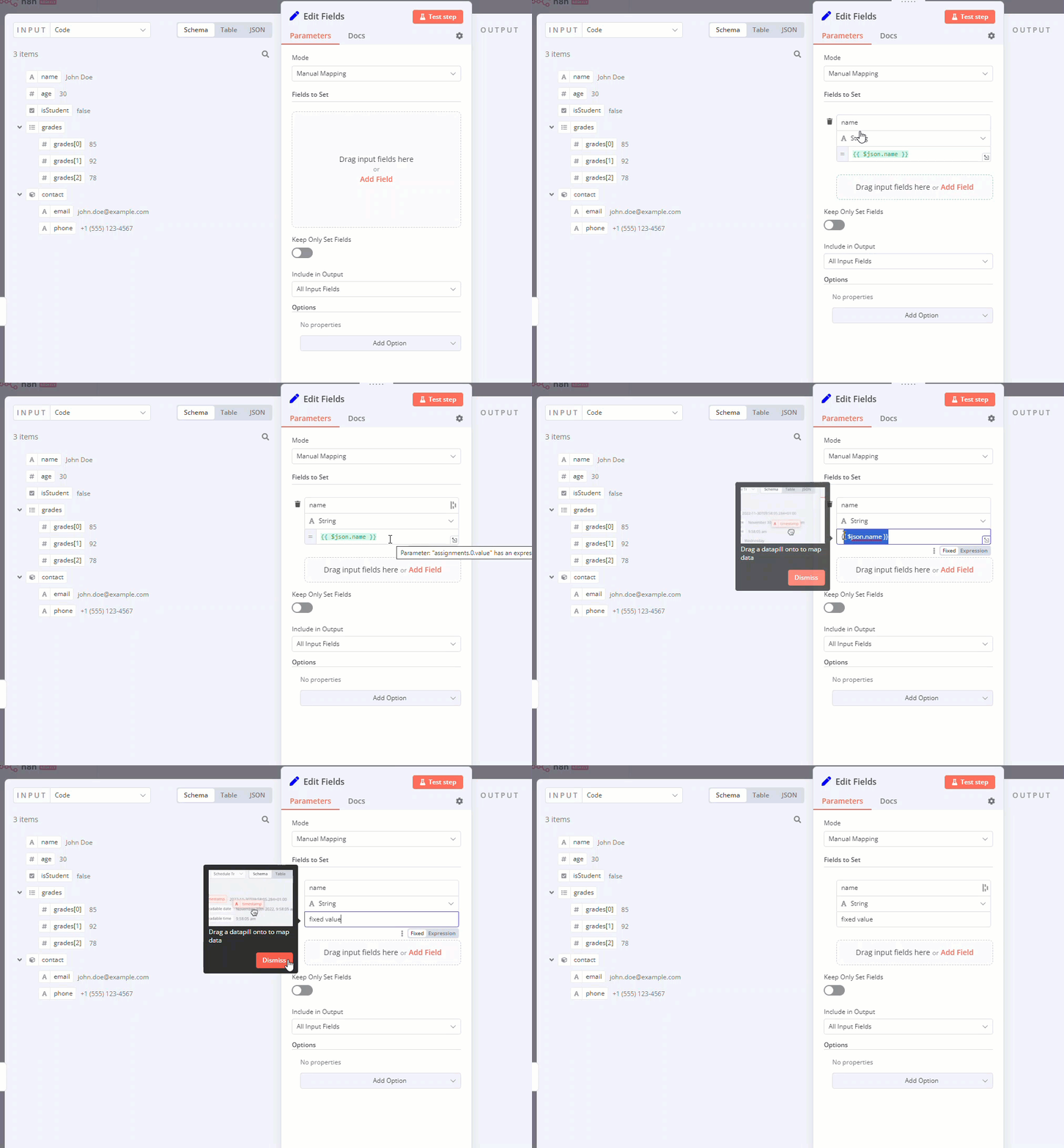
如果你选择“模式”>“手动映射”,则可以通过从“输入”中拖放值来配置字段。
¥If you select Mode > Manual Mapping, you can configure the fields by dragging and dropping values from INPUT.
拖动值时的默认行为:
¥The default behavior when you drag a value is:
- n8n 会将值名称设置为字段名称。
¥n8n sets the value's name as the field name.
- 字段值包含一个访问该值的表达式。
¥The field value contains an expression which accesses the value.
如果你不想使用表达式:
¥If you don't want to use expressions:
- 鼠标悬停在字段上。n8n 显示“固定 | 表达式”切换按钮。
¥Hover over a field. n8n displays the Fixed | Expressions toggle. 2. 选择“固定”。
¥Select Fixed.
你可以同时对字段的名称和值执行此操作。
¥You can do this for both the name and value of the field.
仅保留已设置字段#
¥Keep Only Set Fields
启用此选项可丢弃你在“要设置的字段”中未使用的任何输入数据。
¥Enable this to discard any input data that you don't use in Fields to Set.
包含在输出中#
¥Include in Output
选择要包含在节点输出数据中的输入数据。
¥Choose which input data to include in the node's output data.
节点选项#
¥Node options
使用这些选项来自定义节点的行为。
¥Use these options to customize the behavior of the node.
包含二进制数据#
¥Include Binary Data
如果输入数据包含二进制数据,请选择是否将其包含在“编辑字段”节点的输出数据中。
¥If the input data includes binary data, choose whether to include it in the Edit Fields node's output data.
忽略类型转换错误#
¥Ignore Type Conversion Errors
仅支持手动映射。
¥Manual Mapping only.
启用此选项后,n8n 在映射字段时可以忽略某些数据类型错误。
¥Enabling this allows n8n to ignore some data type errors when mapping fields.
支持点号表示法#
¥Support Dot Notation
默认情况下,n8n 支持点表示法。
¥By default, n8n supports dot notation.
例如,使用手动映射时,节点名称字段采用点号表示法。这意味着,如果你将“名称”字段中的名称设置为 number.one,将“值”字段中的值设置为 20,则生成的 JSON 为:
¥For example, when using manual mapping, the node follows the dot notation for the Name field. That means if you set the name in the Name field as number.one and the value in the Value field as 20, the resulting JSON is:
1 | |
你可以通过选择“添加选项”>“支持点表示法”,并将“点表示法”字段设置为“关闭”来阻止此行为。现在生成的 JSON 如下:
¥You can prevent this behavior by selecting Add Option > Support Dot Notation, and setting the Dot Notion field to off. Now the resulting JSON is:
1 | |
模板和示例#
¥Templates and examples
JSON 输出模式下的数组和表达式#
¥Arrays and expressions in JSON Output mode
创建 JSON 输出时,你可以使用数组和表达式。
¥You can use arrays and expressions when creating your JSON Output.
例如,给定由客户数据存储节点生成的以下输入数据:
¥For example, given this input data generated by the Customer Datastore node:
1 2 3 4 5 6 7 8 9 10 11 12 13 14 15 16 17 18 19 20 21 22 23 24 25 26 27 28 29 30 31 32 33 34 35 36 37 38 39 40 41 42 | |
在 JSON 输出字段中添加以下 JSON 代码,并将“包含在输出中”设置为“所有输入字段”:
¥Add the following JSON in the JSON Output field, with Include in Output set to All Input Fields:
1 2 3 4 5 6 7 8 9 | |
你将获得以下输出:
¥You get this output:
1 2 3 4 5 6 7 8 9 10 11 12 13 14 15 16 17 18 19 20 21 22 23 24 25 26 27 28 29 30 31 32 33 34 35 36 37 38 39 40 41 42 43 44 45 46 47 48 49 50 51 52 53 54 55 56 57 58 59 60 61 62 63 64 65 66 67 68 69 70 71 72 73 74 75 76 77 78 79 80 81 82 83 84 85 86 87 88 89 90 91 92 | |