节点(Nodes)#
节点 是 工作流 的关键构建模块。它们执行一系列操作,包括:
- 正在启动工作流。
- 正在获取并发送数据。
- 处理和操作数据。
n8n 提供了一系列内置节点,以及创建自定义节点的功能。请参考:
🌐 n8n provides a collection of built-in nodes, as well as the ability to create your own nodes. Refer to:
向工作流添加节点(Add a node to your workflow)#
向空工作流添加节点(Add a node to an empty workflow)#
- 选择 添加第一步。n8n 会打开节点面板,在这里你可以搜索或浏览触发节点。
-
选择要使用的触发器。
选择正确的应用事件
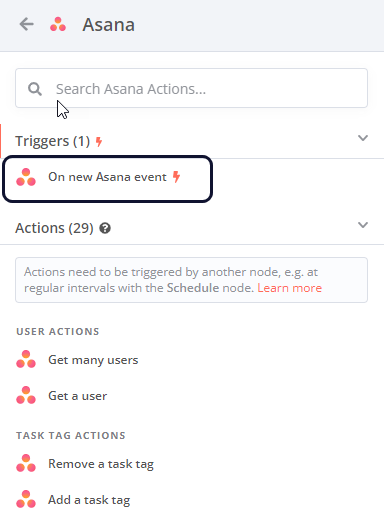
如果你选择 应用内事件(On App Event),n8n 会显示所有支持服务的列表。使用此列表浏览 n8n 的集成,并在所选服务中的事件发生时触发工作流。并非所有集成都有触发器。要查看哪些可以用作触发器,请选择该节点。如果可用触发器存在,你将在可用操作列表的顶部看到它。
例如,这是 Asana 的触发器:
 ///
///向现有工作流添加节点(Add a node to an existing workflow)#
选择 添加节点
 连接器。n8n 会打开节点面板,你可以在其中搜索或浏览所有节点。
Node operations: Triggers and Actions#
When you add a node to a workflow, n8n displays a list of available operations. An operation is something a node does, such as getting or sending data.
There are two types of operation:
- Triggers start a workflow in response to specific events or conditions in your services. When you select a Trigger, n8n adds a trigger node to your workflow, with the Trigger operation you chose pre-selected. When you search for a node in n8n, Trigger operations have a bolt icon
 .
. - Actions are operations that represent specific tasks within a workflow, which you can use to manipulate data, perform operations on external systems, and trigger events in other systems as part of your workflows. When you select an Action, n8n adds a node to your workflow, with the Action operation you chose pre-selected.
节点控件(Node controls)#
要查看节点控件,请将鼠标悬停在画布上的节点上。
🌐 To view node controls, hover over the node on the canvas:
- 执行步骤
 :运行节点。
 - 停用
 :停用该节点。
 - 删除
 :删除该节点。
 - 节点右键菜单
 :选择节点操作。可用操作:
- 打开节点
- 执行步骤
- 重命名节点
- 停用节点
- 图钉节点
- 复制节点
- 复制节点
- 整理工作流程
- 将节点转换为子工作流
- 全选
- 清除选择
- 删除节点
节点设置(Node settings)#
设置选项卡下的节点设置允许你控制节点行为并添加节点备注。
🌐 The node settings under the Settings tab allow you to control node behaviors and add node notes.
启用或设置后,它们将执行以下操作:
🌐 When active or set, they do the following:
- 始终输出数据:即使节点在执行过程中没有返回数据,该节点仍会返回一个空项。在 IF 节点上设置此选项时要小心,因为这可能导致无限循环。
- 只执行一次:该节点只执行一次,使用它接收到的第一个项目的数据。它不会处理任何额外的项目。
- 失败重试:当执行失败时,节点会重新运行直到成功。
- 出错时:
- 停止工作流:当发生错误时,会停止整个工作流,防止进一步的节点执行。
- 继续:即使出现错误,也会使用最后的有效数据继续到下一个节点。
- 继续(使用错误输出):继续工作流的执行,将错误信息传递给下一个节点以便可能处理。
你可以使用节点注释来记录你的工作流:
🌐 You can document your workflow using node notes:
- 注意:请将其与节点一起保存。
- 在流程中显示备注:如果启用,n8n 会在工作流中以副标题的形式显示该备注。
- Triggers start a workflow in response to specific events or conditions in your services. When you select a Trigger, n8n adds a trigger node to your workflow, with the Trigger operation you chose pre-selected. When you search for a node in n8n, Trigger operations have a bolt icon