工作流共享(Workflow sharing)#
功能可用性
适用于专业版和企业云计划,以及企业自托管计划。
工作流共享允许你在同一 n8n 实例的用户之间共享工作流。
🌐 Workflow sharing allows you to share workflows between users of the same n8n instance.
用户可以分享他们创建的工作流。实例所有者和具有管理员角色的用户可以查看并分享实例中的所有工作流。有关所有者和管理员的更多信息,请参阅账户类型。
🌐 Users can share workflows they created. Instance owners, and users with the admin role, can view and share all workflows in the instance. Refer to Account types for more information about owners and admins.
共享工作流(Share a workflow)#
- 打开要共享的工作流。
- 选择 共享。
- 在添加用户中,查找并选择你想要共享的用户。
- 选择 保存。
注意: 只有在共享位于 个人 工作区的工作流程时,此选项才可用。当尝试对位于 项目 中的工作流程使用“添加用户”选项时,你将会看到以下弹窗:
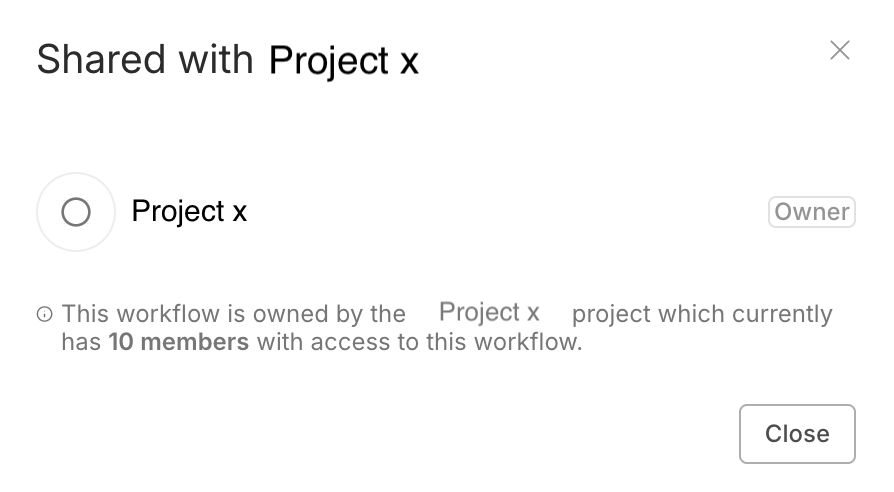
这是预期的行为,这意味着该工作流与该特定项目中的所有人共享。你不需要直接将用户添加到工作流中,而是需要将用户添加到包含该工作流的项目中。
🌐 This is intended behavior, and it means that the workflow is shared with everyone inside that specific project. Instead of adding the user directly to the workflow, you need to add the user to the project in which the workflow is located.
查看共享工作流(View shared workflows)#
你可以在工作流列表中浏览和搜索工作流。列表中的工作流取决于项目:
🌐 You can browse and search workflows on the Workflows list. The workflows in the list depend on the project:
- 概览 列出了你可以访问的所有工作流。这包括:
- 你自己的工作流。
- 与你共享的工作流
- 你所属项目中的工作流。
- 如果你以实例所有者或管理员身份登录:实例中的所有工作流。
- 其他项目:项目中的所有工作流程。
工作流角色和权限(Workflow roles and permissions)#
有两种工作流程角色:创建者和编辑者。创建者是指创建工作流程的用户。编辑者是指有权访问该工作流程的其他用户。
🌐 There are two workflow roles: creator and editor. The creator is the user who created the workflow. Editors are other users with access to the workflow.
你无法更改工作流所有者,除非删除用户。
🌐 You can't change the workflow owner, except when deleting the user.
权限(Permissions)#
| 权限 | 创建者 | 编辑者 |
|---|---|---|
| 查看工作流(只读) |  |
|
| 查看执行记录 | |
|
| 更新(包括标签) | |
|
| 运行 | |
|
| 分享 | |
 |
| 导出 | |
|
| 删除 | |
|
使用非共享凭据时节点编辑受限(Node editing restrictions with unshared credentials)#
n8n中的共享遵循最小权限原则。这意味着如果某个用户与你共享了一个工作流程,但没有共享他们的凭据,你将无法编辑使用这些凭据的工作流程中的节点。你可以查看和运行该工作流程,并编辑不使用未共享凭据的节点。
🌐 Sharing in n8n works on the principle of least privilege. This means that if a user shares a workflow with you, but they don't share their credentials, you can't edit the nodes within the workflow that use those credentials. You can view and run the workflow, and edit nodes that don't use unshared credentials.
请参阅 Credential sharing 以获取有关共享凭据的指南。
🌐 Refer to Credential sharing for guidance on sharing credentials.