n8n v2.0 重大变更(n8n v2.0 breaking changes)#
n8n v2.0 即将发布。本文件重点说明了重要的重大更改以及您应采取的准备措施。这些更新提升了安全性、简化了配置,并移除了遗留功能。
🌐 n8n v2.0 will be released soon. This document highlights important breaking changes and actions you should take to prepare for the transition. These updates improve security, simplify configuration, and remove legacy features.
n8n 2.0 的发布延续了 n8n 提供安全、可靠且适合生产环境使用的自动化平台的承诺。这个主要版本包括重要的安全增强和对弃用功能的清理。
🌐 The release of n8n 2.0 continues n8n's commitment to providing a secure, reliable, and production-ready automation platform. This major version includes important security enhancements and cleanup of deprecated features.
行为变更(Behavior changes)#
子工作流从等待状态(等待 webhook、表单、HITL 等)恢复时,返回预期的子工作流数据(Return expected sub-workflow data when the sub-workflow resumes from waiting (waiting for webhook, forms, HITL, etc.))#
以前,当一个执行(父级)调用一个包含导致子执行进入等待状态的节点的子执行(子级)时,如果父级执行被设置为等待子执行完成,则父级执行会收到错误的响应。结果。
🌐 Previously, when an execution (parent) called a sub-execution (child) that contained a node that causes the sub-execution to enter the waiting state and the parent-execution is set up to wait for the sub-execution's completion, the parent-execution would receive incorrect results.
进入等待状态会发生在例如子执行包含一个超时时间超过65秒的等待节点,或者包含网络钩子调用、表单提交,或者一个人工干预节点,例如Slack节点的情况下。
🌐 Entering the waiting state would happen for example if the sub-execution contains a Wait node with a timeout higher than 65 seconds or a webhook call or a form submission, or a human-in-the-loop node, like the slack node.
父工作流:
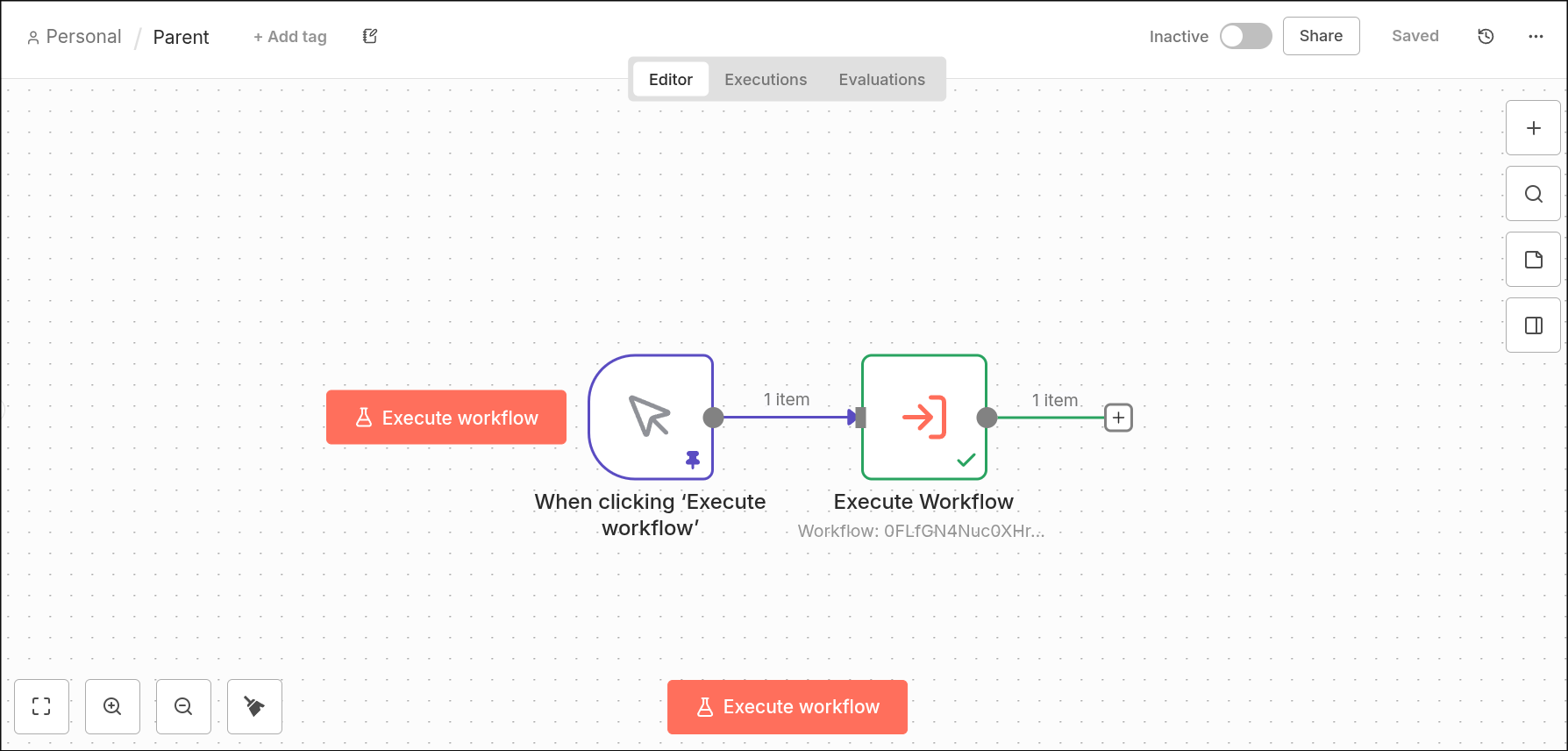
🌐 Parent-Workflow:
子工作流:
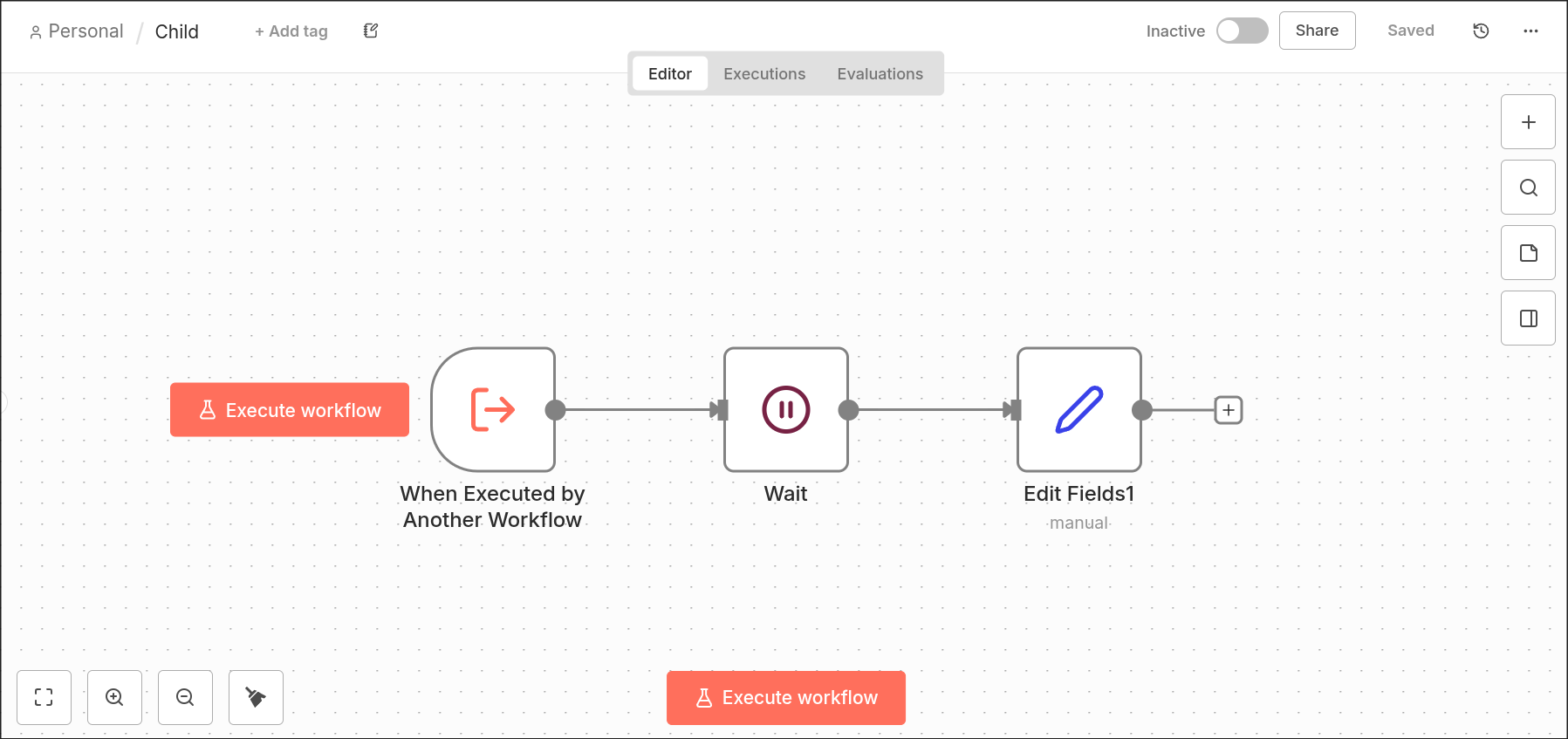
🌐 Sub-Workflow:
v1:父执行将子执行的输入作为其输出再现。:
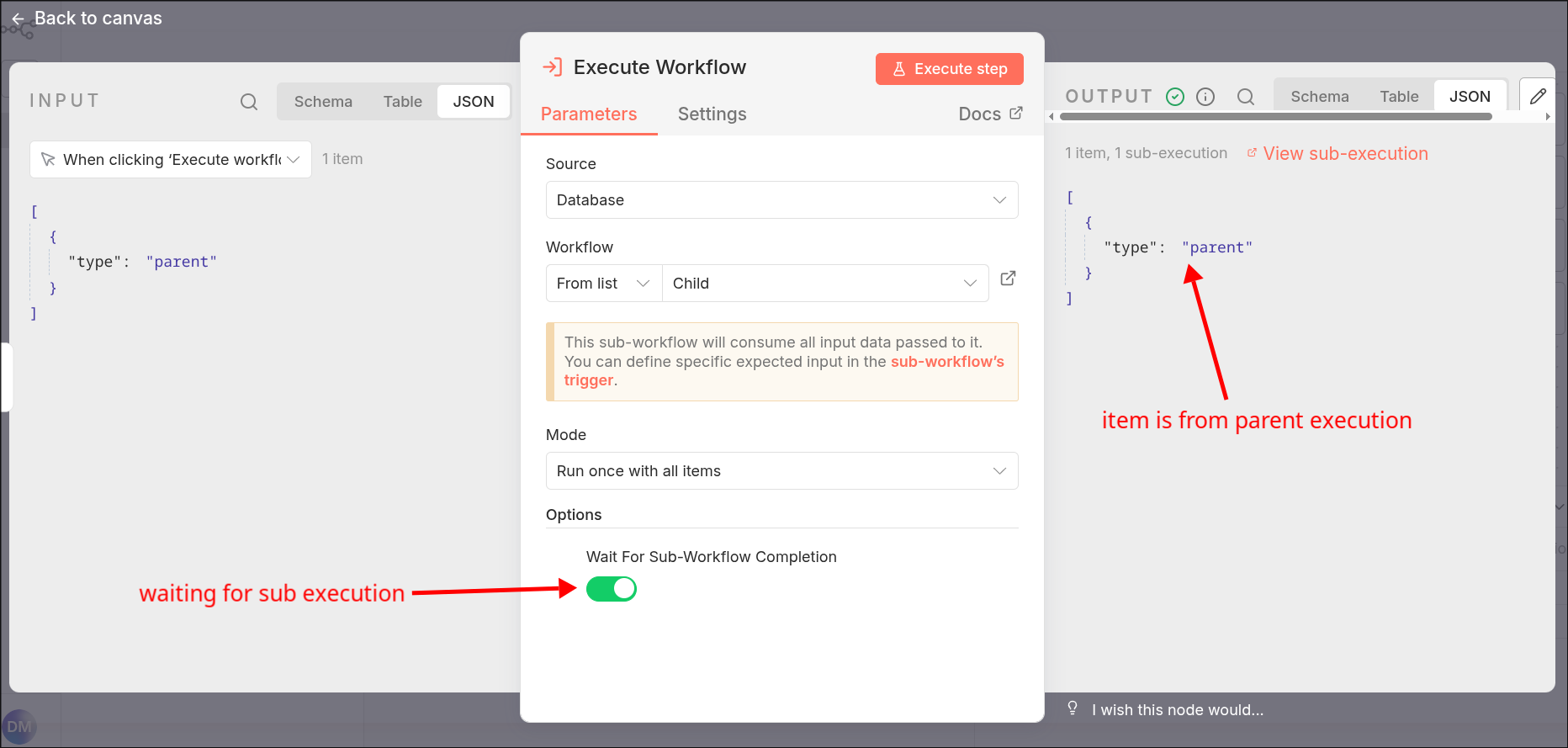
🌐 v1: The parent-execution reproduces the sub-execution's input as its output.:
v2:父执行将接收子执行的结果:
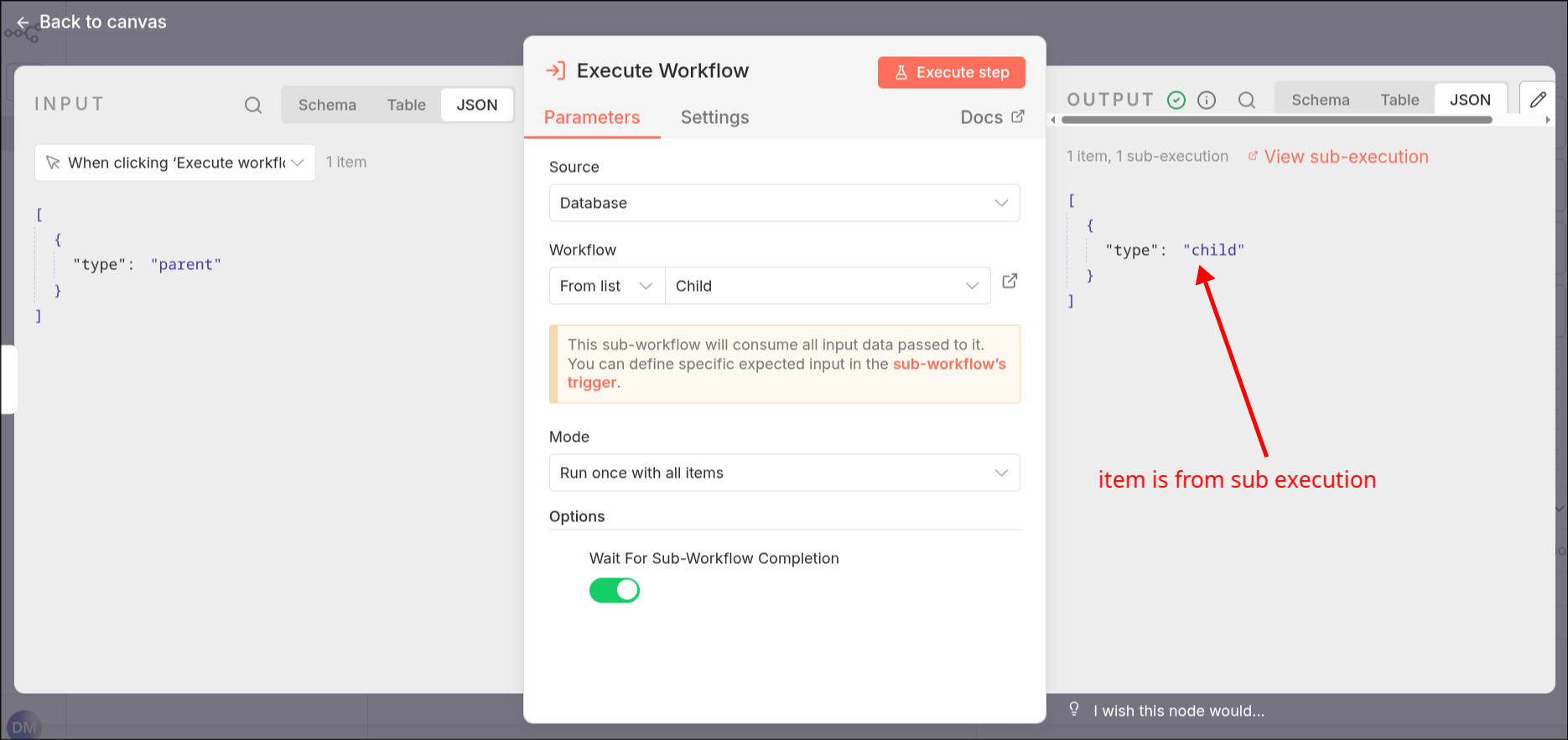
🌐 v2: The parent execution receives the result of the child execution:
这使得在子工作流中使用人机交互节点,并在父工作流中使用结果(例如,批准或拒绝操作)。
🌐 This allows using human-in-the-loop nodes in the sub-workflow and use the results (for example approving or declining an action) in the parent-workflow.
迁移路径: 检查所有调用子工作流并希望接收子工作流输入的工作流。更新这些工作流,以处理新的行为,即父工作流接收来自子工作流结束时的输出。
起始节点已移除(Start node removed)#
“开始”节点不再被支持。该节点曾是启动工作流的原始方式,但现在已由更具体的触发节点取代。
🌐 The Start node is no longer supported. This node was the original way to begin workflows but more specific trigger nodes now replace it.
迁移路径: 根据你使用工作流的方式替换开始节点:
- 手动执行: 将开始节点替换为 手动触发 节点。
- 子工作流: 如果另一个工作流将此工作流作为子工作流调用,请将开始节点替换为 执行工作流触发器 节点并激活该工作流。
- 已禁用的开始节点: 如果开始节点被禁用,请将其从工作流中删除。
保存和发布工作流程(Saving and publishing workflows)#
新的工作流发布系统取代了之前的启用/停用切换。这意味着原来的“激活/停用”切换变成了新的“发布/取消发布”按钮。此更改使你可以更好地控制工作流变更何时生效,从而减少意外将正在进行的更改部署到生产环境的风险。更多信息请参见:保存和发布工作流
🌐 The new workflow publishing system replaces the previous active/inactive toggle. This means that the old "Activate/Deactivate" toggles become the new "Publish/Unpublish" buttons. This change gives you better control over when your workflow changes go live, reducing the risk of accidentally deploying work-in-progress changes to production. More information can be found here: Saving and publishing workflows.
移除已停用服务的节点(Removed nodes for retired services)#
以下节点已被移除,因为它们连接的外部服务已不再可用:
🌐 The following nodes have been removed because the external services they connect to are no longer available:
- 自发节点
- crowd.dev 节点
- Kitemaker 节点
- Automizy 节点
迁移路径: 如果你的工作流使用了其中任何节点,请更新或移除这些工作流以避免错误。
安全(Security)#
默认情况下阻止从代码节点访问环境变量(Block environment variable access from Code Node by default)#
为了提高安全性,n8n 默认将阻止从代码节点访问环境变量。N8N_BLOCK_ENV_ACCESS_IN_NODE 的默认值现在设置为 true。
🌐 To improve security, n8n will block access to environment variables from the Code node by default. The default value for N8N_BLOCK_ENV_ACCESS_IN_NODE is now set to true.
迁移路径: 如果你的工作流需要在代码节点中访问环境变量,请在环境配置中设置 N8N_BLOCK_ENV_ACCESS_IN_NODE=false。对于敏感数据,请使用凭据或其他安全方法,而不是环境变量。
强制设置文件权限(Enforce settings file permissions)#
n8n 将要求配置文件具有严格的文件权限以提高安全性。默认情况下,配置文件必须使用 0600 权限,这意味着只有文件所有者可以读取和写入它们。这种方法类似于 SSH 保护私钥的方式。
🌐 n8n will require strict file permissions for configuration files to improve security. By default, configuration files must use 0600 permissions, which means only the file owner can read and write them. This approach is similar to how SSH protects private keys.
迁移路径: 若要在 v2.0 之前测试此行为,请设置 N8N_ENFORCE_SETTINGS_FILE_PERMISSIONS=true。如果你的环境不支持文件权限(例如,在 Windows 上),请设置 N8N_ENFORCE_SETTINGS_FILE_PERMISSIONS=false 以禁用此要求。
默认启用任务运行器(Enable task runners by default)#
n8n 将默认启用 任务运行器 以提高安全性和隔离性。所有代码节点的执行都将在任务运行器上进行。
🌐 n8n will enable task runners by default to improve security and isolation. All Code node executions will run on task runners.
迁移路径: 在升级到 v2.0 之前,将 N8N_RUNNERS_ENABLED=true 来测试此行为。确保你的基础设施符合运行任务执行器的要求。为了增加安全性,可以考虑使用 外部模式。
从 n8nio/n8n Docker 镜像中移除任务运行器(Remove task runner from n8nio/n8n docker image)#
从 v2.0 开始,主 n8nio/n8n Docker 镜像将不再包含用于外部模式的任务运行器。你必须使用单独的 n8nio/runners Docker 镜像来在外部模式下运行任务运行器。
🌐 Starting with v2.0, the main n8nio/n8n Docker image will no longer include the task runner for external mode. You must use the separate n8nio/runners Docker image to run task runners in external mode.
迁移路径: 如果你在 Docker 中以外部模式运行任务执行器,请更新你的设置,使用 n8nio/runners 镜像替代 n8nio/n8n。
移除基于 Pyodide 的 Python 代码节点和工具(Remove Pyodide-based Python Code node and tool)#
n8n 将移除基于 Pyodide 的 Python 代码节点和工具,并用基于 任务运行器 的实现来替代,使用本地 Python 以提升安全性和性能。从 v2.0 开始,你只能在 外部模式 和本地 Python 工具中使用带任务运行器的 Python 代码节点。
🌐 n8n will remove the Pyodide-based Python Code node and tool and replace them with a task runner-based implementation that uses native Python for better security and performance. Starting in v2.0, you can only use Python Code nodes with task runners in external mode and native Python tools.
原生 Python 代码节点不支持像 _input 这样的内置变量或点访问符号,这些在基于 Pyodide 的版本中是可用的。详情请参阅 代码节点文档。
🌐 The native Python Code node doesn't support built-in variables like _input or dot access notation, which were available in the Pyodide-based version. For details, see the Code node documentation.
原生 Python 工具支持 _query,用于 AI 代理在调用该工具时传递给工具的输入字符串。
🌐 The native Python tool supports _query for the input string that the AI Agent passes to the tool when it calls it.
迁移路径: 若要继续在 Code 节点中使用 Python,请以外部模式设置任务运行器,并检查现有的 Python Code 节点和工具的兼容性。
默认禁用 ExecuteCommand 和 LocalFileTrigger 节点(Disable ExecuteCommand and LocalFileTrigger nodes by default)#
n8n 默认会禁用 ExecuteCommand 和 LocalFileTrigger 节点,因为它们存在安全风险。这些节点允许用户执行任意命令并访问文件系统。
🌐 n8n will disable the ExecuteCommand and LocalFileTrigger nodes by default because they pose security risks. These nodes allow users to run arbitrary commands and access the file system.
迁移路径: 如果你需要使用这些节点,请通过更新 NODES_EXCLUDE 环境变量从 n8n 配置的已禁用节点列表中移除它们。例如,设置 NODES_EXCLUDE="[]" 以启用所有节点,或仅移除你需要的特定节点。
要求在 OAuth 回调中进行身份验证默认 URL(Require authentication on OAuth callback URLs by default)#
默认情况下,n8n 将要求 OAuth 回调端点进行身份验证。N8N_SKIP_AUTH_ON_OAUTH_CALLBACK 的默认值将从 true(无需身份验证)更改为 false(需要身份验证)。
🌐 n8n will require authentication for OAuth callback endpoints by default. The default value for N8N_SKIP_AUTH_ON_OAUTH_CALLBACK will change from true (no authentication required) to false (authentication required).
迁移路径: 在升级到 v2.0 之前,设置 N8N_SKIP_AUTH_ON_OAUTH_CALLBACK=false 并测试你的 OAuth 集成,以确保在启用身份验证的情况下能够正常工作。
设置 N8N_RESTRICT_FILE_ACCESS_TO 的默认值(Set default value for N8N_RESTRICT_FILE_ACCESS_TO)#
n8n 将为 N8N_RESTRICT_FILE_ACCESS_TO 设置默认值,以控制文件操作可以发生的位置。这会影响 ReadWriteFile 和 ReadBinaryFiles 节点。默认情况下,这些节点只能访问 ~/.n8n-files 目录中的文件。
🌐 n8n will set a default value for N8N_RESTRICT_FILE_ACCESS_TO to control where file operations can occur. This affects the ReadWriteFile and ReadBinaryFiles nodes. By default, these nodes can only access files in the ~/.n8n-files directory.
迁移路径: 检查使用文件节点的工作流程,并确保它们仅访问允许的目录。如果需要允许访问其他目录,请将 N8N_RESTRICT_FILE_ACCESS_TO 环境变量设置为你想要的路径。
将 N8N_GIT_NODE_DISABLE_BARE_REPOS 的默认值更改为 true(Change the default value of N8N_GIT_NODE_DISABLE_BARE_REPOS to true)#
默认情况下,出于安全原因,Git 节点现在将阻止裸仓库。N8N_GIT_NODE_DISABLE_BARE_REPOS 的默认值设置为 true,这意味着裸仓库被禁用,除非你更改此设置。
🌐 By default, the Git node will now block bare repositories for security reasons. The default value for N8N_GIT_NODE_DISABLE_BARE_REPOS is set to true, which means bare repositories are disabled unless you change this setting.
迁移路径: 如果你的工作流需要使用裸仓库,请在环境配置中设置 N8N_GIT_NODE_DISABLE_BARE_REPOS=false 以启用它们。
数据(Data)#
放弃 MySQL/MariaDB 支持(Drop MySQL/MariaDB support)#
n8n 将不再支持 MySQL 和 MariaDB 作为存储后端。这项支持在 v1.0 版本中已被弃用。为了获得最佳兼容性和长期支持,请使用 PostgreSQL。MySQL 节点将继续像以前一样受支持。
🌐 n8n will no longer support MySQL and MariaDB as storage backends. This support was deprecated in v1.0. For best compatibility and long-term support, use PostgreSQL. MySQL node will continue to be supported as before.
迁移路径: 在升级到 v2.0 之前,使用数据库迁移工具将你的数据从 MySQL 或 MariaDB 转移到 PostgreSQL 或 SQLite。
移除 SQLite 旧版驱动程序(Remove SQLite legacy driver)#
由于可靠性问题,n8n 将移除旧版 SQLite 驱动。连接池驱动将成为默认且唯一的 SQLite 驱动。连接池驱动使用 WAL 模式、单写连接以及多读连接的池。我们的基准测试显示,它的速度可以提高到原来的 10 倍。
🌐 n8n will remove the legacy SQLite driver due to reliability issues. The pooling driver will become the default and only SQLite driver. The pooling driver uses WAL mode, a single write connection, and a pool of read connections. Our benchmarks show it can be up to 10 times faster.
迁移路径: sqlite-pooled 驱动程序将自动成为默认值。你现在可以通过将 DB_SQLITE_POOL_SIZE 设置为大于 0 的值来启用连接池。默认的池大小将设置为 2。
移除内存二进制数据模式(Remove in-memory binary data mode)#
n8n 将移除 N8N_DEFAULT_BINARY_DATA_MODE 的 default 模式,该模式在执行过程中会将二进制数据保存在内存中。为了更好的性能和稳定性,从 v2 开始将提供以下选项:
🌐 n8n will remove the default mode for N8N_DEFAULT_BINARY_DATA_MODE, which keeps execution binary data in memory during execution. For better performance and stability the following options will be available starting from v2:
filesystem:二进制数据存储在文件系统中。常规模式下的默认选项。database:二进制数据存储在数据库中。队列模式的默认选项。s3:二进制数据存储在兼容 S3 的存储中。
N8N_AVAILABLE_BINARY_DATA_MODES 设置也将被移除,因此现在模式仅由 N8N_DEFAULT_BINARY_DATA_MODE 决定。
🌐 The N8N_AVAILABLE_BINARY_DATA_MODES setting will also be removed, so the mode is now determined only by N8N_DEFAULT_BINARY_DATA_MODE.
迁移路径: 将根据配置自动使用文件系统或数据库模式。请确保你的 n8n 实例有足够的磁盘空间来存储二进制数据。详情请参阅 二进制数据配置。
配置和环境(Configuration & Environment)#
升级 dotenv(Upgrade dotenv)#
n8n 使用 dotenv 库从 .env 文件加载环境配置。该库将从 8.6.0 版本升级到最新版本,这可能会改变 .env 文件的解析方式。主要的不兼容变更包括:
🌐 n8n loads environment configuration from a .env file using the dotenv library. The library will be upgraded from version 8.6.0 to the latest version, which may change how .env files are parsed. Key breaking changes include:
- 反引号支持 (#615):如果你的值包含反引号,请用单引号或双引号括起来。
- 多行支持:你现在可以使用多行值。
#表示注释的开始:以 # 开头的行被视为注释。
迁移路径: 查看 dotenv 更新日志,并更新你的 .env 文件以确保与新版本兼容。
移除 n8n --tunnel 选项(Remove n8n --tunnel option)#
n8n --tunnel 命令行选项将在 v2.0 中被移除。
🌐 The n8n --tunnel command-line option will be removed in v2.0.
迁移路径: 如果你当前在开发或测试中使用 --tunnel 选项,请切换到其他隧道解决方案,例如 ngrok、localtunnel 或 Cloudflare 隧道。更新你的工作流程和文档以反映此更改。
移除 QUEUE_WORKER_MAX_STALLED_COUNT(Remove QUEUE_WORKER_MAX_STALLED_COUNT)#
QUEUE_WORKER_MAX_STALLED_COUNT 环境变量和 Bull 的挂起任务重试机制将被移除,因为它们经常引起混淆且无法可靠工作。
🌐 The QUEUE_WORKER_MAX_STALLED_COUNT environment variable and the Bull retry mechanism for stalled jobs will be removed because they often caused confusion and didn't work reliably.
迁移路径: 从你的配置中删除此环境变量。升级后,n8n 将不再自动重试停滞的任务。如果你需要处理停滞的任务,请考虑实现你自己的重试逻辑或监控机制。
移除 N8N_CONFIG_FILES(Remove N8N_CONFIG_FILES)#
N8N_CONFIG_FILES 环境变量已被移除。
🌐 The N8N_CONFIG_FILES environment variable has been removed.
迁移路径: 从你的配置中删除此环境变量。将配置移入环境变量、.env 文件或基于 _FILE 的配置。
CLI 和工作流(CLI & Workflow)#
替换 CLI 命令 update:workflow(Replace CLI command update:workflow)#
update:workflow CLI 命令将被弃用,并由两个新命令取代,以提供类似的功能并更加清晰:
🌐 The update:workflow CLI command will be deprecated and replaced by two new commands to deliver similar functionality and more clarity:
publish:workflow参数为id和versionId(可选)--all参数将被移除,以防止在生产环境中意外发布工作流unpublish:workflow带有参数id和all
迁移路径: 使用新的 publish:workflow 命令按 ID 单独发布工作流,可选择指定版本。要取消发布,请使用新的 unpublish:workflow 命令。这可以更清晰地控制工作流的发布状态。
外部钩子(External Hooks)#
已弃用的前端工作流钩子(Deprecated frontend workflow hooks)#
workflow.activeChange 和 workflow.activeChangeCurrent 钩子将被弃用。它们将被一个新的钩子 workflow.published 替代。新的钩子将在任何版本的工作流发布时触发。
🌐 The hooks workflow.activeChange and workflow.activeChangeCurrent will be deprecated. These will be replaced by a new hook workflow.published. The new hook will be triggered when any version of a workflow is published.
迁移路径: 更新你的代码,使用新的 workflow.published 钩子替代 workflow.activeChange 和 workflow.activeChangeCurrent。该钩子提供了更一致的行为,并将在每次工作流版本发布时触发。
发布渠道(Release channels)#
n8n 已将发布通道从 latest 和 next 分别重命名为 stable 和 beta。
🌐 n8n has renamed the release channels from latest and next to stable and beta, respectively.
stable 标签表示最新的稳定版本,beta 标签表示最新的实验版本。这些标签在 npm 和 Docker Hub 上都可以使用。暂时,n8n 将继续将发布版本标记为 latest 和 next。这些标签将在将来的主要版本中被移除。
🌐 The stable tag designates the latest stable release, and the beta tag designates the latest experimental release. These tags are available on both npm and Docker Hub. For now, n8n will continue to tag releases as latest and next. These tags will be removed in a future major version.
建议: 将你的 n8n 版本固定到特定版本号,例如 2.0.0。
举报问题(Reporting issues)#
如果在更新到 n8n 2.0 时遇到任何问题,请访问社区论坛寻求帮助和支持。
🌐 If you run into any problems while updating to n8n 2.0, visit the community forum for help and support.