高级 AI(Advanced AI)#
使用 n8n 构建 AI 功能:从创建自己的聊天机器人,到使用 AI 处理来自其他来源的文档和数据。
🌐 Build AI functionality using n8n: from creating your own chat bot, to using AI to process documents and data from other sources.
功能可用性
此功能在 Cloud 和自宿 n8n 中可用,版本需为 1.19.4 及以上。
-
开始
通过简短的教程学习在 n8n 中构建 AI 工作流程的基础知识。
-
使用入门套件
试试 n8n 的自托管 AI 入门套件,快速开始构建 AI 工作流程。
-
探索示例和概念
浏览示例和工作流程模板,帮助你进行构建。包括重要人工智能概念的解释。
-
n8n 如何使用 LangChain
了解更多关于 n8n 如何基于 LangChain 构建的信息。
-
浏览 AI 模板
在 n8n 网站上探索各种 AI 工作流程模板。
相关资源(Related resources)#
相关文档和工具。
🌐 Related documentation and tools.
节点类型(Node types)#
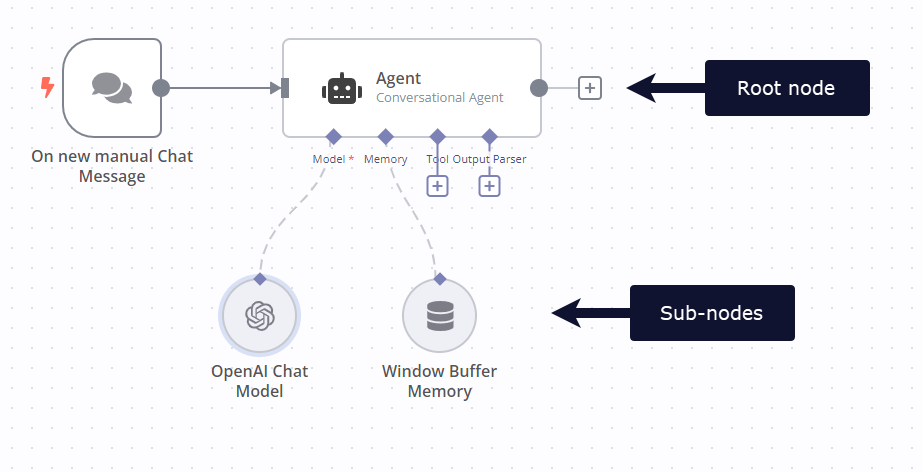
🌐 This feature uses Cluster nodes: groups of root and sub nodes that work together.
Cluster nodes are node groups that work together to provide functionality in an n8n workflow. Instead of using a single node, you use a root node and one or more sub-nodes that extend the functionality of the node.
工作流模板(Workflow templates)#
你可以在应用内或 n8n 网站的 工作流 页面浏览 工作流模板。
🌐 You can browse workflow templates in-app or on the n8n website Workflows page.
请参阅 模板 以获取有关在应用内访问模板的信息。
🌐 Refer to Templates for information on accessing templates in-app.
聊天触发器(Chat trigger)#
使用 n8n 聊天触发器 根据聊天互动触发工作流。
🌐 Use the n8n Chat Trigger to trigger a workflow based on chat interactions.
聊天机器人组件(Chatbot widget)#
n8n 提供了一个聊天机器人小部件,您可以将其用作 AI 驱动聊天工作流程的前端。有关使用信息,请参阅 @n8n/chat npm 页面。
🌐 n8n provides a chatbot widget that you can use as a frontend for AI-powered chat workflows. Refer to the @n8n/chat npm page for usage information.