基于指标的评估#
适用于专业版和企业版计划
基于指标的评估在专业版和企业版计划中可用。注册社区用户和入门计划用户也可以在单个工作流中使用它。
什么是基于指标的评估?(What are metric-based evaluations?)#
一旦你的工作流准备好部署,你通常希望在比构建它时更多的例子上进行测试。
🌐 Once your workflow is ready for deployment, you often want to test it on more examples than when you were building it.
例如,当生产环境中的执行开始出现一些极端情况时,你需要将它们添加到测试数据集中,以确保这些情况都被覆盖。
🌐 For example, when production executions start to turn up edge cases, you want to add them to your test dataset so that you can make sure they're covered.
对于像基于生产数据构建的大型数据集,仅凭观察结果很难对性能有一个直观的了解。相反,你必须对性能进行测量。基于指标的评估可以为每次测试运行分配一个或多个分数,你可以将这些分数与之前的运行进行比较。单个分数会汇总,以衡量整个数据集的性能。
🌐 For large datasets like the ones built from production data, it can be hard to get a sense of performance just by eyeballing the results. Instead, you must measure performance. Metric-based evaluations can assign one or more scores to each test run, which you can compare to previous runs. Individual scores get rolled up to measure performance on the whole dataset.
此功能允许你运行评估以计算指标,跟踪这些指标在运行之间的变化,并深入分析这些变化的原因。
🌐 This feature allows you to run evaluations that calculate metrics, track how those metrics change between runs and drill down into the reasons for those changes.
度量可以是确定性的函数(例如两个字符串之间的距离),也可以使用人工智能来计算。度量通常涉及检查输出与参考输出(也称为真实值)之间的差距。为此,数据集必须包含该参考输出。不过,有些评估并不需要这个参考输出(例如,检查文本的情感或毒性)。
🌐 Metrics can be deterministic functions (such as the distance between two strings) or you can calculate them using AI. Metrics often involve checking how far away the output is from a reference output (also called ground truth). To do so, the dataset must contain that reference output. Some evaluations don't need this reference output though (for example, checking text for sentiment or toxicity).
怎么运行的(How it works)#
Google 表格凭证
评估使用数据表或 Google 表格来存储测试数据集。要使用 Google 表格作为数据集来源,请配置 Google 表格凭据。
- 设置轻量评估
- 向工作流添加指标
- 运行评估并查看结果
1. 设置光线评估(1. Set up light evaluation)#
按照 设置说明 创建数据集,并将其连接到你的工作流程,将输出写回数据集。
🌐 Follow the setup instructions to create a dataset and wire it up to your workflow, writing outputs back to the dataset.
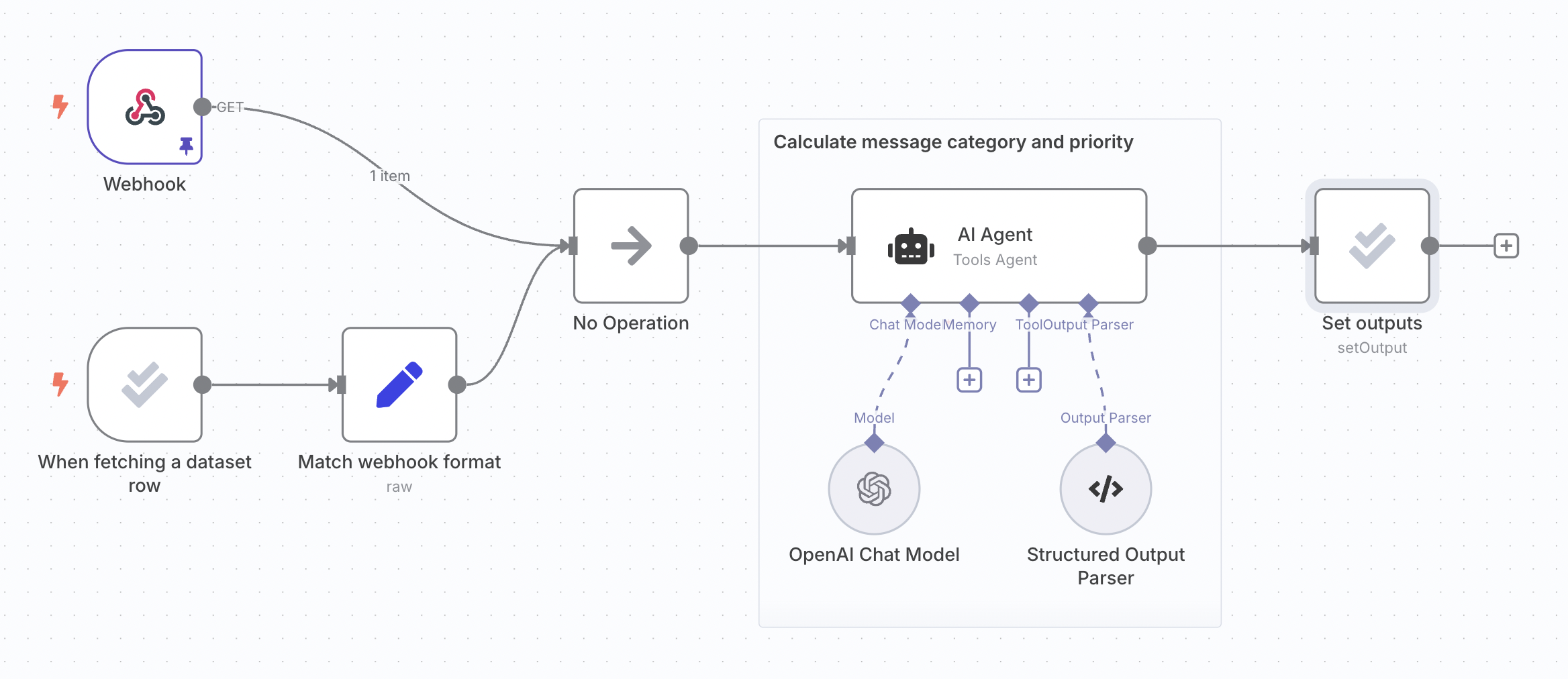
以下步骤使用与轻量级评估文档相同的支持工单分类工作流程:
🌐 The following steps use the same support ticket classification workflow from the light evaluation docs:
2. 向工作流程中添加指标(2. Add metrics to workflow)#
指标是用来评估工作流输出的维度。它们通常将实际工作流输出与参考输出进行比较。通常会使用 AI 来计算指标,虽然有时也可以只使用代码。在 n8n 中,指标总是以数字形式表示。
🌐 Metrics are dimensions used to score the output of your workflow. They often compare the actual workflow output with a reference output. It's common to use AI to calculate metrics, although it's sometimes possible to just use code. In n8n, metrics are always numbers.
您需要在工作流生成输出之后的某个时刻,添加计算指标的逻辑。您可以将指标使用的任何参考输出作为数据集中的一列添加。这可以确保它在工作流中可用,因为评估触发器会输出这些内容。
🌐 You need to add the logic to calculate the metrics for your workflow, at a point after it has produced the outputs. You can add any reference outputs your metric uses as a column in your dataset. This makes sure they it will be available in the workflow, since they will be output by the evaluation trigger.
使用 设置指标 操作来计算:
🌐 Use the Set Metrics operation to calculate:
- 正确性(基于 AI):答案的含义是否与提供的参考答案一致。使用1到5的评分,5分为最佳。
- 有用性(基于人工智能):回答是否解决了所提出的问题。使用1到5的评分,5分为最佳。
- 字符串相似度:答案与参考答案的接近程度,通过逐字符比较(编辑距离)来衡量。分数范围为0到1。
- 分类:答案是否与参考答案完全匹配。匹配时返回1,否则返回0。
- 使用的工具:执行过程中是否使用了工具。返回一个介于 0 到 1 之间的分数。
你也可以添加自定义指标。只需在工作流中计算指标,然后将它们映射到评估节点中。使用 设置指标 操作,并选择 自定义指标 作为指标类型。然后,你可以设置要返回的指标名称和值。
🌐 You can also add custom metrics. Just calculate the metrics within the workflow and then map them into an Evaluation node. Use the Set Metrics operation and choose Custom Metrics as the Metric. You can then set the names and values for the metrics you want to return.
例如:
🌐 For example:
- RAG 文档相关性:在使用向量数据库时,检索到的文档是否与问题相关。
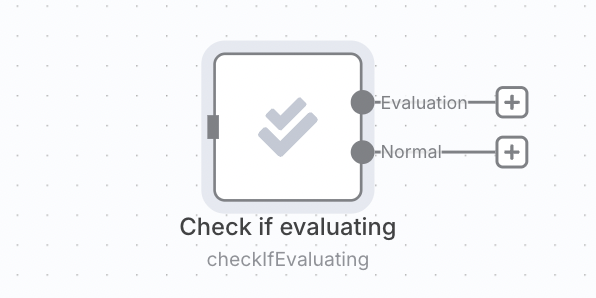
计算指标可能会增加延迟和成本,因此你可能只希望在运行评估时进行计算,而在执行生产任务时避免进行。你可以通过将指标逻辑放在['检查是否在评估']操作之后来实现这一点。
🌐 Calculating metrics can add latency and cost, so you may only want to do it when running an evaluation and avoid it when making a production execution. You can do this by putting the metric logic after a 'check if evaluating' operation.
3. 运行评估并查看结果(3. Run evaluation and view results)#
切换到工作流程中的 评估 选项卡,然后点击 运行评估 按钮。评估将开始。评估完成后,它会显示每个指标的汇总得分。
🌐 Switch to the Evaluations tab on your workflow and click the Run evaluation button. An evaluation will start. Once the evaluation has finished, it will display a summary score for each metric.
你可以通过点击测试运行行查看每个测试用例的结果。点击单个测试用例将打开生成该结果的执行(在新标签页中)。
🌐 You can see the results for each test case by clicking on the test run row. Clicking on an individual test case will open the execution that produced it (in a new tab).