提示和常见问题(Tips and common issues)#
合并多个触发器(Combining multiple triggers)#
如果你的工作流中已经有了另一个触发器,你将有两个潜在的起点:该触发器和评估触发器。为了确保无论哪个触发器执行,你的工作流都能按预期工作,你需要将这些分支合并在一起。
🌐 If you have another trigger in the workflow already, you have two potential starting points: that trigger and the evaluation trigger. To make sure your workflow works as expected no matter which trigger executes, you will need to merge these branches together.
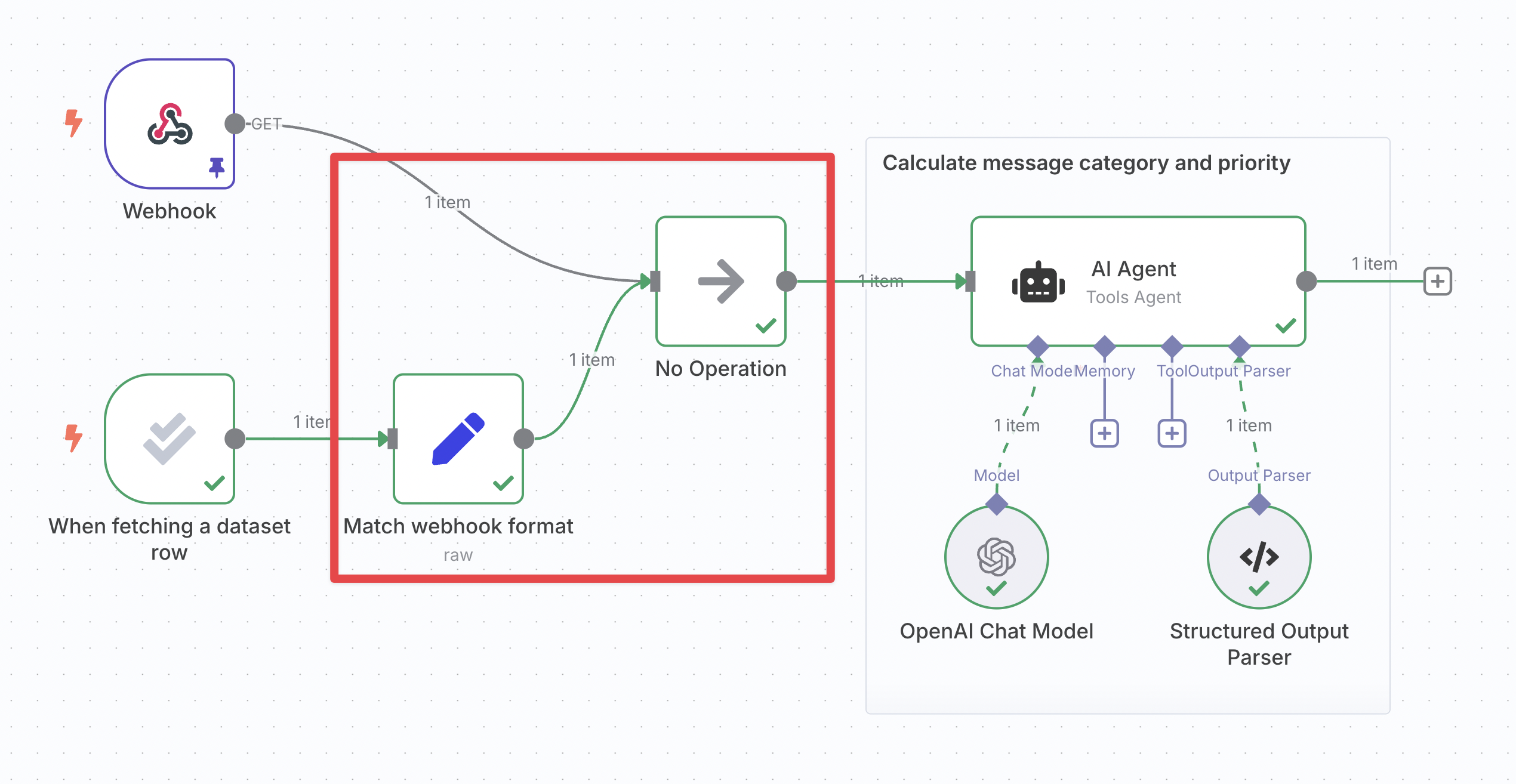
禁用方法:
🌐 To do so:
- 获取另一个触发器的数据格式:
- 执行其他触发器。
- 打开它并导航到其输出窗格的 JSON 视图。
- 点击右侧的复制按钮。
- 重新调整评估触发数据以匹配:
- 在评估触发器之后插入一个 编辑字段(集合)节点,并将它们连接起来。
- 将其模式更改为JSON。
- 将你的数据粘贴到“JSON”字段中,删除第一行和最后一行的
[和]。 - 将字段类型切换为 表达式。
- 从输入窗格拖动数据,即可映射触发器中的数据。
- 对于字符串,确保替换整个值(包括引号),并在表达式末尾添加
.toJsonString()。
- 使用“无操作”节点合并分支:插入一个无操作节点,并将另一个触发器和设置节点都连接到它。‘无操作’节点只会输出它接收到的任何输入。
- 在工作流的其他部分参考“No-op”节点的输出:由于两个路径都会以相同的格式通过该节点,你可以确保输入数据始终存在。
避免评估中断聊天(Avoiding evaluation breaking the chat)#
n8n 的内部聊天会读取工作流中最后执行节点的输出数据。在添加了带有 '设置输出' 操作 的评估节点后,这些数据可能不符合预期格式,甚至可能不包含聊天响应。
🌐 n8n's internal chat reads the output data of the last executed node in the workflow. After adding an evaluation node with the 'set outputs' operation, this data may not be in the expected format, or even contain the chat response.
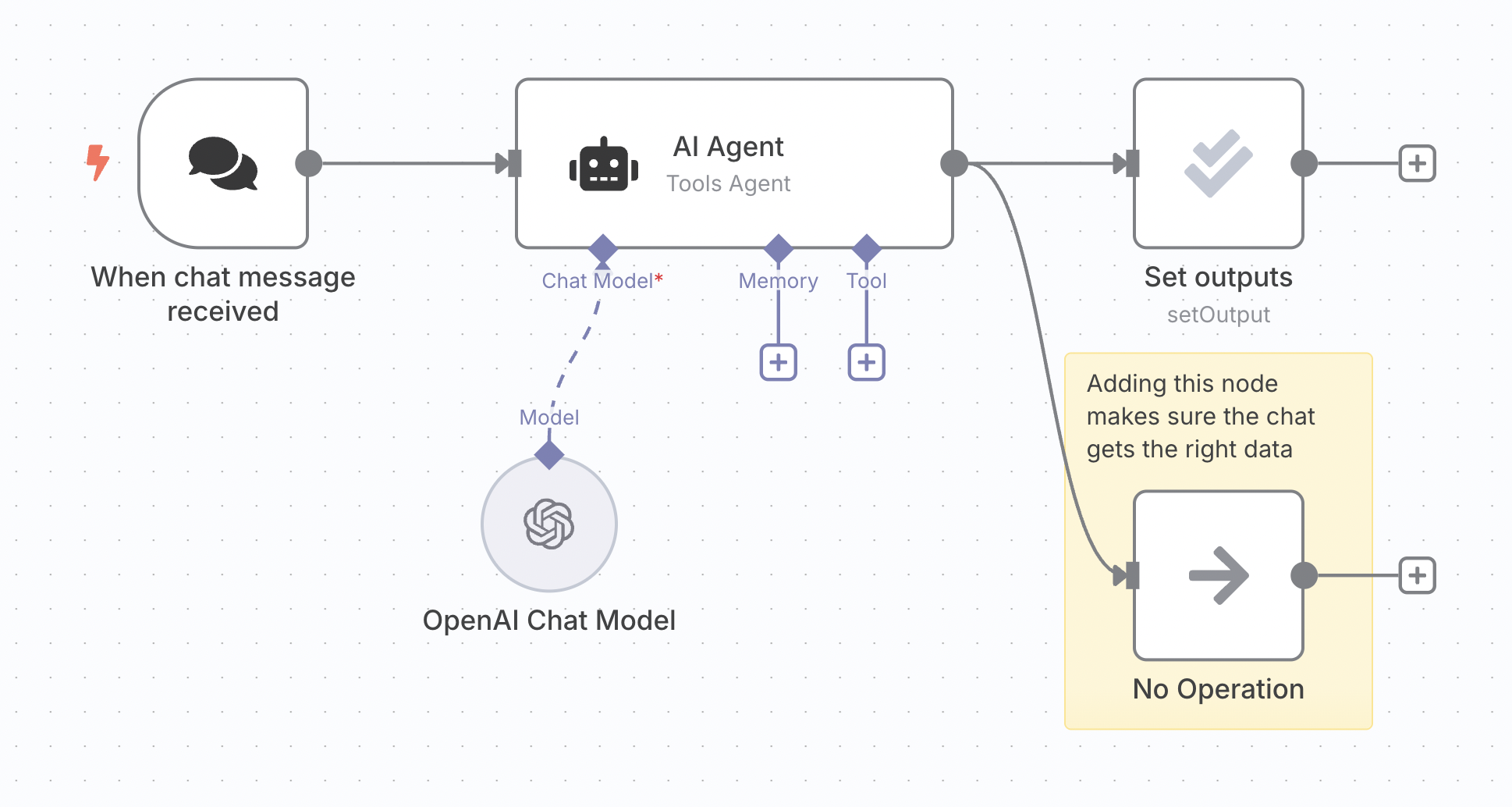
解决方案是在你的代理上添加一个额外的分支。在 n8n 中,下层分支会较晚执行,这意味着你附加到该分支的任何节点将最后执行。你可以在这里使用一个空操作节点,因为它只需要传递代理输出。
🌐 The solution is to add an extra branch coming out of your agent. Lower branches execute later in n8n, which means any node you attach to this branch will execute last. You can use a no-op node here since it only needs to pass the agent output through.
计算指标时访问工具数据(Accessing tool data when calculating metrics)#
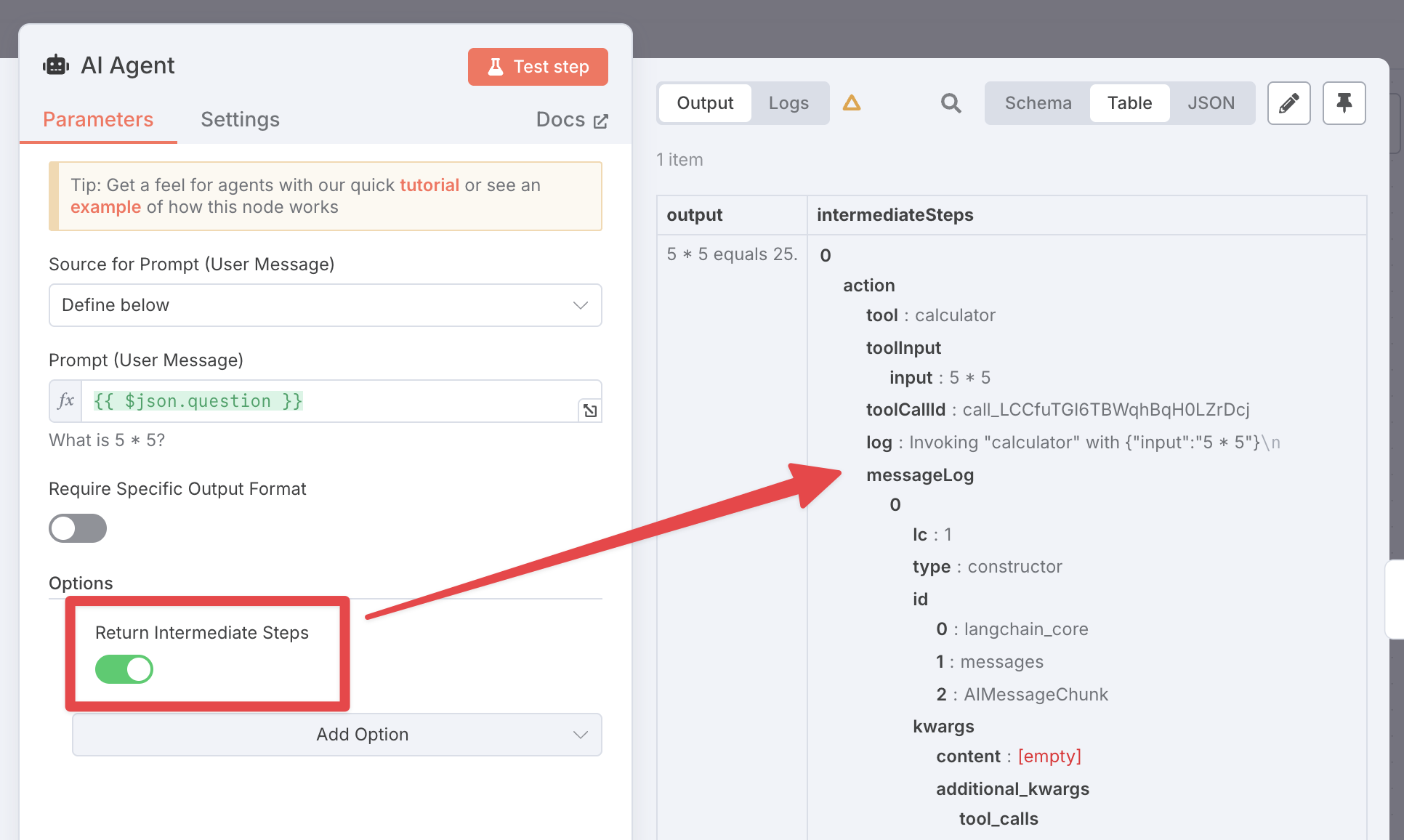
有时候你需要了解代理执行的子节点中发生了什么,例如检查它是否执行了某个工具。你不能直接在表达式中引用这些节点,但你可以在代理中启用 返回中间步骤 选项。这会添加一个名为 intermediateSteps 的额外输出字段,你可以在后续节点中使用它:
🌐 Sometimes you need to know what happened in executed sub-nodes of an agent, for example to check whether it executed a tool. You can't reference these nodes directly with expressions, but you can enable the Return intermediate steps option in the agent. This will add an extra output field called intermediateSteps which you can use in later nodes:
在同一工作流中进行多次评估(Multiple evaluations in the same workflow)#
每个工作流程只能设置一个评估。换句话说,每个工作流程只能有一个评估触发器。
🌐 You can only have one evaluation set up per workflow. In other words, you can only have one evaluation trigger per workflow.
即便如此,你仍然可以通过将工作流程的不同部分放入子工作流程并对每个子工作流程进行评估,来测试工作流程的不同部分。
🌐 Even so, you can still test different parts of your workflow with different evaluations by putting those parts in sub-workflows and evaluating each sub-workflow.
处理不一致的结果(Dealing with inconsistent results)#
指标常常会有噪声:即使是完全相同的工作流程,在不同的评估运行中,它们也可能不同。这是因为工作流程本身可能返回不同的结果,或者任何基于大语言模型的指标可能会有自然的波动。
🌐 Metrics can often have noise: they may be different across evaluation runs of the exact same workflow. This is because the workflow itself may return different results, or any LLM-based metrics might have natural variation in them.
你可以通过复制数据集中的行来补偿这一点,这样每行在数据集中会出现多次。由于这意味着每个输入实际上会运行多次,它将平滑任何变化。
🌐 You can compensate for this by duplicating the rows of your dataset, so that each row appears more than once in the dataset. Since this means that each input will effectively be running multiple times, it will smooth out any variations.