让 AI 指定工具参数(Let AI specify the tool parameters)#
在配置连接到工具代理的工具时,许多参数可以由 AI 模型本身填写。AI 模型将利用任务的上下文以及其他已连接工具的信息来填写适当的详情。
🌐 When configuring tools connected to the Tools Agent, many parameters can be filled in by the AI model itself. The AI model will use the context from the task and information from other connected tools to fill in the appropriate details.
你可以通过两种方式执行此操作,并且可以在它们之间切换。
🌐 There are two ways to do this, and you can switch between them.
让模型填充参数(Let the model fill in the parameter)#
工具编辑对话框中每个相应的参数字段末尾都有一个额外的按钮:
🌐 Each appropriate parameter field in the tool's editing dialog has an extra button at the end:
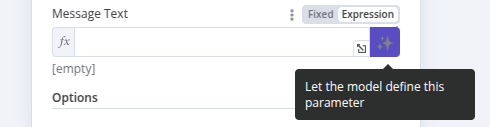
激活此按钮后,AI Agent 将为你填写表达式,无需任何进一步的用户输入。该字段本身会显示一条消息,表明参数已由模型自动定义。
🌐 On activating this button, the AI Agent will fill in the expression for you, with no need for any further user input. The field itself is filled in with a message indicating that the parameter has been defined automatically by the model.
如果你想自己定义参数,请点击此框中的“X”以恢复为用户定义的值。注意,“表达式”字段现在将包含由此功能生成的表达式,不过你现在可以进一步编辑它以添加额外的细节,如下节所述。
🌐 If you want to define the parameter yourself, click on the 'X' in this box to revert to user-defined values. Note that the 'expression' field will now contain the expression generated by this feature, though you can now edit it further to add extra details as described in the following section.
/// 警告 激活此功能将覆盖你可能已经添加的任何手动定义。 ///
使用 $fromAI() 函数(Use the $fromAI() function)#
$fromAI() 函数使用人工智能为连接到 工具 AI 代理 的工具动态填充参数。
🌐 The $fromAI() function uses AI to dynamically fill in parameters for tools connected to the Tools AI agent.
仅限工具
$fromAI() 功能仅适用于连接到 AI 代理节点的工具。$fromAI() 功能不能与 Code 工具或其他非工具集群子节点使用。
要使用 $fromAI() 函数,请使用必需的 key 参数调用它:
🌐 To use the $fromAI() function, call it with the required key parameter:
1 | |
key 参数以及传递给 $fromAI() 函数的其他参数并不是对现有值的引用。相反,可以将这些参数视为 AI 模型用来填充正确数据的提示。
🌐 The key parameter and other arguments to the $fromAI() function aren't references to existing values. Instead, think of these arguments as hints that the AI model will use to populate the right data.
例如,如果你选择一个名为 email 的键,AI 模型会在其上下文、其他工具和输入数据中查找电子邮件地址。在聊天工作流程中,如果模型在其他地方找不到电子邮件地址,它可能会向用户询问电子邮件地址。你也可以选择传递其他参数,比如 description,为 AI 模型提供额外的上下文。
🌐 For instance, if you choose a key called email, the AI Model will look for an email address in its context, other tools, and input data. In chat workflows, it may ask the user for an email address if it can't find one elsewhere. You can optionally pass other parameters like description to give extra context to the AI model.
参数(Parameters)#
$fromAI() 函数接受以下参数:
🌐 The $fromAI() function accepts the following parameters:
| 参数 | 类型 | 必填? | 描述 |
|---|---|---|---|
key |
字符串 |  |
表示参数键或名称的字符串。长度必须在 1 到 64 个字符之间,只能包含小写字母、大写字母、数字、下划线和连字符。 |
description |
字符串 |  |
描述参数的字符串。 |
type |
字符串 | |
指定数据类型的字符串。可以是 string、number、boolean 或 json(默认为 string)。 |
defaultValue |
任意类型 | |
参数的默认值。 |
示例(Examples)#
例如,你可以使用以下 $fromAI() 表达式来动态填充一个名称字段:
🌐 As an example, you could use the following $fromAI() expression to dynamically populate a field with a name:
1 | |
如果你不需要可选参数,可以将其简化为:
🌐 If you don't need the optional parameters, you could simplify this as:
1 | |
要动态显示你库存中的商品数量,你可以使用像这样的 $fromAI() 表达式:
🌐 To dynamically populate the number of items you have in stock, you could use a $fromAI() expression like this:
1 | |
如果你只想用模型的动态值填写字段的部分内容,你也可以在普通表达式中使用它。例如,如果你希望模型为电子邮件填写 subject 参数,但总是用字符串“Generated by AI:”作为生成值的前缀,你可以使用以下表达式:
🌐 If you only want to fill in parts of a field with a dynamic value from the model, you can use it in a normal expression as well. For example, if you want the model to fill out the subject parameter for an e-mail, but always pre-fix the generated value with the string 'Generated by AI:', you could use the following expression:
1 | |
模板(Templates)#
你可以在以下模板中看到$fromAI()函数的实际效果:
🌐 You can see the $fromAI() function in action in the following templates: