项目链接概念(Item linking concepts)#
节点创建的每个输出项都包含将其与节点用于生成它的输入项(或多项)关联的元数据。这会创建一条可以向后追溯以访问先前项目的项目链。理解这一点可能比较复杂,尤其是在节点拆分或合并数据时。在构建自己的编程节点或在某些使用代码节点的场景中,你需要理解项目的关联方式。
🌐 Each output item created by a node includes metadata that links them to the input item (or items) that the node used to generate them. This creates a chain of items that you can work back along to access previous items. This can be complicated to understand, especially if the node splits or merges data. You need to understand item linking when building your own programmatic nodes, or in some scenarios using the Code node.
本文件提供了该功能的概念概述。如需使用详情,请参阅:
🌐 This document provides a conceptual overview of this feature. For usage details, refer to:
- 节点创建者的物品链接,有关在构建节点时如何处理物品链接的详细信息。
- 代码节点中的项目链接,学习如何在代码节点中处理项目链接。
- 项目链接错误,了解在编辑器界面中可能遇到的错误。
n8n 的自动项目链接(n8n's automatic item linking)#
如果节点无法控制如何将输入项链接到输出项,n8n 会尝试自动猜测如何链接这些项:
🌐 If a node doesn't control how to link input items to output items, n8n tries to guess how to link the items automatically:
- 单输入,单输出:输出与输入相关联。
- 单输入,多输出:所有输出都与该输入相关。
- 多个输入和输出
- 如果你保留输入项,但更改顺序(或删除一些项但保留其他项),n8n 可以自动添加正确的链接项信息。
- 如果输入和输出的数量相等,n8n 会按顺序链接项目。这意味着输出-1 链接到输入-1,输出-2 链接到输入-2,依此类推。
- 如果数字不相等,或者你创建了全新的项,n8n 将无法自动链接项。
如果 n8n 无法自动链接项目,并且节点不处理项目链接,n8n 会显示错误。有关更多信息,请参阅 项目链接错误。
🌐 If n8n can't link items automatically, and the node doesn't handle the item linking, n8n displays an error. Refer to Item linking errors for more information.
项目链接示例(Item linking example)#
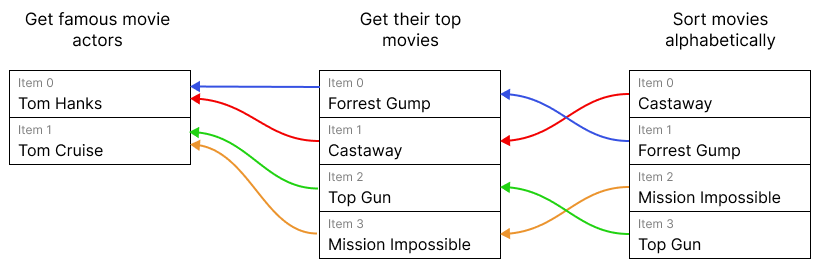
在这个例子中,n8n 可以将一个节点中的项目链接回几步之前的节点,尽管项目的顺序发生了变化。这意味着按字母顺序排序电影的节点可以访问获取著名电影演员的节点中已链接项目的信息。
🌐 In this example, it's possible for n8n to link an item in one node back several steps, despite the item order changing. This means the node that sorts movies alphabetically can access information about the linked item in the node that gets famous movie actors.
访问关联项目的方法取决于你使用的是用户界面、表达式还是代码节点。请参考以下资源:
🌐 The methods for accessing linked items are different depending on whether you're using the UI, expressions, or the code node. Explore the following resources: