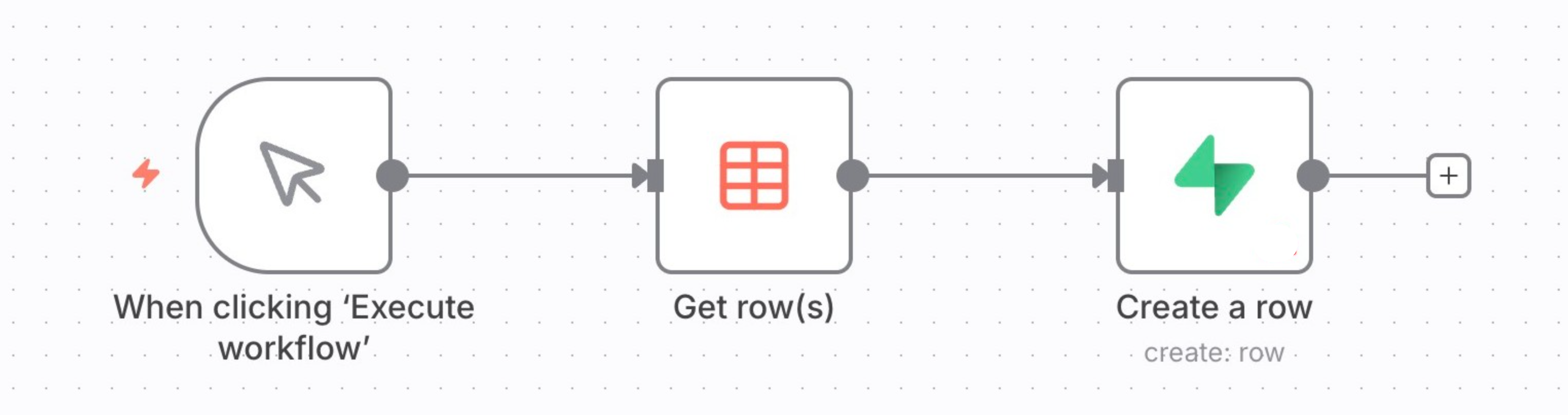
数据表(Data tables)#
概述(Overview)#
数据表将数据存储集成到你的 n8n 环境中。通过使用数据表,你可以在工作流中直接保存、管理和操作数据,而无需依赖外部数据库系统,适用于以下场景:
🌐 Data tables integrate data storage within your n8n environment. Using data tables, you can save, manage, and interact with data directly inside your workflows without relying on external database systems for scenarios such as:
- 在同一项目的不同工作流中持久化数据。
- 存储用于防止重复运行或控制工作流触发器的标记。
- 在工作流中重用提示或消息
- 存储 AI 工作流的评估数据。
- 存储工作流执行生成的数据。
- 合并来自不同来源的数据以丰富你的数据集。
- 创建查找表,作为工作流中的快速参考点
如何使用数据表(How to use data tables)#
处理数据表有两个部分:创建数据表和在工作流程中与它们进行交互。
🌐 There are two parts to working with data tables: creating them and interacting with them in workflows.
步骤 1:创建数据表(Step 1: Creating a data table)#
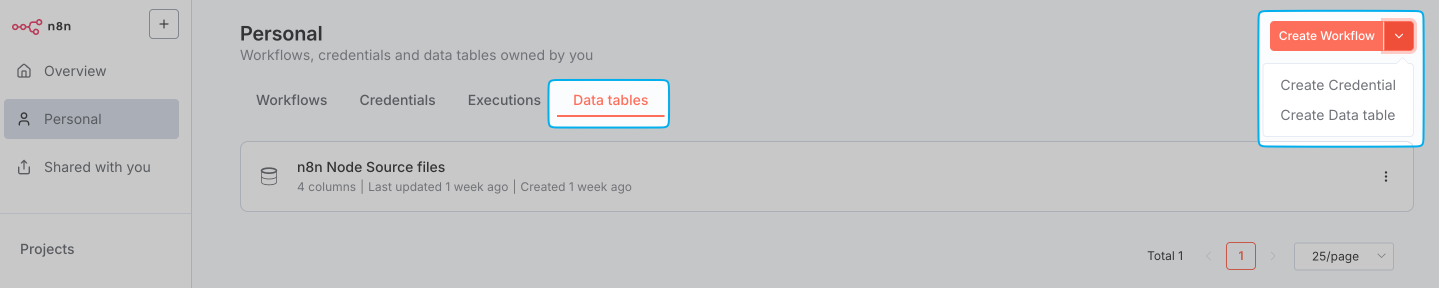
- 在你的 n8n 项目中,选择 数据表 选项卡。
-
点击位于右上角的拆分按钮,然后选择 创建数据表。
-
输入表格的描述性名称。
在出现的表格视图中,你可以:
- 添加并重新排序列以整理数据
- 添加、删除和更新行
- 编辑现有数据
步骤2:在工作流中与数据表交互(Step 2: Interacting with Data tables in workflows)#
在工作流程中使用 数据表 节点与数据表进行交互,该节点允许你检索、更新和操作存储在数据表中的数据。
🌐 Interact with data tables in your workflow using the Data table node, which allows you to retrieve, update, and manipulate the data stored in a Data table.
请参见 数据表节点。
🌐 See Data table node.
数据表的注意事项和局限性(Considerations and limitations of data tables)#
- 数据表适合轻量到中等的数据存储。默认情况下,实例中所有数据表使用的总存储空间限制为50MB。在自托管环境中,你可以使用环境变量
N8N_DATA_TABLES_MAX_SIZE_BYTES来增加此默认大小限制。 - 当你的数据表接近存储上限的 80% 时,会收到警告。当达到存储上限时,会出现最终警告。超过此限制将禁止手动向表中添加数据,并在尝试插入或更新数据时导致工作流执行错误。
- 默认情况下,在项目中创建的数据表对该项目中的所有团队成员都可访问。
- 在个人空间中创建的表格只有创建者可以访问。
数据表与变量(Data tables versus variables)#
| 功能 | 数据表 | 变量 |
|---|---|---|
| 统一表格视图 | ✓ | ✗ |
| 行列关系 | ✓ | ✗ |
| 跨项目访问 | ✗ | ✓ |
| 单个值显示 | ✗ | ✓ |
| 优化短值 | ✗ | ✓ |
| 结构化数据 | ✓ | ✗ |
| 限于项目范围 | ✓ | ✗ |
| 将值用作表达式 | ✗ | ✓ |
导出和导入数据(Exporting and importing data)#
要在 n8n 和外部工具之间传输数据,请使用以下工作流:
🌐 To transfer data between n8n and external tools, use workflows that:
- 从数据表中获取数据。
- 使用 API 或文件导出功能导出凭据。
-
将数据相应地导入到另一个系统或数据表中。