Skip to content

嵌入式工作流管理#

¥Workflow management in Embed

Feature availability

Embed requires an embed license. For more information about when to use Embed, as well as costs and licensing processes, refer to Embed on the n8n website.

管理跨团队或组织的嵌入式 n8n 部署时,你可能需要为多个用户运行相同(或类似)的工作流。有两种可用的选项:

¥When managing an embedded n8n deployment, spanning across teams or organizations, you will likely need to run the same (or similar) workflows for multiple users. There are two available options for doing so:

解决方案 优点 缺点
为每个用户创建工作流 工作流启动方式无限制(可以使用任何触发器)。 需要管理多个工作流。
创建一个工作流,并在执行时传递用户凭据 简化工作流管理(只需更改一个工作流)。 要运行工作流,你的产品必须调用它。

Warning

本文档中引用的 API 可能会随时更改。确保每次版本升级后都检查功能是否仍然可用。

¥The APIs referenced in this document are subject to change at any time. Be sure the check for continued functionality with each version upgrade.

每个用户的工作流#

¥Workflow per user

一般步骤如下:

¥There are three general steps to follow:

  • 获取每个用户的凭据,以及根据工作流程可能需要的任何其他参数。

¥Obtain the credentials for each user, and any additional parameters that may be required based on the workflow.

¥Create the n8n credentials for this user.

  • 创建工作流。

¥Create the workflow.

1. 获取用户凭据#

¥ Obtain user credentials

你需要在此处捕获用户必须进行身份验证的任何节点/服务的全部凭据,以及特定工作流所需的任何其他参数。所需的凭据和任何参数将取决于你的流程以及你想要执行的操作。

¥Here you need to capture all credentials for any node/service this user must authenticate with, along with any additional parameters required for the particular workflow. The credentials and any parameters needed will depend on your workflow and what you are trying to do.

2. 创建用户凭据#

¥ Create user credentials

获取所有相关凭证详细信息后,即可在 n8n 中创建相关服务凭证。可以使用编辑器 UI 或 API 调用来完成此操作。

¥After all relevant credential details have been obtained, you can proceed to create the relevant service credentials in n8n. This can be done using the Editor UI or API call.

使用编辑器 UI#

¥Using the Editor UI

  1. 从菜单中选择“凭据”>“新建”。

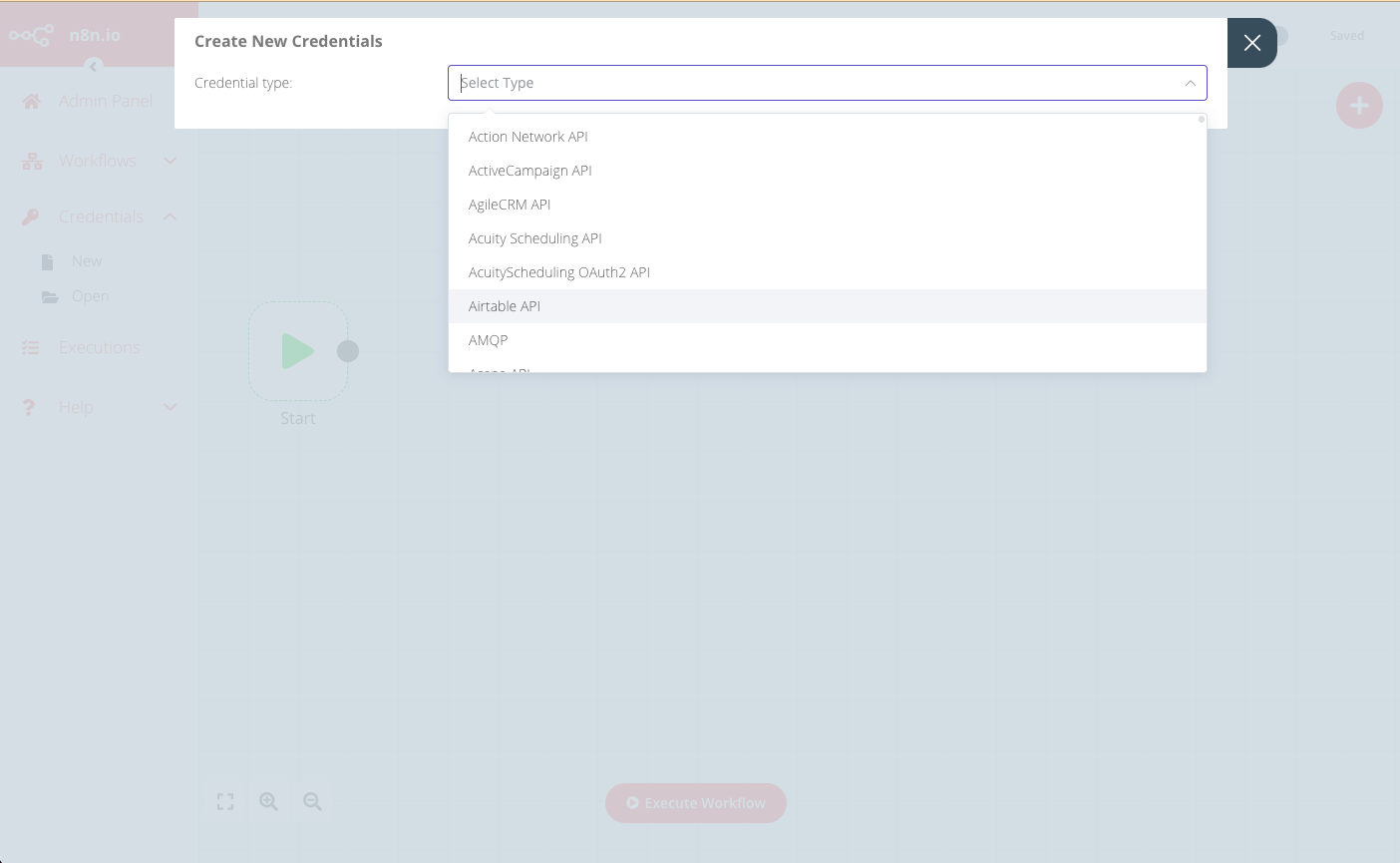
¥From the menu select Credentials > New. 2. 使用下拉菜单选择要创建的凭据类型,例如 Airtable。

¥Use the drop-down to select the Credential type to create, for example Airtable.

Create New Credentials drop-down

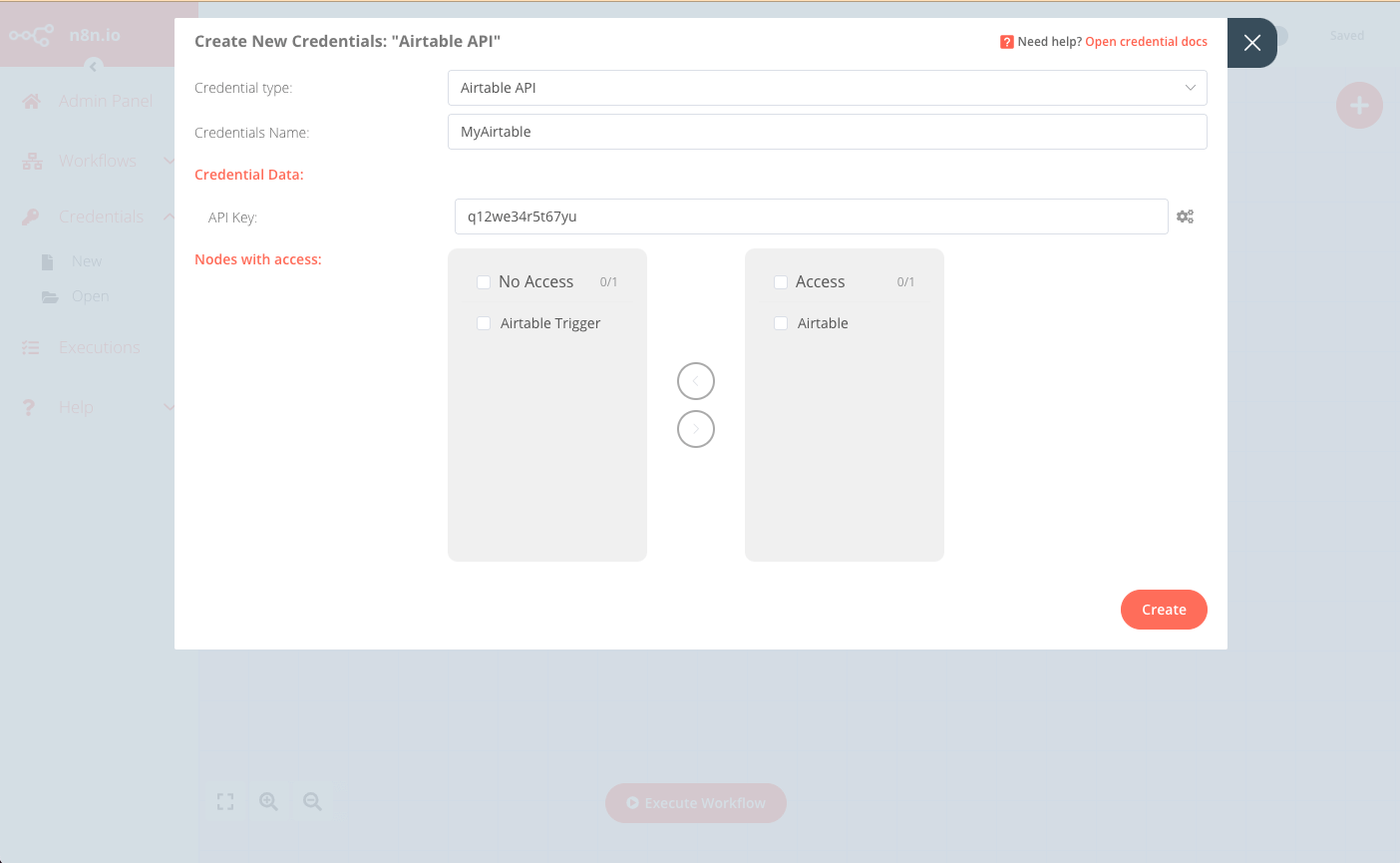
  1. 在“创建新凭据”对话框中,输入用户的相应凭据详细信息,并选择将有权访问这些凭据的节点。

¥In the Create New Credentials modal, enter the corresponding credentials details for the user, and select the nodes that will have access to these credentials.

Create New Credentials modal

  1. 点击“创建”完成并保存。

¥Click Create to finish and save.

使用 API#

¥Using the API

也可以调用编辑器 UI 使用的前端 API 来实现相同的结果。API 端点格式如下:https://<n8n-domain>/rest/credentials

¥The frontend API used by the Editor UI can also be called to achieve the same result. The API endpoint is in the format: https://<n8n-domain>/rest/credentials.

例如,要创建上述编辑器 UI 示例中的凭据,请求应为:

¥For example, to create the credentials in the Editor UI example above, the request would be:

1
POST https://<n8n-domain>/rest/credentials

包含请求正文:

¥With the request body:

 1
 2
 3
 4
 5
 6
 7
 8
 9
10
11
12
{
   "name":"MyAirtable",
   "type":"airtableApi",
   "nodesAccess":[
      {
         "nodeType":"n8n-nodes-base.airtable"
      }
   ],
   "data":{
      "apiKey":"q12we34r5t67yu"
   }
}

响应将包含新凭据的 ID,你将在为该用户创建工作流时使用该 ID。

¥The response will contain the ID of the new credentials, which you will use when creating the workflow for this user:

 1
 2
 3
 4
 5
 6
 7
 8
 9
10
11
12
13
14
15
16
17
18
{
   "data":{
      "name":"MyAirtable",
      "type":"airtableApi",
      "data":{
         "apiKey":"q12we34r5t67yu"
      },
      "nodesAccess":[
         {
            "nodeType":"n8n-nodes-base.airtable",
            "date":"2021-09-10T07:41:27.770Z"
         }
      ],
      "id":"29",
      "createdAt":"2021-09-10T07:41:27.777Z",
      "updatedAt":"2021-09-10T07:41:27.777Z"
   }
}

3. 创建工作流#

¥ Create the workflow

最佳实践是创建一个“基础”工作流,然后复制该工作流,并根据每个新用户的凭据(以及任何其他详细信息)进行自定义。

¥Best practice is to have a “base” workflow that you then duplicate and customize for each new user with their credentials (and any other details).

你可以使用编辑器 UI 或 API 调用来复制和自定义模板工作流。

¥You can duplicate and customize your template workflow using either the Editor UI or API call.

使用编辑器 UI#

¥Using the Editor UI

  1. 从菜单中选择“工作流”>“打开”,以打开要复制的模板工作流。

¥From the menu select Workflows > Open to open the template workflow to be duplicated.

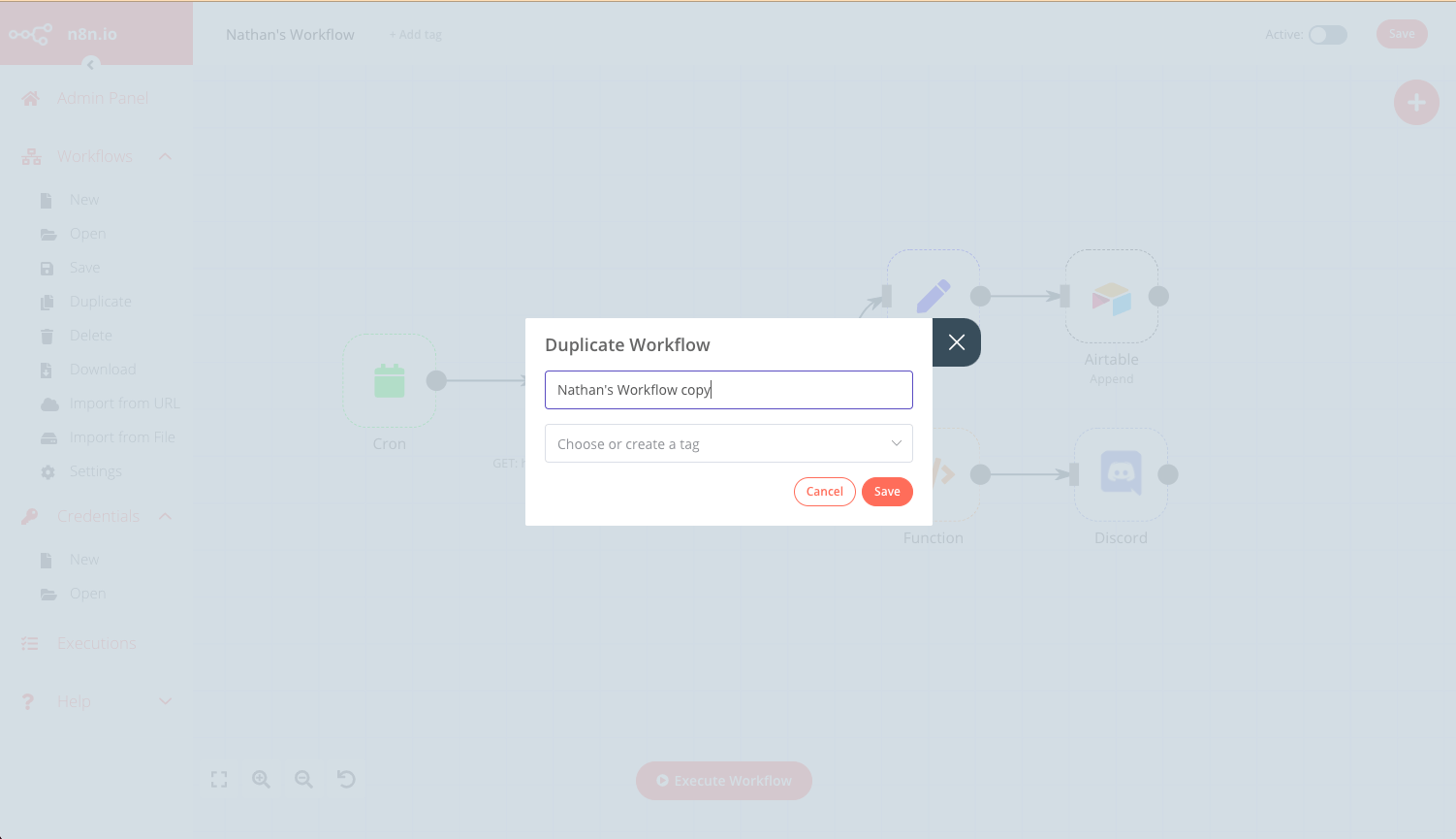
  1. 选择“工作流”>“复制”,然后输入新工作流的名称并单击“保存”。

¥Select Workflows > Duplicate, then enter a name for this new workflow and click Save.

Duplicate workflow

  1. 更新所有相关节点,使其使用此用户(如上所述)的凭据

¥Update all relevant nodes to use the credentials for this user (created above).

  1. 保存此工作流,并使用右上角的切换按钮将其设置为“激活”。

¥Save this workflow set it to Active using the toggle in the top-right corner.

使用 API#

¥Using the API

  1. 使用以下端点获取模板工作流的 JSON:https://<n8n-domain>/rest/workflows/<workflow_id>

¥Fetch the JSON of the template workflow using the endpoint: https://<n8n-domain>/rest/workflows/<workflow_id>

1
GET https://<n8n-domain>/rest/workflows/1012

响应将包含所选工作流的 JSON 数据。

¥The response will contain the JSON data of the selected workflow:

  1
  2
  3
  4
  5
  6
  7
  8
  9
 10
 11
 12
 13
 14
 15
 16
 17
 18
 19
 20
 21
 22
 23
 24
 25
 26
 27
 28
 29
 30
 31
 32
 33
 34
 35
 36
 37
 38
 39
 40
 41
 42
 43
 44
 45
 46
 47
 48
 49
 50
 51
 52
 53
 54
 55
 56
 57
 58
 59
 60
 61
 62
 63
 64
 65
 66
 67
 68
 69
 70
 71
 72
 73
 74
 75
 76
 77
 78
 79
 80
 81
 82
 83
 84
 85
 86
 87
 88
 89
 90
 91
 92
 93
 94
 95
 96
 97
 98
 99
100
101
102
103
104
105
106
107
108
109
110
111
112
113
114
115
116
117
118
119
120
121
122
123
124
125
126
127
128
129
130
131
132
133
134
135
136
137
138
139
140
141
142
143
144
145
146
147
148
149
150
151
152
153
154
155
156
157
158
159
160
161
162
163
164
165
166
167
168
169
170
171
172
173
174
175
176
177
178
179
180
181
182
183
184
185
186
187
188
189
190
191
192
193
194
195
196
197
198
199
200
201
202
203
204
205
206
207
208
209
210
211
212
213
214
215
216
217
218
219
220
221
222
223
224
225
226
227
228
{
  "data": {
    "id": "1012",
    "name": "Nathan's Workflow",
    "active": false,
    "nodes": [
      {
        "parameters": {},
        "name": "Start",
        "type": "n8n-nodes-base.start",
        "typeVersion": 1,
        "position": [
          130,
          640
        ]
      },
      {
        "parameters": {
          "authentication": "headerAuth",
          "url": "https://internal.users.n8n.cloud/webhook/custom-erp",
          "options": {
            "splitIntoItems": true
          },
          "headerParametersUi": {
            "parameter": [
              {
                "name": "unique_id",
                "value": "recLhLYQbzNSFtHNq"
              }
            ]
          }
        },
        "name": "HTTP Request",
        "type": "n8n-nodes-base.httpRequest",
        "typeVersion": 1,
        "position": [
          430,
          300
        ],
        "credentials": {
          "httpHeaderAuth": "beginner_course"
        }
      },
      {
        "parameters": {
          "operation": "append",
          "application": "appKBGQfbm6NfW6bv",
          "table": "processingOrders",
          "options": {}
        },
        "name": "Airtable",
        "type": "n8n-nodes-base.airtable",
        "typeVersion": 1,
        "position": [
          990,
          210
        ],
        "credentials": {
          "airtableApi": "Airtable"
        }
      },
      {
        "parameters": {
          "conditions": {
            "string": [
              {
                "value1": "={{$json[\"orderStatus\"]}}",
                "value2": "processing"
              }
            ]
          }
        },
        "name": "IF",
        "type": "n8n-nodes-base.if",
        "typeVersion": 1,
        "position": [
          630,
          300
        ]
      },
      {
        "parameters": {
          "keepOnlySet": true,
          "values": {
            "number": [
              {
                "name": "=orderId",
                "value": "={{$json[\"orderID\"]}}"
              }
            ],
            "string": [
              {
                "name": "employeeName",
                "value": "={{$json[\"employeeName\"]}}"
              }
            ]
          },
          "options": {}
        },
        "name": "Set",
        "type": "n8n-nodes-base.set",
        "typeVersion": 1,
        "position": [
          800,
          210
        ]
      },
      {
        "parameters": {
          "functionCode": "let totalBooked = items.length;\nlet bookedSum = 0;\n\nfor(let i=0; i < items.length; i++) {\n  bookedSum = bookedSum + items[i].json.orderPrice;\n}\nreturn [{json:{totalBooked, bookedSum}}]\n"
        },
        "name": "Function",
        "type": "n8n-nodes-base.function",
        "typeVersion": 1,
        "position": [
          800,
          400
        ]
      },
      {
        "parameters": {
          "webhookUri": "https://discord.com/api/webhooks/865213348202151968/oD5_WPDQwtr22Vjd_82QP3-_4b_lGhAeM7RynQ8Js5DzyXrQEnj0zeAQIA6fki1JLtXE",
          "text": "=This week we have {{$json[\"totalBooked\"]}} booked orders with a total value of {{$json[\"bookedSum\"]}}. My Unique ID: {{$node[\"HTTP Request\"].parameter[\"headerParametersUi\"][\"parameter\"][0][\"value\"]}}"
        },
        "name": "Discord",
        "type": "n8n-nodes-base.discord",
        "typeVersion": 1,
        "position": [
          1000,
          400
        ]
      },
      {
        "parameters": {
          "triggerTimes": {
            "item": [
              {
                "mode": "everyWeek",
                "hour": 9
              }
            ]
          }
        },
        "name": "Cron",
        "type": "n8n-nodes-base.cron",
        "typeVersion": 1,
        "position": [
          220,
          300
        ]
      }
    ],
    "connections": {
      "HTTP Request": {
        "main": [
          [
            {
              "node": "IF",
              "type": "main",
              "index": 0
            }
          ]
        ]
      },
      "Start": {
        "main": [
          []
        ]
      },
      "IF": {
        "main": [
          [
            {
              "node": "Set",
              "type": "main",
              "index": 0
            }
          ],
          [
            {
              "node": "Function",
              "type": "main",
              "index": 0
            }
          ]
        ]
      },
      "Set": {
        "main": [
          [
            {
              "node": "Airtable",
              "type": "main",
              "index": 0
            }
          ]
        ]
      },
      "Function": {
        "main": [
          [
            {
              "node": "Discord",
              "type": "main",
              "index": 0
            }
          ]
        ]
      },
      "Cron": {
        "main": [
          [
            {
              "node": "HTTP Request",
              "type": "main",
              "index": 0
            }
          ]
        ]
      }
    },
    "createdAt": "2021-07-16T11:15:46.066Z",
    "updatedAt": "2021-07-16T12:05:44.045Z",
    "settings": {},
    "staticData": null,
    "tags": []
  }
}
  1. 保存返回的 JSON 数据,并更新新用户的相关凭据和字段。

¥Save the returned JSON data and update any relevant credentials and fields for the new user.

  1. 使用更新后的 JSON 作为端点请求正文创建一个新的工作流:https://<n8n-domain>/rest/workflows

¥Create a new workflow using the updated JSON as the request body at endpoint: https://<n8n-domain>/rest/workflows

1
POST https://<n8n-domain>/rest/workflows/

响应将包含新工作流的 ID,你将在下一步中使用该 ID。

¥The response will contain the ID of the new workflow, which you will use in the next step.

  1. 最后,激活新的工作流:

¥Lastly, activate the new workflow:

1
PATCH https://<n8n-domain>/rest/workflows/1012

在 JSON 有效负载中传递附加值 active

¥Passing the additional value active in your JSON payload:

1
2
3
4
5
// ...
"active":true,
"settings": {},
"staticData": null,
"tags": []

单工作流程#

¥Single workflow

实现此方法需要遵循四个步骤:

¥There are four steps to follow to implement this method:

  • 获取每个用户的凭据,以及根据工作流程可能需要的任何其他参数。请参阅上文 获取用户凭据

¥Obtain the credentials for each user, and any additional parameters that may be required based on the workflow. See Obtain user credentials above.

¥Create the n8n credentials for this user. See Create user credentials above.

  • 创建工作流。

¥Create the workflow.

  • 根据需要调用工作流

¥Call the workflow as needed.

创建工作流#

¥Create the workflow

此工作流的细节和范围会根据具体用例而有很大差异,但有一些设计实现需要注意:

¥The details and scope of this workflow will vary greatly according to the individual use case, however there are a few design implementations to keep in mind:

  • 此工作流必须由 Webhook 节点触发。

¥This workflow must be triggered by a Webhook node.

  • 传入的 Webhook 调用必须包含用户的凭据以及任何其他必需的工作流参数。

¥The incoming webhook call must contain the user’s credentials and any other workflow parameters required.

  • 每个需要用户凭据的节点都应该使用 expression,以便节点的凭据字段能够读取 webhook 调用中提供的凭据。

¥Each node where the user’s credentials are needed should use an expression so that the node’s credential field reads the credential provided in the webhook call.

  • 保存并激活工作流,确保为 Webhook 节点选择生产 URL。有关更多信息,请参阅 Webhook 节点

¥Save and activate the workflow, ensuring the production URL is selected for the Webhook node. Refer to webhook node for more information.

调用工作流#

¥Call the workflow

对于每个新用户,或根据需要对任何现有用户,调用定义为工作流触发器的 Webhook,并提供必要的凭据(以及任何其他工作流参数)。

¥For each new user, or for any existing user as may be needed, call the webhook defined as the workflow trigger and provide the necessary credentials (and any other workflow parameters).