n8n 中的循环(Looping in n8n)#
循环在你想要处理多个项目或重复执行某个操作时非常有用,例如向通讯录中的每个联系人发送消息。n8n 会自动处理这种重复操作,这意味着你不需要在工作流中专门构建循环。不过,有一些节点 并非如此。
🌐 Looping is useful when you want to process multiple items or perform an action repeatedly, such as sending a message to every contact in your address book. n8n handles this repetitive processing automatically, meaning you don't need to specifically build loops into your workflows. There are some nodes where this isn't true.
在 n8n 中使用循环(Using loops in n8n)#
n8n 节点可以接收任意数量的项目作为输入,处理这些项目,并输出结果。你可以将每个项目视为一个单独的数据点,或节点输出表中的一行。
🌐 n8n nodes take any number of items as input, process these items, and output the results. You can think of each item as a single data point, or a single row in the output table of a node.
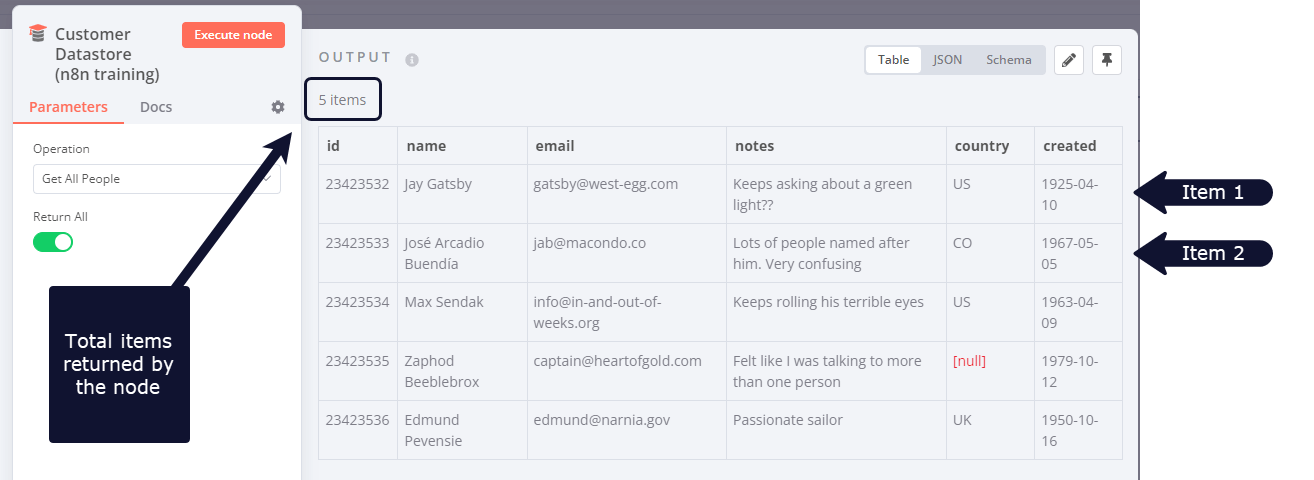
节点通常会对每个项目运行一次。例如,如果你想将客户数据存储节点中的客户名称和备注作为消息发送到 Slack,你可以这样做:
🌐 Nodes usually run once for each item. For example, if you wanted to send the name and notes of the customers in the Customer Datastore node as a message on Slack, you would:
- 将 Slack 节点连接到“客户数据存储”节点。
- 配置参数。
- 执行节点。
你会收到五条消息:每个项目一条。
🌐 You would receive five messages: one for each item.
这样你就可以在不显式连接循环中的节点的情况下处理多个项目。
🌐 This is how you can process multiple items without having to explicitly connect nodes in a loop.
执行节点一次(Executing nodes once)#
在某些情况下,如果你不希望节点处理所有接收到的项目,例如只向第一个客户发送 Slack 消息,你可以通过切换该节点设置标签中的 仅执行一次 参数来实现。当传入数据包含多个项目且你只想处理第一个项目时,此设置非常有用。
🌐 For situations where you don't want a node to process all received items, for example sending a Slack message only to the first customer, you can do so by toggling the Execute Once parameter in the Settings tab of that node This setting is helpful when the incoming data contains multiple items and you want to only process the first one.
创建循环(Creating loops)#
n8n 通常会处理所有传入项目的迭代。然而,在某些情况下,您需要创建一个循环来遍历所有项目。有关不自动遍历所有传入项目的节点列表,请参阅 节点异常。
🌐 n8n typically handles the iteration for all incoming items. However, there are certain scenarios where you will have to create a loop to iterate through all items. Refer to Node exceptions for a list of nodes that don't automatically iterate over all incoming items.
循环直到满足条件(Loop until a condition is met)#
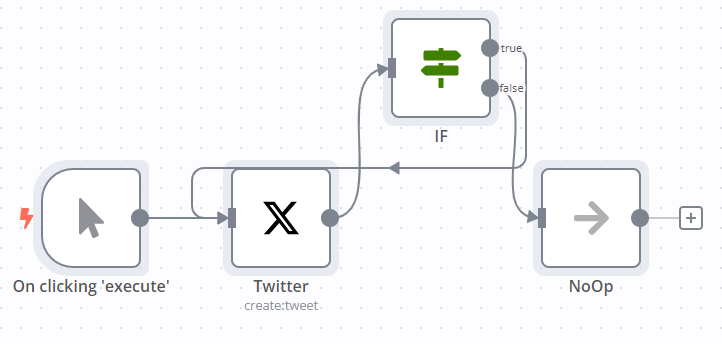
要在 n8n 工作流中创建循环,将一个节点的输出连接到前一个节点的输入。添加一个 IF 节点来检查何时停止循环。
🌐 To create a loop in an n8n workflow, connect the output of one node to the input of a previous node. Add an IF node to check when to stop the loop.
这是一个实现使用 IF 节点的循环的示例工作流程:
🌐 Here is an example workflow that implements a loop with an IF node:
循环直到处理完所有项目(Loop until all items are processed)#
当你希望循环直到处理完所有项目时,请使用 Loop Over Items 节点。要单独处理每个项目,请将 批量大小 设置为 1。
🌐 Use the Loop Over Items node when you want to loop until all items are processed. To process each item individually, set Batch Size to 1.
你可以将数据分批处理。这种方法在处理大量传入数据时,或当你想处理返回的特定数据组时,非常有助于避免 API 速率限制。
🌐 You can batch the data in groups and process these batches. This approach is useful for avoiding API rate limits when processing large incoming data or when you want to process a specific group of returned items.
循环处理项节点会在所有传入项被分成批次并传递给工作流中的下一个节点后停止执行,因此无需添加 IF 节点来停止循环。
🌐 The Loop Over Items node stops executing after all the incoming items get divided into batches and passed on to the next node in the workflow so it's not necessary to add an IF node to stop the loop.
节点例外(Node exceptions)#
需要在工作流中设计循环的节点和操作:
🌐 Nodes and operations where you need to design a loop into your workflow:
- CrateDB 对
insert和update各执行一次。 - Run Once for All Items 模式下的 Code 节点:根据输入的代码片段处理所有项目。
- 以“为所有项目运行一次”模式运行执行工作流节点。
- HTTP请求:您必须自己处理分页。如果您的API调用返回分页结果,您必须创建一个循环一次获取一页。
- Microsoft SQL 对
insert、update和delete各执行一次。 - MongoDB 对
insert和update各执行一次。 - QuestDB 对
insert执行一次。 - Redis:
- 信息:此操作只执行一次,无论传入数据中有多少项。
- RSS 读取 会针对请求的 URL 执行一次。
- TimescaleDB 针对
insert和update各执行一次。