合并数据(Merging data)#
合并将多个数据流汇聚在一起。你可以根据工作流程的需求使用不同的节点来实现这一点。
🌐 Merging brings multiple data streams together. You can achieve this using different nodes depending on your workflow requirements.
- 合并来自不同数据流或节点的数据:使用 Merge 节点将来自各种来源的数据合并为一个。
- 合并来自多个节点执行的数据:在需要合并来自某个节点或多个节点的多次执行的数据的复杂场景下,使用 Code 节点。
- 比较并合并数据:使用 Compare Datasets 节点根据比较结果对数据流进行比较、合并和输出。
以下各节将详细介绍每种方法。
🌐 Explore each method in more detail in the sections below.
合并来自不同数据流的数据(Merge data from different data streams)#
如果你的工作流程分裂,你可以将分开的流重新合并成一个流。
🌐 If your workflow splits, you combine the separate streams back into one stream.
这里有一个示例工作流,展示了不同类型的合并:追加数据集、仅保留新项目,以及仅保留现有项目。合并节点文档包含关于每种合并操作的详细信息。
🌐 Here's an example workflow showing different types of merging: appending data sets, keeping only new items, and keeping only existing items. The Merge node documentation contains details on each of the merge operations.
Workflow preview placeholder.
}
合并来自不同节点(Merge data from different nodes)#
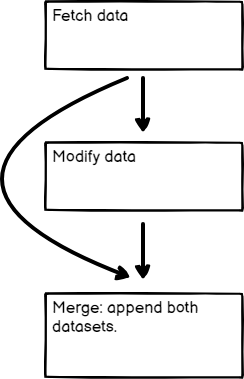
你可以使用合并节点将来自两个前置节点的数据合并,即使工作流尚未分成独立的数据流。如果你想从多个节点生成的数据中生成单一的数据集,这会很有用。
🌐 You can use the Merge node to combine data from two previous nodes, even if the workflow hasn't split into separate data streams. This can be useful if you want to generate a single dataset from the data generated by multiple nodes.
合并来自多个节点执行的数据(Merge data from multiple node executions)#
使用代码节点合并来自多个节点执行的数据。这在某些循环场景中很有用。
🌐 Use the Code node to merge data from multiple node executions. This is useful in some Looping scenarios.
Node executions and workflow executions
This section describes merging data from multiple node executions. This is when a node executes multiple times during a single workflow execution.
Refer to this example workflow using Loop Over Items and Wait to artificially create multiple executions.
Workflow preview placeholder.
比较、合并并再次拆分(Compare, merge, and split again)#
比较数据集 节点在合并数据流之前比较它们。它最多可以输出四种不同的数据流。
🌐 The Compare Datasets node compares data streams before merging them. It outputs up to four different data streams.
请参考这个示例工作流程作为示例。
🌐 Refer to this example workflow for an example.
Workflow preview placeholder.
}