任务运行器(Task runners)#
任务运行器是一种通用机制,用于以安全且高效的方式执行任务。它们用于在代码节点中执行用户提供的 JavaScript 和 Python 代码。
🌐 Task runners are a generic mechanism to execute tasks in a secure and performant way. They're used to execute user-provided JavaScript and Python code in the Code node.
本文档描述了任务运行器的工作原理以及如何配置它们。
🌐 This document describes how task runners work and how you can configure them.
怎么运行的(How it works)#
任务运行器功能包括以下组件:一个或多个任务运行器、一个任务中介和一个任务请求者。
🌐 The task runner feature consists of these components: one or more task runners, a task broker, and a task requester.
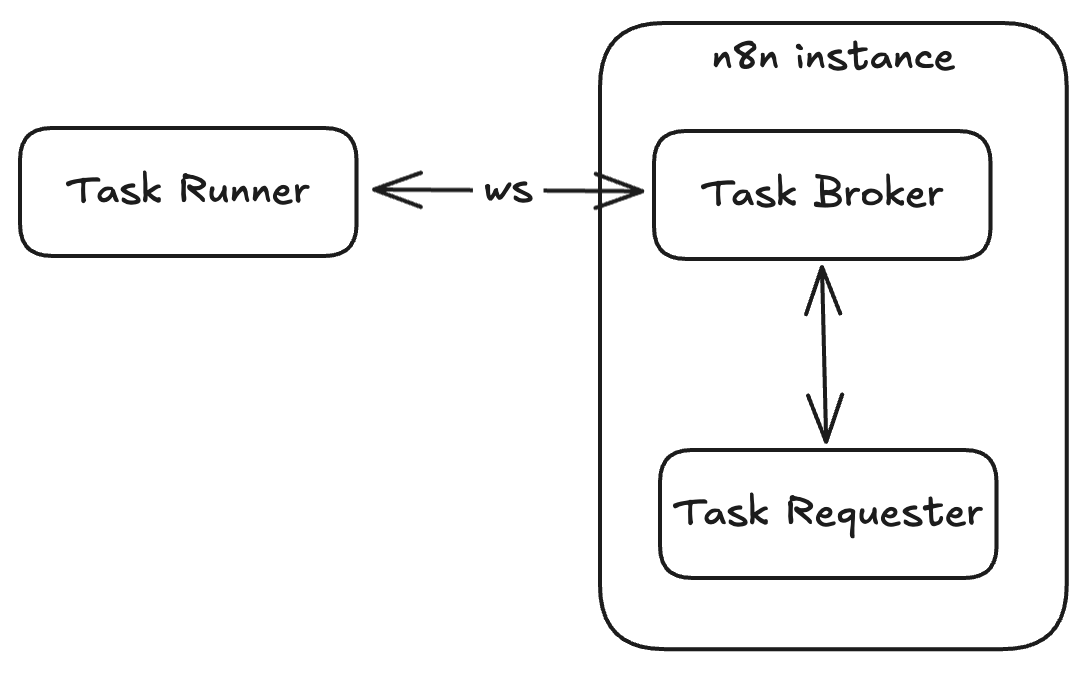
任务执行器通过 WebSocket 连接到任务代理。任务请求者将任务请求提交给代理,代理会让可用的任务执行器接取并执行该任务。
🌐 Task runners connect to the task broker using a websocket connection. A task requester submits a task request to the broker where an available task runner can pick it up for execution.
运行者执行任务并将结果提交给任务请求者。任务经纪人协调运行者与请求者之间的沟通。
🌐 The runner executes the task and submits the results to the task requester. The task broker coordinates communication between the runner and the requester.
n8n 实例(主节点和工作节点)充当代理。在这种情况下,Code 节点是任务请求者。
🌐 The n8n instance (main and worker) acts as the broker. The Code node in this case is the task requester.
任务运行器模式(Task runner modes)#
你可以以两种不同的模式使用任务运行器:内部模式和外部模式。
🌐 You can use task runners in two different modes: internal and external.
内部模式(Internal mode)#
在内部模式下,n8n 实例会将任务运行器作为子进程启动。n8n 进程会监控并管理任务运行器的生命周期。任务运行器进程与 n8n 共享相同的 uid 和 gid。不建议在生产环境中使用此配置。
🌐 In internal mode, the n8n instance launches the task runner as a child process. The n8n process monitors and manages the life cycle of the task runner. The task runner process shares the same uid and gid as n8n. This is not recommended for production.
外部模式(External mode)#
在外部模式下,启动器应用会按需启动任务运行器并管理它们的生命周期。通常,这意味着在 n8n 旁边添加一个运行 n8nio/runners 镜像的 sidecar 容器,该镜像包含启动器、JS 任务运行器和 Python 任务运行器。这个 sidecar 容器独立于 n8n 实例。
🌐 In external mode, a launcher application launches task runners on demand and manages their lifecycle. Typically, this means that next to n8n you add a sidecar container running the n8nio/runners image containing the launcher, the JS task runner and the Python task runner. This sidecar container is independent from the n8n instance.
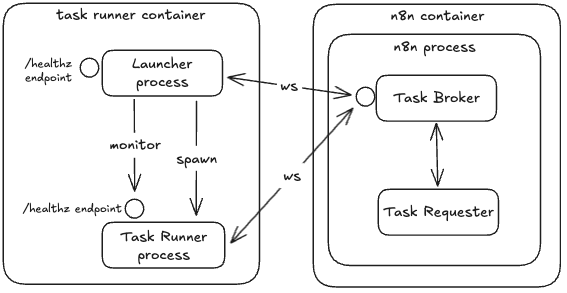
在使用队列模式时,每个工作节点都需要有自己的任务运行器 sidecar 容器。
🌐 When using Queue mode, each worker needs to have its own sidecar container for task runners.
此外,如果你还没有启用将手动执行任务卸载到工作节点(如果你的配置中没有设置 OFFLOAD_MANUAL_EXECUTIONS_TO_WORKERS=true),那么你的主实例将运行手动执行任务,并且也需要自己的任务运行器 sidecar 容器。请注意,不启用卸载运行 n8n 的情况下不建议用于生产环境。
🌐 In addition, if you haven't enabled offloading manual executions to workers (if you aren't setting OFFLOAD_MANUAL_EXECUTIONS_TO_WORKERS=true in your configuration), then your main instance will run manual executions and needs its own sidecar container for task runners as well. Please note that running n8n with offloading disabled isn't recommended for production.
设置外部模式(Setting up external mode)#
在外部模式下,你可以将 n8nio/runners 镜像作为 sidecar 容器与 n8n 一起运行。下面你将找到一个 docker compose 供参考。请记住,n8nio/runners 镜像的版本必须与 n8nio/n8n 镜像一致,并且 n8n 的版本必须 >=1.111.0。
🌐 In external mode, you run the n8nio/runners image as a sidecar container next to n8n. Below you will find a docker compose as a reference. Keep in mind that the n8nio/runners image version must match that of the n8nio/n8n image, and the n8n version must be >=1.111.0.
1 2 3 4 5 6 7 8 9 10 11 12 13 14 15 16 17 18 19 20 21 22 23 24 25 26 27 28 | |
有三层配置:n8n 容器、runners 容器,以及 runners 容器内的 launcher。
🌐 There are three layers of configuration: the n8n container, the runners container, and the launcher inside the runners container.
配置 n8n 容器处于外部模式(Configuring n8n container in external mode)#
以下是可以在外部模式下运行的 n8n 容器上设置的主要环境变量:
🌐 These are the main environment variables that you can set on the n8n container running in external mode:
| 环境变量 | 描述 |
|---|---|
N8N_RUNNERS_ENABLED=true |
启用任务运行器。 |
N8N_RUNNERS_MODE=external |
在外部模式下使用任务运行器。 |
N8N_RUNNERS_AUTH_TOKEN=<random secure shared secret> |
任务运行器用于连接到代理的共享密钥。 |
N8N_RUNNERS_BROKER_LISTEN_ADDRESS=0.0.0.0 |
默认情况下,任务代理只监听本地主机。当使用多个容器(例如,使用 Docker Compose)时,它需要能够接受外部连接。 |
有关环境变量的完整列表,请参阅 任务运行器环境变量。
🌐 For full list of environment variables see task runner environment variables.
正在配置 runners 容器处于外部模式(Configuring runners container in external mode)#
以下是可以在外部模式下运行的 runners 容器上设置的主要环境变量:
🌐 These are the main environment variables that you can set on the runners container running in external mode:
| 环境变量 | 描述 |
|---|---|
N8N_RUNNERS_AUTH_TOKEN=<random secure shared secret> |
任务运行器用于连接到代理的共享密钥。 |
N8N_RUNNERS_TASK_BROKER_URI=localhost:5679 |
n8n 实例中任务代理服务器的地址。 |
N8N_RUNNERS_AUTO_SHUTDOWN_TIMEOUT=15 |
在关闭任务运行器进程之前等待的空闲秒数。当有新任务需要执行时,启动器会自动重新启动运行器。设置为 0 可禁用自动关闭。 |
有关环境变量的完整列表,请参阅 任务运行器环境变量。
🌐 For full list of environment variables see task runner environment variables.
在外部模式下配置 Runner 容器中的启动器(Configuring launcher in runners container in external mode)#
启动器从运行器的容器环境中读取环境变量,并执行以下操作:
🌐 The launcher reads environment variables from runners container environment, and performs the following actions:
- 将环境变量从启动器自身的环境传递到所有运行器(
allowed-env) - 在特定运行器(
env-overrides)上设置特定环境变量
要传递和设置的环境变量在运行器镜像中包含的启动器配置文件中定义。该配置文件位于容器中的 /etc/task-runners.json。要了解有关启动器配置文件的更多信息,请参阅配置文件文档。
🌐 Which environment variables to pass and to set are defined in the launcher config file included in the runners image. This config file is located in the container at /etc/task-runners.json. To learn more about the launcher config file, refer to the Config file documentation.
默认的启动器配置文件是锁定的,但你可以编辑此文件,例如,允许列入白名单的第一方或第三方模块。要自定义启动器配置文件,请挂载到此路径:
🌐 The default launcher configuration file is locked down, but you can edit this file, for example, to allowlist first- or third-party modules. To customize the launcher configuration file, mount to this path:
1 | |
添加额外依赖(Adding extra dependencies)#
1. 扩展 n8nio/runners 图片(1. Extend the n8nio/runners image)#
你可以扩展 n8nio/runners 镜像以向运行器添加额外的依赖。要执行此操作,你需要 n8nio/runners:1.121.0 或更高版本。
🌐 You can extend the n8nio/runners image to add extra dependencies to the runners. You'll need n8nio/runners:1.121.0 or later to do this.
1 2 3 4 5 6 | |
您还必须允许代码节点使用的任何第一方或第三方软件包。通过编辑配置文件 n8n-task-runners.json,将这些软件包包含在您的扩展镜像中来实现此操作。
🌐 You must also allowlist any first-party or third-party packages for use by the Code node. Do this by editing the configuration file n8n-task-runners.json to include the packages in your extended image.
1 2 3 4 5 6 7 8 9 10 11 12 13 14 15 16 17 18 19 | |
NODE_FUNCTION_ALLOW_BUILTIN:允许的 Node 内置模块的逗号分隔列表。NODE_FUNCTION_ALLOW_EXTERNAL:允许的 JS 包的逗号分隔列表。N8N_RUNNERS_STDLIB_ALLOW:允许的 Python 标准库包的逗号分隔列表。N8N_RUNNERS_EXTERNAL_ALLOW:允许的 Python 包的逗号分隔列表。
2. 构建自定义镜像(2. Build your custom image)#
例如,从 n8n 存储库根目录:
🌐 For example, from the n8n repository root:
1 2 3 4 | |
3. 运行镜像(3. Run the image)#
例如:
🌐 For example:
1 2 3 4 5 6 | |