Docker 安装(Docker Installation)#
n8n 建议对于大多数自托管需求使用 Docker。它提供了一个干净、隔离的环境,避免操作系统和工具的不兼容性,并使数据库和环境管理更加简单。
🌐 n8n recommends using Docker for most self-hosting needs. It provides a clean, isolated environment, avoids operating system and tooling incompatibilities, and makes database and environment management simpler.
你也可以在 Docker 中使用 n8n,并结合 Docker Compose。你可以在 n8n-hosting 仓库 中找到针对各种架构的 Docker Compose 配置。
🌐 You can also use n8n in Docker with Docker Compose. You can find Docker Compose configurations for various architectures in the n8n-hosting repository.
Self-hosting knowledge prerequisites
Self-hosting n8n requires technical knowledge, including:
- Setting up and configuring servers and containers
- Managing application resources and scaling
- Securing servers and applications
- Configuring n8n
n8n recommends self-hosting for expert users. Mistakes can lead to data loss, security issues, and downtime. If you aren't experienced at managing servers, n8n recommends n8n Cloud.
你还可以观看我们的视频指南:
🌐 You can also follow along with our video guide here:
先决条件(Prerequisites)#
在继续操作之前,请安装 Docker:
🌐 Before proceeding, install Docker:
- Docker Desktop 可用于 Mac、Windows 和 Linux。Docker Desktop 包含 Docker 引擎和 Docker Compose。
- Docker Engine 和 Docker Compose 也可以作为单独的软件包在 Linux 上使用。对于没有图形界面的 Linux 机器,或者当你不想使用 Docker Desktop 界面时,可以使用它们。
Stable and Beta versions
n8n releases a new minor version most weeks. The stable version is for production use. beta is the most recent release. The beta version may be unstable. To report issues, use the forum.
Current stable: 2.4.7
Current beta: 2.6.2
启动 n8n(Starting n8n)#
在你的终端中运行以下命令,将 <YOUR_TIMEZONE> 占位符替换为 你的时区 :
🌐 From your terminal, run the following commands, replacing the <YOUR_TIMEZONE> placeholders with your timezone:
1 2 3 4 5 6 7 8 9 10 11 | |
此命令创建一个卷来存储持久数据,下载所需的 n8n 镜像,并使用以下设置启动容器:
🌐 This command creates a volume to store persistent data, downloads the required n8n image, and starts the container with the following settings:
- 映射并在主机上公开端口
5678。 - 设置容器的时区:
TZ环境变量设置系统时区,以控制脚本和命令(如date)的返回结果。GENERIC_TIMEZONE环境变量 为以调度为导向的节点(如 Schedule Trigger 节点)设置正确的时区。
- 强制执行 n8n 配置文件的安全文件权限。
- 启用 任务运行器,这是在 n8n 中执行任务的推荐方式。
- 将
n8n_data卷挂载到/home/node/.n8n目录,以在容器重启时保留数据。
一旦启动运行,你可以通过打开以下网址访问 n8n: http://localhost:5678
🌐 Once running, you can access n8n by opening: http://localhost:5678
与……一起使用 PostgreSQL(Using with PostgreSQL)#
默认情况下,n8n 使用 SQLite 来保存凭证、过去的执行记录和工作流。n8n 还支持 PostgreSQL,可以通过下面详细说明的环境变量进行配置。
🌐 By default, n8n uses SQLite to save credentials, past executions, and workflows. n8n also supports PostgreSQL, configurable using environment variables as detailed below.
仍然建议保留 .n8n 目录
在使用 PostgreSQL 时,n8n 不需要使用 .n8n 目录来存放 SQLite 数据库文件。然而,该目录仍然包含其他重要数据,如加密密钥、实例日志和源控制功能资源。虽然你可以通过一些方法来规避部分这些需求(例如,通过设置 N8N_ENCRYPTION_KEY 环境变量),但最好还是为该目录映射持久卷,以避免潜在问题。
要将 n8n 与 PostgreSQL 一起使用,请执行以下命令,并将占位符(用尖括号表示,例如 <POSTGRES_USER>)替换为你的实际值:
🌐 To use n8n with PostgreSQL, execute the following commands, replacing the placeholders (depicted within angled brackets, for example <POSTGRES_USER>) with your actual values:
1 2 3 4 5 6 7 8 9 10 11 12 13 14 15 16 17 18 | |
你可以在 n8n 托管仓库 中找到完整的 PostgreSQL docker-compose 文件。
🌐 You can find a complete docker-compose file for PostgreSQL in the n8n hosting repository.
正在更新(Updating)#
要更新 n8n,在 Docker 桌面端,导航到 Images 标签,然后从上下文菜单中选择 Pull 来下载最新的 n8n 镜像:
🌐 To update n8n, in Docker Desktop, navigate to the Images tab and select Pull from the context menu to download the latest n8n image:
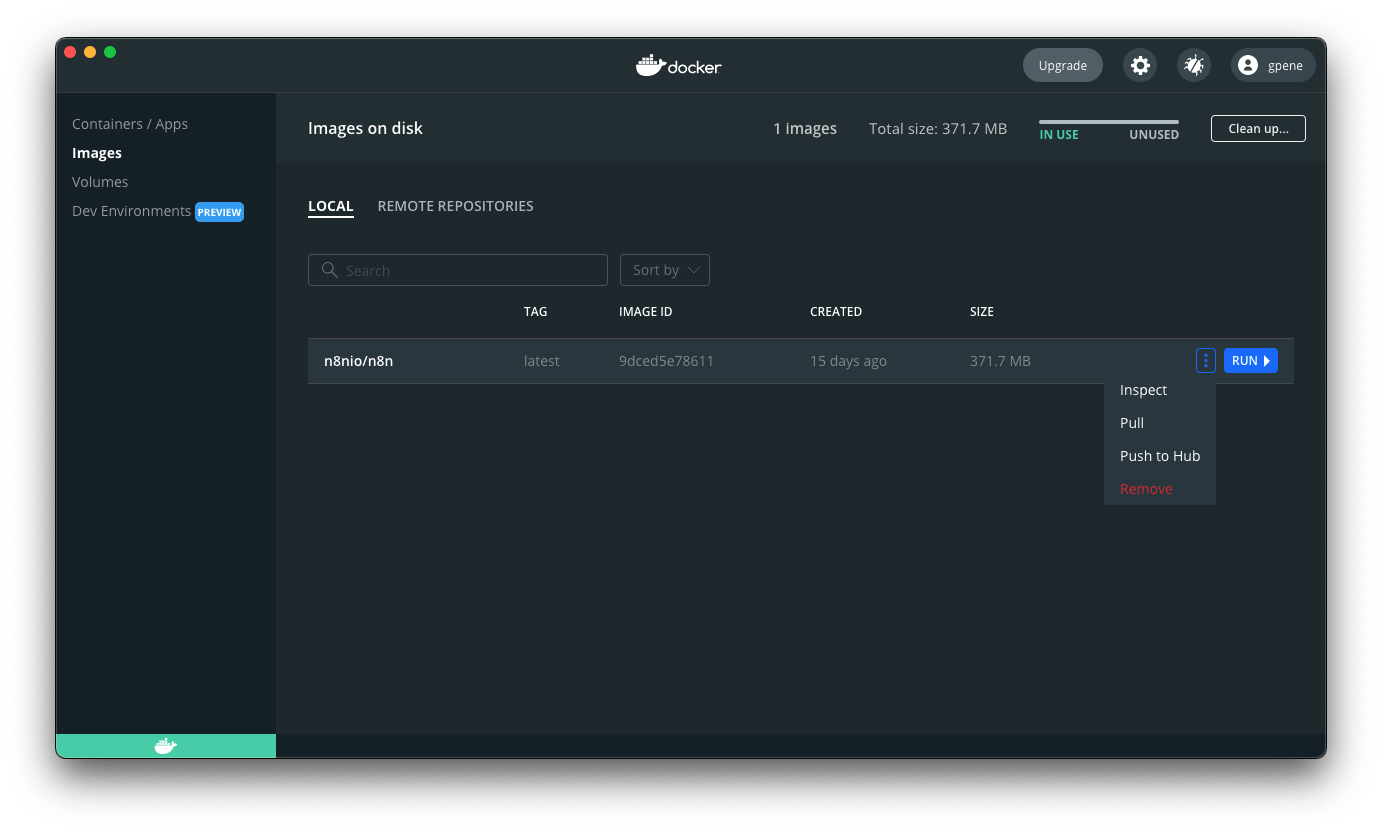
你还可以使用命令行拉取最新版本或特定版本:
🌐 You can also use the command line to pull the latest, or a specific version:
1 2 3 4 5 6 7 8 | |
在拉取更新的镜像后,停止你的 n8n 容器并重新启动它。你也可以使用命令行。在下面的命令中将 <container_id> 替换为你在第一个命令中找到的容器 ID:
🌐 After pulling the updated image, stop your n8n container and start it again. You can also use the command line. Replace <container_id> in the commands below with the container ID you find in the first command:
1 2 3 4 5 6 7 8 9 10 11 | |
正在更新 Docker Compose(Updating Docker Compose)#
If you run n8n using a Docker Compose file, follow these steps to update n8n:
1 2 3 4 5 6 7 8 9 10 11 | |
n8n with tunnel#
Danger
Use this for local development and testing. It isn't safe to use it in production.
To use webhooks for trigger nodes of external services like GitHub, n8n has to be reachable from the web. n8n runs a tunnel service that can redirect requests from n8n's servers to your local n8n instance.
通过运行 --tunnel 启动 n8n:
🌐 Start n8n with --tunnel by running:
1 2 3 4 5 6 7 8 9 10 11 12 | |
下一步步骤(Next steps)#
- 在 Docker 镜像 的 README 文件中查找有关 Docker 设置的更多信息。--8<-- "_snippets/self-hosting/installation/server-setups-next-steps.md"