队列模式(Queue mode)#
你可以根据需求以不同模式运行 n8n。队列模式提供最佳的可扩展性。
🌐 You can run n8n in different modes depending on your needs. The queue mode provides the best scalability.
二进制数据存储
n8n 不支持在文件系统中使用队列模式存储二进制数据。如果您的工作流需要在队列模式下持久化二进制数据,您可以使用 S3 外部存储。
怎么运行的(How it works)#
在队列模式下运行时,你可以设置多个 n8n 实例,其中一个主实例接收工作流信息(例如触发器),而其他工作实例执行工作流。
🌐 When running in queue mode, you have multiple n8n instances set up, with one main instance receiving workflow information (such as triggers) and the worker instances performing the executions.
每个工作线程都是独立的 Node.js 实例,以 main 模式运行,但由于其高 IOPS(每秒输入输出操作数),能够处理多个同时的工作流执行。
🌐 Each worker is its own Node.js instance, running in main mode, but able to handle multiple simultaneous workflow executions due to their high IOPS (input-output operations per second).
通过使用工作实例并在队列模式下运行,你可以根据需要扩展 n8n(通过添加工作实例)或缩减(通过移除工作实例)以处理工作负载。
🌐 By using worker instances and running in queue mode, you can scale n8n up (by adding workers) and down (by removing workers) as needed to handle the workload.
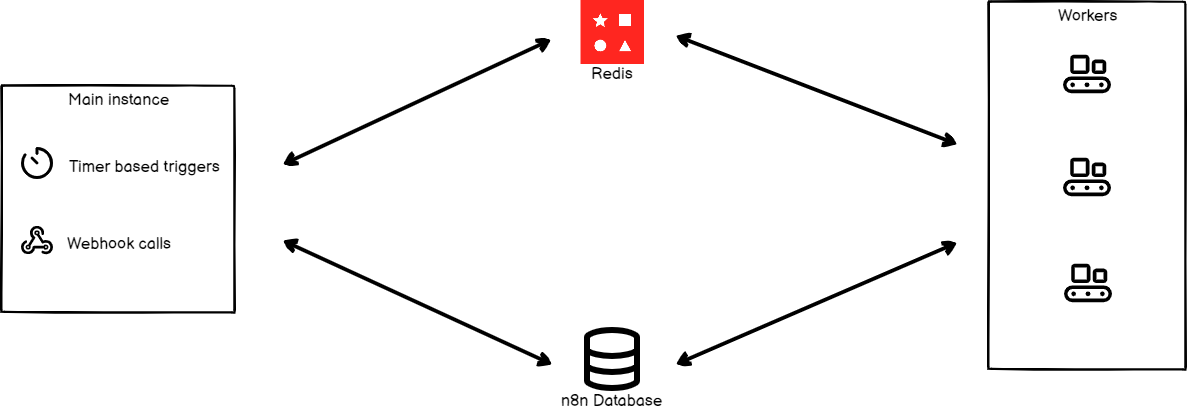
这是流程图:
🌐 This is the process flow:
- 主 n8n 实例处理计时器和 Webhook 调用,生成(但不运行)工作流执行。
- 它将执行 ID 传递给消息代理 Redis,该代理维护待执行队列,并允许下一个可用的工作者取出执行任务。
- 工作池中的一个工作节点从 Redis 中获取消息。
- 工作进程使用执行 ID 从数据库获取工作流信息。
- 工作流执行完成后,工作进程:
- 将结果写入数据库。
- 向 Redis 发送 POST 请求,表明执行已完成。
- Redis 会通知主实例。
正在配置 worker(Configuring workers)#
工作者是执行实际工作的 n8n 实例。它们从主 n8n 进程接收关于必须执行的工作流的信息,执行这些工作流,并在每次执行完成后更新状态。
🌐 Workers are n8n instances that do the actual work. They receive information from the main n8n process about the workflows that have to get executed, execute the workflows, and update the status after each execution is complete.
设置加密密钥(Set encryption key)#
n8n 在首次启动时会自动生成加密密钥。如果需要,你也可以使用 环境变量 提供自定义密钥。
🌐 n8n automatically generates an encryption key upon first startup. You can also provide your own custom key using environment variable if desired.
主 n8n 实例的加密密钥必须与所有工作节点和 Webhook 处理器节点共享,以确保这些工作节点能够访问存储在数据库中的凭据。
🌐 The encryption key of the main n8n instance must be shared with all worker and webhooks processor nodes to ensure these worker nodes are able to access credentials stored in the database.
为每个工作节点在配置文件中或通过设置相应的环境变量来设置加密密钥:
🌐 Set the encryption key for each worker node in a configuration file or by setting the corresponding environment variable:
1 | |
设置执行模式(Set executions mode)#
数据库注意事项
n8n 建议使用 Postgres 13 及以上版本。不建议在使用 SQLite 数据库并将执行模式设置为 queue 的情况下运行 n8n。
使用以下命令在主实例和任何工作节点上将环境变量 EXECUTIONS_MODE 设置为 queue。
🌐 Set the environment variable EXECUTIONS_MODE to queue on the main instance and any workers using the following command.
1 | |
或者,你可以在配置文件中将 executions.mode 设置为 queue。
🌐 Alternatively, you can set executions.mode to queue in the configuration file.
启动 Redis(Start Redis)#
在另一台机器上运行 Redis
你可以在一台独立的机器上运行 Redis,只需确保 n8n 实例可以访问它。
要在 Docker 容器中运行 Redis,请按照以下说明操作:
🌐 To run Redis in a Docker container, follow the instructions below:
运行以下命令以启动 Redis 实例:
🌐 Run the following command to start a Redis instance:
1 | |
默认情况下,Redis 在端口 6379 的 localhost 上运行且没有密码。根据你的 Redis 配置,为主 n8n 进程设置以下配置。这将允许 n8n 与 Redis 进行交互。
🌐 By default, Redis runs on localhost on port 6379 with no password. Based on your Redis configuration, set the following configurations for the main n8n process. These will allow n8n to interact with Redis.
| 使用配置文件 | 使用环境变量 | 描述 |
|---|---|---|
queue.bull.redis.host:localhost |
QUEUE_BULL_REDIS_HOST=localhost |
默认情况下,Redis 运行在 localhost。 |
queue.bull.redis.port:6379 |
QUEUE_BULL_REDIS_PORT=6379 |
默认端口是 6379。如果 Redis 运行在其他端口,请配置该值。 |
你还可以设置以下可选配置:
🌐 You can also set the following optional configurations:
| 使用配置文件 | 使用环境变量 | 描述 |
|---|---|---|
queue.bull.redis.username:USERNAME |
QUEUE_BULL_REDIS_USERNAME |
默认情况下,Redis 不需要用户名。如果你使用特定用户,请配置该变量。 |
queue.bull.redis.password:PASSWORD |
QUEUE_BULL_REDIS_PASSWORD |
默认情况下,Redis 不需要密码。如果你使用密码,请配置该变量。 |
queue.bull.redis.db:0 |
QUEUE_BULL_REDIS_DB |
默认值为 0。如果你更改此值,请更新配置。 |
queue.bull.redis.timeoutThreshold:10000ms |
QUEUE_BULL_REDIS_TIMEOUT_THRESHOLD |
告诉 n8n 如果 Redis 不可用,它应等待多长时间后再退出。默认值为 10000 毫秒。 |
queue.bull.gracefulShutdownTimeout:30 |
N8N_GRACEFUL_SHUTDOWN_TIMEOUT |
在终止进程之前,给工作人员优雅关闭的超时时间以完成执行的任务。默认值为 30 秒。 |
现在你可以启动 n8n 实例,它将连接到你的 Redis 实例。
🌐 Now you can start your n8n instance and it will connect to your Redis instance.
启动工作进程(Start workers)#
您需要启动工作进程以允许 n8n 执行工作流。如果您想在另一台机器上托管工作进程,请在该机器上安装 n8n,并确保它已连接到您的 Redis 实例和 n8n 数据库。
🌐 You will need to start worker processes to allow n8n to execute workflows. If you want to host workers on a separate machine, install n8n on the machine and make sure that it's connected to your Redis instance and the n8n database.
从根目录运行以下命令启动工作进程:
🌐 Start worker processes by running the following command from the root directory:
1 | |
如果你使用 Docker,请使用以下命令:
🌐 If you're using Docker, use the following command:
1 | |
您可以设置多个工作进程。确保所有工作进程都能访问 Redis 和 n8n 数据库。
🌐 You can set up multiple worker processes. Make sure that all the worker processes have access to Redis and the n8n database.
工作服务器(Worker server)#
每个工作进程运行一个服务器,该服务器公开可选的端点:
🌐 Each worker process runs a server that exposes optional endpoints:
/healthz:如果你启用了QUEUE_HEALTH_CHECK_ACTIVE环境变量,将返回该工作线程是否运行/healthz/readiness:返回工作进程的数据库和 Redis 连接是否就绪,如果你启用了QUEUE_HEALTH_CHECK_ACTIVE环境变量- 凭证覆盖端点
/metrics
查看正在运行的工作进程(View running workers)#
功能可用性
- 可在自托管企业计划中使用。
- 如果你希望在云端企业版中使用此功能,请联系 n8n。
您可以通过选择 设置 > 工作节点 在 n8n 中查看运行中的工作节点及其性能指标。
🌐 You can view running workers and their performance metrics in n8n by selecting Settings > Workers.
运行带队列的 n8n(Running n8n with queues)#
在使用队列运行 n8n 时,所有生产工作流的执行都会由工作进程处理。对于 webhook 来说,这意味着 HTTP 请求由主进程/ webhook 进程接收,但实际的工作流执行会传递给工作进程,这可能会增加一些开销和延迟。
🌐 When running n8n with queues, all the production workflow executions get processed by worker processes. For webhooks, this means the HTTP request is received by the main/webhook process, but the actual workflow execution is passed to a worker, which can add some overhead and latency.
Redis 充当消息代理,数据库则负责持久化数据,因此需要访问两者。在这种配置下使用 SQLite 运行分布式系统是不支持的。
🌐 Redis acts as the message broker, and the database persists data, so access to both is required. Running a distributed system with this setup over SQLite isn't supported.
迁移数据
如果你想将数据从一个数据库迁移到另一个数据库,可以使用导出和导入命令。请参考 n8n 的 CLI 命令文档,了解如何使用这些命令。
Webhook 处理器(Webhook processors)#
记住
Webhook 处理依赖于 Redis,并且需要设置 EXECUTIONS_MODE 环境变量。请按照上方的配置工作节点部分来设置 webhook 处理器节点。
Webhook 处理器是 n8n 中的另一种扩展层。配置 webhook 处理器是可选的,它可以让你扩展传入的 webhook 请求。
🌐 Webhook processors are another layer of scaling in n8n. Configuring the webhook processor is optional, and allows you to scale the incoming webhook requests.
此方法允许 n8n 处理大量的并行请求。你所要做的就是相应地增加更多的 webhook 进程和工作线程。webhook 进程将在相同端口(默认:5678)监听请求。将这些进程运行在容器或独立的机器上,并使用负载均衡系统相应地路由请求。
🌐 This method allows n8n to process a huge number of parallel requests. All you have to do is add more webhook processes and workers accordingly. The webhook process will listen to requests on the same port (default: 5678). Run these processes in containers or separate machines, and have a load balancing system to route requests accordingly.
n8n 不建议将主进程添加到负载均衡池中。如果将主进程添加到池中,它将接收请求并可能承受较重的负载。这将导致编辑、查看和与 n8n 用户界面交互的性能下降。
🌐 n8n doesn't recommend adding the main process to the load balancer pool. If you add the main process to the pool, it will receive requests and possibly a heavy load. This will result in degraded performance for editing, viewing, and interacting with the n8n UI.
你可以通过在根目录下执行以下命令来启动 Webhook 处理器:
🌐 You can start the webhook processor by executing the following command from the root directory:
1 | |
如果你使用 Docker,请使用以下命令:
🌐 If you're using Docker, use the following command:
1 | |
配置 Webhook URL(Configure webhook URL)#
要配置 Webhook URL,请在运行主 n8n 实例的计算机上执行以下命令:
🌐 To configure your webhook URL, execute the following command on the machine running the main n8n instance:
1 | |
你也可以在配置文件中设置此值。
🌐 You can also set this value in the configuration file.
配置负载均衡器(Configure load balancer)#
当使用多个 webhook 进程时,你需要一个负载均衡器来路由请求。如果你的 n8n 实例和 webhook 使用相同的域名,你可以将负载均衡器设置为如下路由请求:
🌐 When using multiple webhook processes you will need a load balancer to route requests. If you are using the same domain name for your n8n instance and the webhooks, you can set up your load balancer to route requests as follows:
- 将任何匹配
/webhook/*的请求重定向到 webhook 服务器池 - 所有其他路径(n8n 内部 API、编辑器的静态文件等)都应路由到主进程。
注意: 手动工作流执行的默认 URL 是 /webhook-test/*。请确保这些 URL 指向你的主要流程。
你可以在配置文件 endpoints.webhook 中更改此路径,或使用环境变量 N8N_ENDPOINT_WEBHOOK。如果你进行了更改,请相应地更新负载均衡器。
🌐 You can change this path in the configuration file endpoints.webhook or using the N8N_ENDPOINT_WEBHOOK environment variable. If you change these, update your load balancer accordingly.
禁用主进程中的 Webhook 处理(可选)(Disable webhook processing in the main process (optional))#
你有 webhook 处理器来执行工作流。你可以在主进程中禁用 webhook 处理。这将确保所有的 webhook 执行都在 webhook 处理器中完成。在配置文件中将 endpoints.disableProductionWebhooksOnMainProcess 设置为 true,以便 n8n 不在主进程中处理 webhook 请求。
🌐 You have webhook processors to execute the workflows. You can disable the webhook processing in the main process. This will make sure to execute all webhook executions in the webhook processors. In the configuration file set endpoints.disableProductionWebhooksOnMainProcess to true so that n8n doesn't process webhook requests on the main process.
或者,你可以使用以下命令:
🌐 Alternatively, you can use the following command:
1 | |
在主进程中禁用 webhook 进程时,请运行主进程,并且不要将其添加到负载均衡器的 webhook 池中。
🌐 When disabling the webhook process in the main process, run the main process and don't add it to the load balancer's webhook pool.
配置工作进程并发数(Configure worker concurrency)#
你可以使用 concurrency 标志来定义一个工作者可以并行运行的任务数量。默认值为 10。要更改它,请执行以下操作:
🌐 You can define the number of jobs a worker can run in parallel by using the concurrency flag. It defaults to 10. To change it:
1 | |
并发和扩展建议(Concurrency and scaling recommendations)#
n8n 建议将工作实例的并发设置为 5 或更高。对于大量工作实例,设置较低的并发值可能会耗尽数据库的连接池,从而导致处理延迟和失败。
🌐 n8n recommends setting concurrency to 5 or higher for your worker instances. Setting low concurrency values with a large numbers of workers can exhaust your database's connection pool, leading to processing delays and failures.
多主设置(Multi-main setup)#
功能可用性
- 可用于自托管企业计划。
在队列模式下,你可以运行多个 main 进程以实现高可用性。
🌐 In queue mode you can run more than one main process for high availability.
在单模式设置中,main 进程执行两组任务:
🌐 In a single-mode setup, the main process does two sets of tasks:
- 常规任务,例如运行 API、提供 UI 服务以及监听 Webhook,和
- 至多一次任务,例如运行非 HTTP 触发器(定时器、轮询器以及像 RabbitMQ 和 IMAP 这样的持久连接),以及清理执行记录和二进制数据。
在多主机设置中,有两种类型的 main 进程:
🌐 In a multi-main setup, there are two kinds of main processes:
- 追随者,执行常规任务,以及
- 该领导者,负责运行常规任务和最多一次任务。
领导者指定(Leader designation)#
在多主设置中,所有主实例都以对用户透明的方式处理领导过程。如果当前的领导者不可用,例如因为它崩溃或其事件循环过于繁忙,其他跟随者可以接管。如果之前的领导者再次恢复响应,它将成为一个跟随者。
🌐 In a multi-main setup, all main instances handle the leadership process transparently to users. In case the current leader becomes unavailable, for example because it crashed or its event loop became too busy, other followers can take over. If the previous leader becomes responsive again, it becomes a follower.
配置多主节点设置(Configuring multi-main setup)#
要在多主设置中部署 n8n,请确保:
🌐 To deploy n8n in multi-main setup, ensure:
- 所有
main进程都在队列模式下运行,并且已连接到 Postgres 和 Redis。 - 所有
main和worker进程都在运行相同版本的 n8n。 - 所有
main进程都已将环境变量N8N_MULTI_MAIN_SETUP_ENABLED设置为true。 - 所有
main进程都在启用会话保持(粘性会话)的负载均衡器后运行。
如有必要,你可以调整 leader 键选项:
🌐 If needed, you can adjust the leader key options:
| 使用配置文件 | 使用环境变量 | 描述 |
|---|---|---|
multiMainSetup.ttl:10 |
N8N_MULTI_MAIN_SETUP_KEY_TTL=10 |
多主设置中主键的生存时间(秒)。 |
multiMainSetup.interval:3 |
N8N_MULTI_MAIN_SETUP_CHECK_INTERVAL=3 |
多主设置中主键检查的间隔时间(秒)。 |