Pinecone 矢量存储节点(Pinecone Vector Store node)#
使用 Pinecone 节点与你的 Pinecone 数据库进行交互,作为向量存储。你可以将文档插入到向量数据库中,从向量数据库获取文档,将文档检索出来以提供给连接到链的检索器,或者直接作为工具连接到代理。你还可以通过 ID 更新向量数据库中的项目。
🌐 Use the Pinecone node to interact with your Pinecone database as vector store. You can insert documents into a vector database, get documents from a vector database, retrieve documents to provide them to a retriever connected to a chain, or connect directly to an agent as a tool. You can also update an item in a vector database by its ID.
本页提供 Pinecone 节点的节点参数以及更多资源的链接。
🌐 On this page, you'll find the node parameters for the Pinecone node, and links to more resources.
凭证
您可以在此处找到此节点的认证信息。
Parameter resolution in sub-nodes
Sub-nodes behave differently to other nodes when processing multiple items using an expression.
Most nodes, including root nodes, take any number of items as input, process these items, and output the results. You can use expressions to refer to input items, and the node resolves the expression for each item in turn. For example, given an input of five name values, the expression {{ $json.name }} resolves to each name in turn.
In sub-nodes, the expression always resolves to the first item. For example, given an input of five name values, the expression {{ $json.name }} always resolves to the first name.
节点使用模式(Node usage patterns)#
你可以按照以下模式使用 Pinecone 向量存储节点。
🌐 You can use the Pinecone Vector Store node in the following patterns.
用作常规节点,用于插入、更新和检索文档(Use as a regular node to insert, update, and retrieve documents)#
您可以将 Pinecone 向量存储作为常规节点来插入、更新或获取文档。这种模式将 Pinecone 向量存储放在常规连接流程中,而无需使用代理。
🌐 You can use the Pinecone Vector Store as a regular node to insert, update, or get documents. This pattern places the Pinecone Vector Store in the regular connection flow without using an agent.
您可以在此模板的场景1中看到一个示例。
🌐 You can see an example of this in scenario 1 of this template.
直接连接到 AI 代理作为工具(Connect directly to an AI agent as a tool)#
你可以将 Pinecone 向量存储节点直接连接到 AI 代理 的工具连接器,以在回答查询时将向量存储作为资源使用。
🌐 You can connect the Pinecone Vector Store node directly to the tool connector of an AI agent to use a vector store as a resource when answering queries.
这里,连接将是:AI 代理(工具连接器)-> Pinecone 向量存储节点。
🌐 Here, the connection would be: AI agent (tools connector) -> Pinecone Vector Store node.
使用检索器获取文档(Use a retriever to fetch documents)#
你可以将 Vector Store Retriever 节点与 Pinecone 向量存储节点一起使用,从 Pinecone 向量存储节点获取文档。这通常与 Question and Answer Chain 节点一起使用,从向量存储中获取与给定聊天输入匹配的文档。
🌐 You can use the Vector Store Retriever node with the Pinecone Vector Store node to fetch documents from the Pinecone Vector Store node. This is often used with the Question and Answer Chain node to fetch documents from the vector store that match the given chat input.
一个连接流程示例可能是:问答链(检索器连接器)-> 向量存储检索器(向量存储连接器)-> Pinecone 向量存储。
🌐 An example of the connection flow would be: Question and Answer Chain (Retriever connector) -> Vector Store Retriever (Vector Store connector) -> Pinecone Vector Store.
使用 Vector Store 问答工具回答问题(Use the Vector Store Question Answer Tool to answer questions)#
另一种模式使用 Vector Store Question Answer Tool 来总结结果并回答来自 Pinecone 向量存储节点的问题。与直接将 Pinecone 向量存储作为工具连接不同,这种模式使用了一个专门设计用于总结向量存储中数据的工具。
🌐 Another pattern uses the Vector Store Question Answer Tool to summarize results and answer questions from the Pinecone Vector Store node. Rather than connecting the Pinecone Vector Store directly as a tool, this pattern uses a tool specifically designed to summarizes data in the vector store.
在这种情况下,连接流程 看起来如下:AI 代理(工具连接器)-> 向量存储问答工具(向量存储连接器)-> Pinecone 向量存储。
🌐 The connections flow in this case would look like this: AI agent (tools connector) -> Vector Store Question Answer Tool (Vector Store connector) -> Pinecone Vector store.
节点参数(Node parameters)#
操作模式(Operation Mode)#
This Vector Store node has five modes: Get Many, Insert Documents, Retrieve Documents (As Vector Store for Chain/Tool), Retrieve Documents (As Tool for AI Agent), and Update Documents. The mode you select determines the operations you can perform with the node and what inputs and outputs are available.
Get Many#
In this mode, you can retrieve multiple documents from your vector database by providing a prompt. The prompt will be embedded and used for similarity search. The node will return the documents that are most similar to the prompt with their similarity score. This is useful if you want to retrieve a list of similar documents and pass them to an agent as additional context.
Insert Documents#
Use Insert Documents mode to insert new documents into your vector database.
Retrieve Documents (As Vector Store for Chain/Tool)#
Use Retrieve Documents (As Vector Store for Chain/Tool) mode with a vector-store retriever to retrieve documents from a vector database and provide them to the retriever connected to a chain. In this mode you must connect the node to a retriever node or root node.
Retrieve Documents (As Tool for AI Agent)#
Use Retrieve Documents (As Tool for AI Agent) mode to use the vector store as a tool resource when answering queries. When formulating responses, the agent uses the vector store when the vector store name and description match the question details.
Update Documents#
Use Update Documents mode to update documents in a vector database by ID. Fill in the ID with the ID of the embedding entry to update.
重新排序结果(Rerank Results)#
Enables reranking. If you enable this option, you must connect a reranking node to the vector store. That node will then rerank the results for queries. You can use this option with the Get Many, Retrieve Documents (As Vector Store for Chain/Tool) and Retrieve Documents (As Tool for AI Agent) modes.
获取多个参数(Get Many parameters)#
- Pinecone 索引:选择或输入要使用的 Pinecone 索引。
- 提示:请输入你的搜索查询。
- 限制:输入要从向量存储中获取的结果数量。例如,将其设置为
10可获取十个最佳结果。
插入文档参数(Insert Documents parameters)#
- Pinecone 索引:选择或输入要使用的 Pinecone 索引。
检索文档(作为链/工具的向量存储)参数(Retrieve Documents (As Vector Store for Chain/Tool) parameters)#
- Pinecone 索引:选择或输入要使用的 Pinecone 索引。
检索文档(作为工具) (适用于 AI 代理)参数(Retrieve Documents (As Tool for AI Agent) parameters)#
- 名称:向量存储的名称。
- 描述:向大型语言模型(LLM)解释此工具的功能。具体而清晰的描述可以让大型语言模型更频繁地产生预期的结果。
- Pinecone 索引:选择或输入要使用的 Pinecone 索引。
- 限制:输入要从向量存储中获取的结果数量。例如,将其设置为
10可获取十个最佳结果。
更新文档的参数(Parameters for Update Documents)#
- 身份证
节点选项(Node options)#
Pinecone 命名空间(Pinecone Namespace)#
另一种在索引中存储数据的分类选项。
🌐 Another segregation option for how to store your data within the index.
元数据筛选器(Metadata Filter)#
Available in Get Many mode. When searching for data, use this to match with metadata associated with the document.
This is an AND query. If you specify more than one metadata filter field, all of them must match.
When inserting data, the metadata is set using the document loader. Refer to Default Data Loader for more information on loading documents.
清除命名空间(Clear Namespace)#
可在 插入文档 模式下使用。会在插入新数据前删除命名空间中的所有数据。
🌐 Available in Insert Documents mode. Deletes all data from the namespace before inserting the new data.
模板和示例(Templates and examples)#
相关资源(Related resources)#
有关该服务的更多信息,请参阅 LangChain 的 Pinecone 文档。
🌐 Refer to LangChain's Pinecone documentation for more information about the service.
View n8n's Advanced AI documentation.
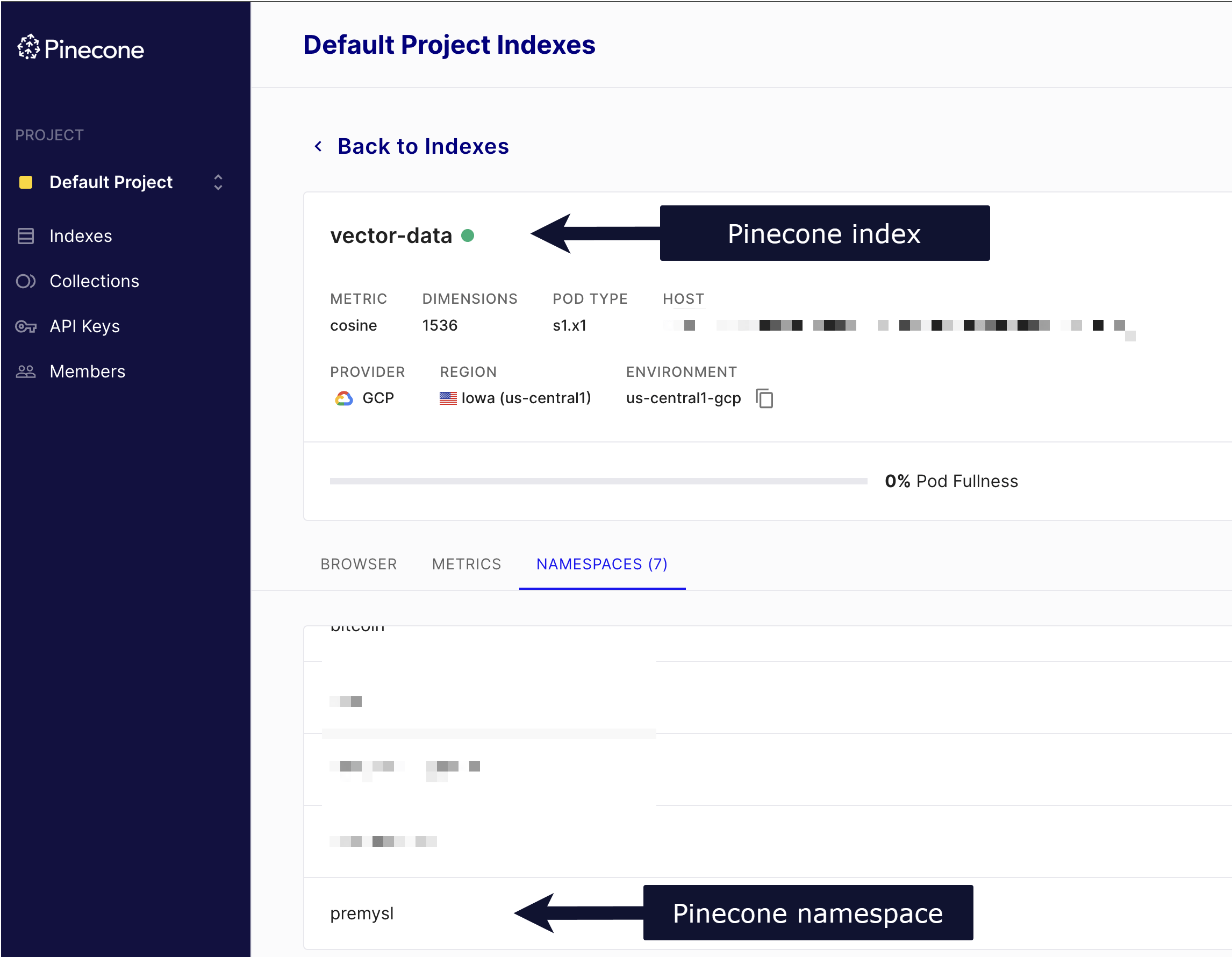
查找 Pinecone 索引和命名空间(Find your Pinecone index and namespace)#
你的 Pinecone 索引和命名空间可在你的 Pinecone 账户中找到。
🌐 Your Pinecone index and namespace are available in your Pinecone account.