n8n 表单触发器节点(n8n Form Trigger node)#
使用 n8n 表格触发器,当用户提交表格时启动工作流,并获取表格中的输入数据。该节点会为你生成可使用的表格网页。
🌐 Use the n8n Form trigger to start a workflow when a user submits a form, taking the input data from the form. The node generates the form web page for you to use.
你可以使用 n8n Form 节点添加更多页面以继续填写表单。
🌐 You can add more pages to continue the form with the n8n Form node.
构建和测试工作流(Build and test workflows)#
在构建或测试工作流时,请使用 测试 URL。使用测试 URL 可确保你能够在编辑器界面中查看传入的数据,这对于调试非常有用。
🌐 While building or testing a workflow, use the Test URL. Using a test URL ensures that you can view the incoming data in the editor UI, which is useful for debugging.
测试有两种方法:
🌐 There are two ways to test:
- 选择 执行步骤。n8n 会打开表单。当你提交表单时,n8n 会运行该节点,但不会运行工作流的其余部分。
- 选择执行工作流。n8n会打开表单。当你提交表单时,n8n会运行该工作流。
生产工作流(Production workflows)#
当你的工作流程准备就绪后,请切换使用 生产环境 URL。然后你可以发布工作流程,n8n 会在用户提交表单时自动运行它。
🌐 When your workflow is ready, switch to using the Production URL. You can then publish your workflow, and n8n runs it automatically when a user submits the form.
在使用生产环境 URL 时,确保你已保存并发布工作流。通过表单触发器传输的数据在编辑器界面中使用生产环境 URL 时不可见。
🌐 When working with a production URL, ensure that you have saved and published the workflow. Data flowing through the Form trigger isn't visible in the editor UI with the production URL.
使用查询参数设置默认选择(Set default selections with query parameters)#
您可以使用 n8n 表单触发器提供的初始 URL 来通过 查询参数 设置字段的初始值。表单的每一 页面 都会接收到发送到 n8n 表单触发器 URL 的相同查询参数。
🌐 You can set the initial values for fields by using query parameters with the initial URL provided by the n8n Form Trigger. Every page in the form receives the same query parameters sent to the n8n Form Trigger URL.
仅限生产使用
查询参数仅在生产模式下使用表单时可用。n8n 在测试模式下不会从查询参数填充字段值。
使用查询参数时,对任何包含特殊字符的字段名称或值进行百分号编码。这可以确保 n8n 使用给定字段的初始值。你可以使用像 URL 编码/解码 这样的工具来使用百分号编码格式化你的查询参数。
例如,假设你有一个包含以下属性的表单:
🌐 As an example, imagine you have a form with the following properties:
- 生产环境网址:
https://my-account.n8n.cloud/form/my-form - 字段:
name:Jane Doeemail:jane.doe@example.com
使用查询参数和百分比编码,你可以使用以下 URL 将上述数据的初始字段值设置为:
🌐 With query parameters and percent-encoding, you could use the following URL to set initial field values to the data above:
1 | |
在这里,百分号编码将符号 @(@)替换为字符串 %40,并将空格字符()替换为字符串 %20。无论这些字段出现在表单的哪个页面上,这都会设置它们的初始值。
节点参数(Node parameters)#
以下是主要的节点配置字段:
🌐 These are the main node configuration fields:
验证(Authentication)#
- 基本认证
- 无
使用基本身份验证(Using basic auth)#
要配置此凭据,你需要:
🌐 To configure this credential, you'll need:
- 用于访问你的 HTTP 请求所针对的应用或服务的用户名。
- 与该用户名对应的密码。
表单 URL(Form URLs)#
表单触发节点有两个 URL:测试 URL 和 生产 URL。n8n 会在节点面板的顶部显示这些 URL。选择 测试 URL 或 生产 URL 来切换 n8n 显示的 URL。
🌐 The Form Trigger node has two URLs: Test URL and Production URL. n8n displays the URLs at the top of the node panel. Select Test URL or Production URL to toggle which URL n8n displays.
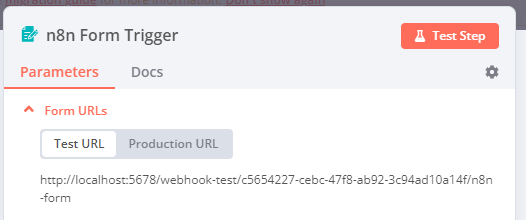
- 测试 URL:当你选择 执行步骤 或 执行工作流 时,如果工作流未激活,n8n 会注册一个测试 webhook。当你访问该 URL 时,n8n 会在工作流中显示数据。
- 生产环境 URL:当你发布工作流时,n8n 会注册一个生产环境 Webhook。使用生产环境 URL 时,n8n 不会在工作流中显示数据。你仍然可以查看生产执行的工作流数据。在工作流中选择 执行 标签,然后选择你想要查看的工作流执行。
表单路径(Form Path)#
为表单设置自定义别名。
🌐 Set a custom slug for the form.
表单标题(Form Title)#
输入表单的标题。n8n 会将 表单标题 显示为网页标题和表单上的主要 h1 标题。
🌐 Enter the title for your form. n8n displays the Form Title as the webpage title and main h1 title on the form.
表单描述(Form Description)#
输入你的表单描述。n8n 会在表单的主标题 h1 下方显示 表单描述 作为副标题。使用 \n 或 <br> 可添加换行。
🌐 Enter the description for your form. n8n displays the Form Description as a subtitle below the main h1 title on the form. Use \n or <br> to add a line break.
表单元素(Form Elements)#
为你的表单创建问题字段。选择 添加表单元素 以添加新字段。
🌐 Create the question fields for your form. Select Add Form Element to add a new field.
每个字段都有以下设置:
🌐 Every field has the following settings:
- 字段标签:输入在呈现表单时出现在输入字段上方的标签。
- 字段名称:此名称用于表单触发节点的输出中。可在下游节点中使用它来引用表单字段。
- 元素类型:从 复选框、自定义 HTML、日期、下拉菜单、电子邮件、文件、隐藏字段、数字、密码、单选按钮、文本 或 多行文本框 中选择。
- 勾选 复选框 以在表单中包含复选框元素。默认情况下,表单用户可以选择任意数量的复选框。你可以通过为 选择限制 选项指定 精确数量、范围 或 无限制 来设置限制。
- 选择 自定义 HTML 以插入任意 HTML。
- 您可以包含链接、图片、视频等元素。您不能包含
<script>、<style>或<input>元素。 - 默认情况下,自定义 HTML 字段不会包含在节点输出中。要在输出中包含自定义 HTML 内容,请填写相关的 元素名称 字段。
- 您可以包含链接、图片、视频等元素。您不能包含
- 选择 日期 在表单中包含日期选择器。有关日期格式的详细信息,请参阅 使用 Luxon 的日期和时间。
- 选择 下拉列表 > 添加字段选项 以添加多个选项。默认情况下,下拉列表为单选。若要设置为多选,请开启 多选。
- 选择 单选按钮 以在表单中包含单选按钮元素。
- 选择 隐藏字段 可以在表单中包含一个元素而不显示它。你可以使用 字段值 参数设置默认值,或使用 查询参数 为该字段传递值。
- 占位符:定义在兼容表单元素中显示的示例文本。占位符在 电子邮件、数字、密码、文本 和 多行文本框 中受支持。
- 默认值:定义将在兼容表单元素中预填或预选的默认值。除了 自定义 HTML、文件、隐藏字段 和 密码 外,所有表单元素都支持默认值。
- 必填字段:开启后,用户必须填写此表单字段。
响应条件(Respond When)#
选择 n8n 何时对表单提交发送响应。你可以在以下情况下进行响应:
🌐 Choose when n8n sends a response to the form submission. You can respond when:
- 表格已提交:用户提交表格后立即发送回应。
- 工作流完成:如果你希望工作流在向用户发送响应之前完成其执行,请使用此选项。如果工作流出现错误,它会向用户发送响应,告知提交表单时出现了问题。
节点选项(Node options)#
选择 添加选项 查看更多配置选项:
🌐 Select Add Option to view more configuration options:
- n8n归属:关闭此选项可隐藏表单底部的 使用 n8n 自动化创建的表单 标记。
- 按钮标签:用于表单提交按钮的标签。n8n 会将 按钮标签 显示为提交按钮的名称。
- 表单路径:表单 URL 的最终部分,适用于测试和生产环境。替代自动生成的 UUID 作为最终组件。
- 忽略机器人:开启后将忽略来自链接预览器和网络爬虫等机器人的请求。
- 使用工作流时区:开启后将使用工作流设置中的时区,而不是默认的 UTC。这将影响节点输出中
submittedAt时间戳的值。 - 自定义表单样式:使用 CSS 覆盖公共表单界面的默认样式。字段会预填充默认样式,因此你只需更改所需部分即可。
自定义表单触发器节点行为(Customizing Form Trigger node behavior)#
使用换行符格式化响应文本(Format response text with line breaks)#
你可以使用以下方法之一向表单响应文本添加换行符:
🌐 You can use one of the following methods to add line breaks to form response text:
• 在 formSubmittedText 字段中使用 HTML 格式,而不是纯文本
• 在发送响应之前,将换行符(\n)替换为 HTML 换行标签(<br>)
• 如果需要更多的格式控制,可以考虑使用自定义的 HTML 响应页面
通过身份验证限制表单访问(Restrict form access with authentication)#
你可以使用以下选项之一向表单添加身份验证:
🌐 You can use one of the following options to add authentication to your form:
• 对于基于令牌的身份验证,在 TOTP 节点验证时使用一次性密码(OTP)字段 • 添加一个带有表单认证的等待节点,作为备用表单页面 • 在数据库中存储哈希密码,并与表单提交进行比较以进行验证 • 如果需要高级身份验证,可使用 Google Forms 等外部身份验证提供者