Webhook 节点(Webhook node)#
使用 Webhook 节点来创建 webhooks,当事件发生时,它可以接收来自应用和服务的数据。它是一个触发节点,这意味着它可以启动 n8n 工作流。这使得服务能够连接到 n8n 并运行工作流。
🌐 Use the Webhook node to create webhooks, which can receive data from apps and services when an event occurs. It's a trigger node, which means it can start an n8n workflow. This allows services to connect to n8n and run a workflow.
当您希望接收数据并基于这些数据运行工作流时,可以将 Webhook 节点用作工作流的触发器。Webhook 节点还支持返回在工作流结束时生成的数据。这使其在构建用于处理数据并返回结果的工作流时非常有用,例如作为一个 API 端点。
🌐 You can use the Webhook node as a trigger for a workflow when you want to receive data and run a workflow based on the data. The Webhook node also supports returning the data generated at the end of a workflow. This makes it useful for building a workflow to process data and return the results, like an API endpoint.
Webhook 允许你从没有专用应用触发节点的服务触发工作流。
🌐 The webhook allows you to trigger workflows from services that don't have a dedicated app trigger node.
工作流开发流程(Workflow development process)#
n8n 为测试和生产提供了不同的 Webhook URL。测试 URL 包含一个 监听测试事件 的选项。有关构建、测试以及将 Webhook 节点切换到生产环境的更多信息,请参阅 工作流开发。
🌐 n8n provides different Webhook URLs for testing and production. The testing URL includes an option to Listen for test event. Refer to Workflow development for more information on building, testing, and shifting your Webhook node to production.
节点参数(Node parameters)#
使用这些参数来配置你的节点。
🌐 Use these parameters to configure your node.
Webhook URL(Webhook URLs)#
Webhook 节点有两个 Webhook URL:测试和生产。n8n 会在节点面板顶部显示这些 URL。
🌐 The Webhook node has two Webhook URLs: test and production. n8n displays the URLs at the top of the node panel.
选择 测试 URL 或 生产 URL 来切换 n8n 显示的 URL。
🌐 Select Test URL or Production URL to toggle which URL n8n displays.
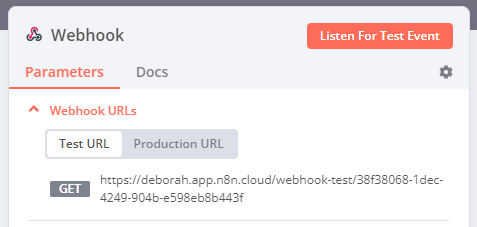
- 测试:当你选择 监听测试事件 或 执行工作流 时,如果工作流未激活,n8n 会注册一个测试 webhook。调用 webhook URL 时,n8n 会在工作流中显示数据。
- 生产环境:当你发布工作流时,n8n 会注册一个生产 webhook。使用生产环境 URL 时,n8n 不会在工作流中显示数据。你仍然可以查看生产环境执行的工作流数据:在工作流中选择 执行 标签,然后选择你想查看的工作流执行。
HTTP 方法(HTTP Method)#
Webhook 节点支持标准的 HTTP 请求方法:
🌐 The Webhook node supports standard HTTP Request Methods:
- 删除
- 获取
- 头部
- 补丁
- 发布
-
放置
Webhook max payload
The webhook maximum payload size is 16MB. If you're self-hosting n8n, you can change this using the endpoint environment variable
N8N_PAYLOAD_SIZE_MAX.
路径(Path)#
默认情况下,此字段包含一个随机生成的 Webhook URL 路径,以避免与其他 Webhook 节点冲突。
🌐 By default, this field contains a randomly generated webhook URL path, to avoid conflicts with other webhook nodes.
你可以手动指定 URL 路径,包括添加路由参数。例如,如果你使用 n8n 来原型化一个 API 并希望端点 URL 保持一致,可能需要这样做。
🌐 You can manually specify a URL path, including adding route parameters. For example, you may need to do this if you use n8n to prototype an API and want consistent endpoint URLs.
路径 字段可以采用以下格式:
🌐 The Path field can take the following formats:
/:variable/path/:variable/:variable/path/:variable1/path/:variable2/:variable1/:variable2
支持的身份验证方法(Supported authentication methods)#
您可以要求任何调用您的 Webhook URL 的服务进行身份验证。可从以下身份验证方法中选择:
🌐 You can require authentication for any service calling your webhook URL. Choose from these authentication methods:
- 基本身份验证
- 标头身份验证
- JWT 身份验证
- 无
有关设置每种凭据类型的更多信息,请参阅 Webhook 凭据。
🌐 Refer to Webhook credentials for more information on setting up each credential type.
响应(Respond)#
- 立即:Webhook 节点返回响应代码和消息 工作流已启动。
- 当最后一个节点完成时:Webhook 节点返回工作流中最后执行的节点的响应代码和数据输出。
- 使用“响应 Webhook”节点:Webhook 节点按响应 Webhook节点中定义的方式进行响应。
- 流式响应:在工作流处理过程中,允许将实时数据流回用户。需要工作流中支持流式传输的节点(例如,AI agent 节点)。
响应代码(Response Code)#
自定义 Webhook 节点在成功执行后返回的 HTTP 响应码。可以从常用响应码中选择或创建自定义代码。
🌐 Customize the HTTP response code that the Webhook node returns upon successful execution. Select from common response codes or create a custom code.
响应数据(Response Data)#
选择要在响应正文中包含的数据:
🌐 Choose what data to include in the response body:
- 所有条目:Webhook 会以数组形式返回最后一个节点的所有条目。
- 第一次条目 JSON:Webhook 返回 JSON 对象中最后一个节点的第一个条目的 JSON 数据。
- 第一次条目二进制:Webhook 返回二进制文件中最后一个节点的第一个条目的二进制数据。
- 无响应内容:Webhook 返回时没有内容。
仅适用于 响应 > 当最后一个节点完成时。
🌐 Applies only to Respond > When Last Node Finishes.
节点选项(Node options)#
选择 添加选项 以查看更多配置选项。可用选项取决于你的节点参数。有关选项可用性,请参阅表格。
🌐 Select Add Option to view more configuration options. The available options depend on your node parameters. Refer to the table for option availability.
- 允许的来源(CORS):设置允许的跨域域名。输入一个以逗号分隔的 URL 列表,允许进行跨域非预检请求。使用
*(默认)以允许所有来源。 - 二进制属性:启用此设置可让 Webhook 节点接收二进制数据,例如图片或音频文件。请输入二进制属性的名称,以将接收到的文件数据写入该属性。
- 忽略机器人:忽略来自像链接预览器和网络爬虫这样的机器人的请求。
- IP 地址白名单:启用此选项可限制谁(或什么)可以调用 Webhook 触发 URL。输入允许的 IP 地址,用逗号分隔。来自白名单外的 IP 地址的访问将返回 403 错误。如果留空,则所有 IP 地址都可以调用 Webhook 触发 URL。
- 无响应正文:启用此选项可防止 n8n 在响应中发送正文。
- 原始主体:指定 Webhook 节点将以原始格式接收数据,例如 JSON 或 XML。
- 响应内容类型:选择 webhook 主体的格式。
- 响应数据:随响应发送自定义数据。
- 响应头:在 Webhook 响应中发送额外的头信息。有关响应头的更多信息,请参阅 MDN Web 文档 | 响应头。
- 属性名称:默认情况下,n8n 会返回所有可用数据。你可以选择返回特定的 JSON 键,这样 n8n 就会返回该键对应的值。
| 选项 | 所需节点配置 |
|---|---|
| 允许的来源 (CORS) | 任何 |
| 二进制属性 | 任一: HTTP 方法 > POST HTTP 方法 > PATCH HTTP 方法 > PUT |
| 忽略机器人 | 任何 |
| IP 白名单 | 任何 |
| 属性名称 | 两者: 响应 > 当最后一个节点完成 响应数据 > 第一个条目 JSON |
| 无响应主体 | 响应 > 立即 |
| 原始主体 | 任何 |
| 响应代码 | 任何,除了 响应 > 使用 'Respond to Webhook' 节点 |
| 响应内容类型 | 两者: 响应 > 当最后一个节点完成 响应数据 > 第一个条目 JSON |
| 响应数据 | 响应 > 立即 |
| 响应头 | 任何 |
n8n 如何保护 HTML 响应(How n8n secures HTML responses)#
从 n8n 版本 1.103.0 开始,n8n 会自动将返回给 webhook 的 HTML 响应封装在 <iframe> 标签中。这是一种保护实例用户的安全机制。
🌐 Starting with n8n version 1.103.0, n8n automatically wraps HTML responses to webhooks in <iframe> tags. This is a security mechanism to protect the instance users.
这具有以下意义:
🌐 This has the following implications:
- HTML 在沙盒化的 iframe 中渲染,而不是直接在父文档中渲染。
- 尝试访问顶层窗口或本地存储的 JavaScript 代码将会失败。
- 在沙箱化的 iframe 中无法使用身份验证头(例如,基本身份验证)。你需要使用其他方法,例如在 HTML 中嵌入短期有效的访问令牌。
- 相对 URL(例如
<form action="/">)无法使用。请改用绝对 URL。
模板和示例(Templates and examples)#
常见问题(Common issues)#
有关常见问题或问题及建议的解决方案,请参阅 常见问题。
🌐 For common questions or issues and suggested solutions, refer to Common issues.