聊天触发器节点(Chat Trigger node)#
在为聊天机器人和其他聊天界面构建 AI 工作流程时使用 Chat Trigger 节点。你可以配置用户如何访问聊天,使用 n8n 提供的界面之一,或使用你自己的界面。你还可以添加身份验证。
🌐 Use the Chat Trigger node when building AI workflows for chatbots and other chat interfaces. You can configure how users access the chat, using one of n8n's provided interfaces, or your own. You can add authentication.
您必须连接一个代理或链 根节点。
🌐 You must connect either an agent or chain root node.
工作流执行使用
每条发送到聊天触发器的消息都会执行你的工作流程。这意味着,如果一个对话中用户发送了 10 条消息,将消耗你 10 次执行额度。请查看你的付费计划以了解你的额度详情。
手动聊天触发器
此节点取代了版本 1.24.0 中的手动聊天触发节点。
节点参数(Node parameters)#
公开聊天记录(Make Chat Publicly Available)#
设置聊天是否应公开(启用)或仅可通过手动聊天界面访问(禁用)。
🌐 Set whether the chat should be publicly available (turned on) or only available through the manual chat interface (turned off).
在构建工作流时保持此项关闭。准备好发布工作流并允许用户访问聊天时,再将其打开。
🌐 Leave this turned off while you're building the workflow. Turn it on when you're ready to publish the workflow and allow users to access the chat.
模式(Mode)#
选择用户如何访问聊天。可选择:
🌐 Choose how users access the chat. Select from:
- 托管聊天:使用 n8n 的托管聊天界面。推荐大多数用户使用,因为你可以通过 节点选项 配置界面,无需进行其他任何设置。
- 嵌入式聊天:此选项要求你自行创建聊天界面。你可以使用 n8n 的 聊天小部件 或自行构建。你的聊天界面必须调用节点中 聊天 URL 显示的 webhook URL。
验证(Authentication)#
选择是否以及如何限制对聊天的访问。可从以下选项中选择:
🌐 Choose whether and how to restrict access to the chat. Select from:
- 无:此聊天不使用身份验证。任何人都可以使用此聊天。
- 基本认证:该聊天使用基本认证。
- 选择或创建一个带有用户名和密码的基本身份验证凭据。所有用户必须使用相同的用户名和密码。
- n8n 用户认证:只有登录 n8n 账户的用户才能使用聊天功能。
初始消息(Initial Message(s))#
此参数仅在你使用 托管聊天 时可用。使用它可以配置用户访问页面时 n8n 聊天界面显示的消息。
🌐 This parameter's only available if you're using Hosted Chat. Use it to configure the message the n8n chat interface displays when the user arrives on the page.
在 n8n 聊天中提供(Make Available in n8n Chat)#
选择是否让该代理可用于聊天中心。
🌐 Choose whether to make the agent available to Chat Hub.
代理名称(Agent Name)#
Chat Hub 上代理的名称。
🌐 The name of the agent on Chat Hub.
代理描述(Agent description)#
Chat Hub上代理的描述。
🌐 The description of the agent on Chat Hub.
节点选项(Node options)#
可用选项取决于聊天模式。
🌐 Available options depend on the chat mode.
托管聊天选项(Hosted chat options)#
允许的来源 (CORS)(Allowed Origin (CORS))#
设置可以访问聊天 URL 的来源。输入允许跨源非预检请求的 URL 列表,用逗号分隔。
🌐 Set the origins that can access the chat URL. Enter a comma-separated list of URLs allowed for cross-origin non-preflight requests.
使用 *(默认)以允许所有来源。
🌐 Use * (default) to allow all origins.
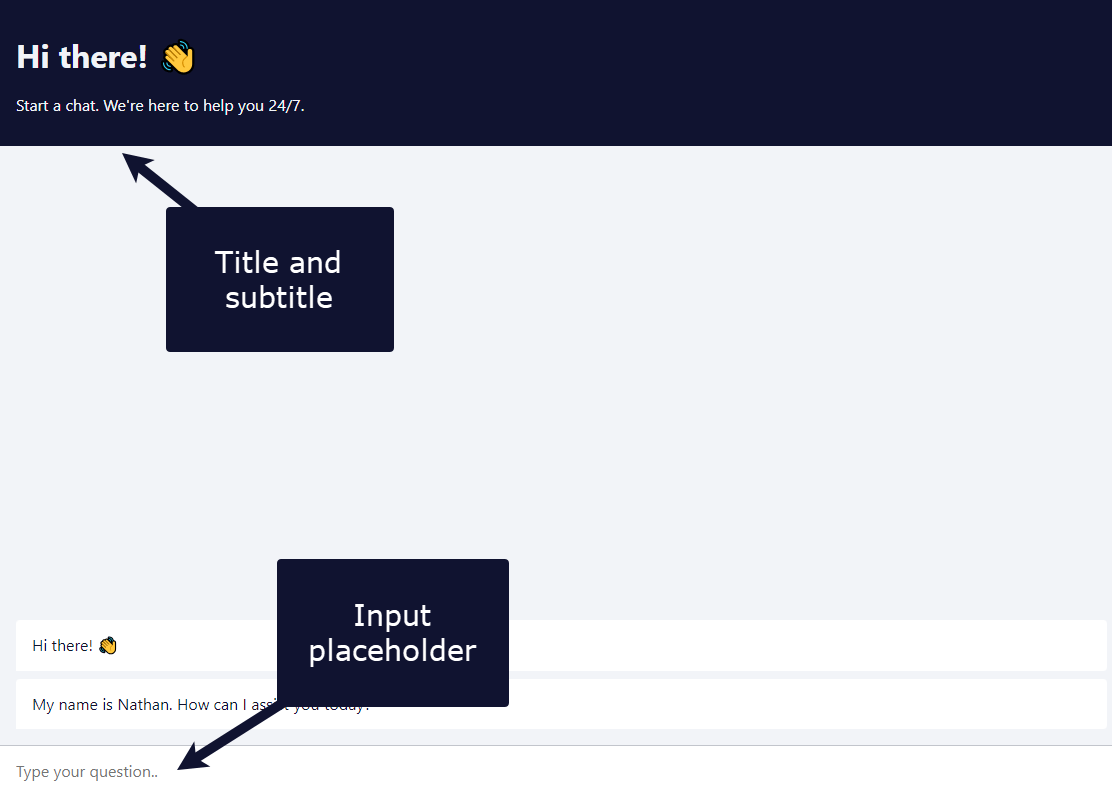
输入占位符、标题和副标题(Input Placeholder, Title, and Subtitle)#
输入聊天界面中这些元素的文本。
🌐 Enter the text for these elements in the chat interface.
??? 详情 “查看截图”
加载上一次会话(Load Previous Session)#
选择是否加载先前聊天会话中的聊天消息。
🌐 Select whether to load chat messages from a previous chat session.
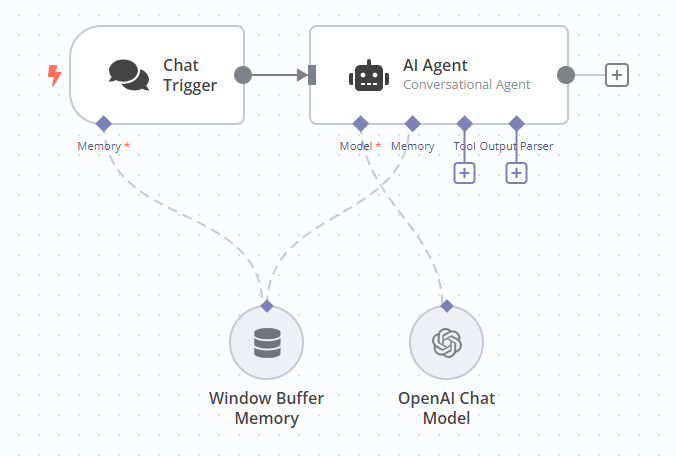
如果你选择 关闭 以外的任何选项,必须将 Chat 触发器和你正在使用的代理连接到一个内存子节点。当你将 加载上一次会话 设置为 从内存 时,Chat 触发器上会显示内存连接器。n8n 建议将 Chat 触发器和代理都连接到同一个内存子节点,因为这可确保两个节点使用统一的数据信息源。
🌐 If you select any option other than Off, you must connect the Chat trigger and the Agent you're using to a memory sub-node. The memory connector on the Chat trigger appears when you set Load Previous Session to From Memory. n8n recommends connecting both the Chat trigger and Agent to the same memory sub-node, as this ensures a single source of truth for both nodes.
??? 详情 “查看截图”
响应模式(Response Mode)#
在构建代理或处理聊天的链之后的工作流程步骤时使用此选项。可选择如下:
🌐 Use this option when building a workflow with steps after the agent or chain that's handling the chat. Choose from:
- 当最后一个节点完成时:聊天触发节点返回工作流中最后执行的节点的响应代码和数据输出。
- 使用响应节点:聊天触发节点按聊天节点或响应 Webhook节点中定义的方式进行响应。在这种响应模式下,聊天触发节点将仅显示这些节点中定义的消息,而不会输出工作流中最后执行节点的数据。
使用响应节点
此模式取代了 Chat Trigger 节点 1.2 版本中的“使用 Respond to Webhook 节点”模式。
- 流式响应:在工作流处理过程中,允许将实时数据流回用户。需要工作流中支持流式传输的节点(例如,AI agent 节点)。
要求点击按钮开始聊天(Require Button Click to Start Chat)#
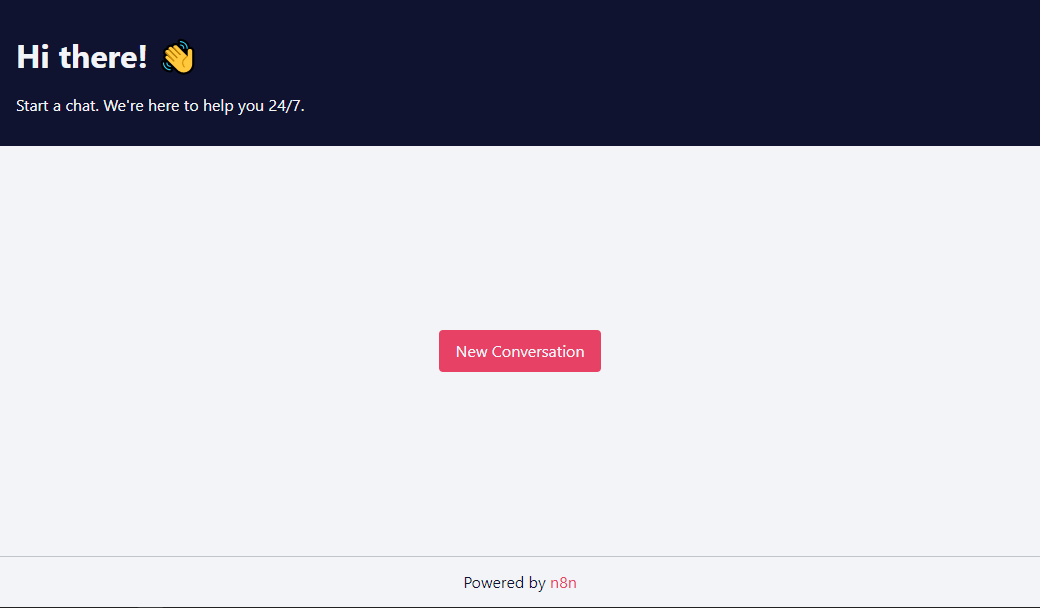
设置是否在聊天界面显示新建对话按钮(开启显示或关闭不显示)。
🌐 Set whether to display a New Conversation button on the chat interface (turned on) or not (turned off).
??? 详情 “查看截图”
嵌入式聊天选项(Embedded chat options)#
允许的来源 (CORS)(Allowed Origin (CORS))#
设置可以访问聊天 URL 的来源。输入允许跨源非预检请求的 URL 列表,用逗号分隔。
🌐 Set the origins that can access the chat URL. Enter a comma-separated list of URLs allowed for cross-origin non-preflight requests.
使用 *(默认)以允许所有来源。
🌐 Use * (default) to allow all origins.
加载上一次会话(Load Previous Session)#
选择是否加载先前聊天会话中的聊天消息。
🌐 Select whether to load chat messages from a previous chat session.
如果你选择 关闭 以外的任何选项,必须将 Chat 触发器和你正在使用的代理连接到一个内存子节点。当你将 加载上一次会话 设置为 从内存 时,Chat 触发器上会显示内存连接器。n8n 建议将 Chat 触发器和代理都连接到同一个内存子节点,因为这可确保两个节点使用统一的数据信息源。
🌐 If you select any option other than Off, you must connect the Chat trigger and the Agent you're using to a memory sub-node. The memory connector on the Chat trigger appears when you set Load Previous Session to From Memory. n8n recommends connecting both the Chat trigger and Agent to the same memory sub-node, as this ensures a single source of truth for both nodes.
??? 详情 “查看截图”
响应模式(Response Mode)#
在构建代理或处理聊天的链之后的工作流程步骤时使用此选项。可选择如下:
🌐 Use this option when building a workflow with steps after the agent or chain that's handling the chat. Choose from:
- 当最后一个节点完成时:聊天触发节点返回工作流中最后执行的节点的响应代码和数据输出。
- 使用响应节点:聊天触发节点按聊天节点或响应 Webhook节点中定义的方式进行响应。在这种响应模式下,聊天触发节点将仅显示这些节点中定义的消息,而不会输出工作流中最后执行节点的数据。
使用响应节点
此模式取代了 Chat Trigger 节点 1.2 版本中的“使用 Respond to Webhook 节点”模式。
- 流式响应:在工作流处理的同时,将实时数据流回用户。需要启用流式支持的节点。
模板和示例(Templates and examples)#
相关资源(Related resources)#
View n8n's Advanced AI documentation.
手动设置聊天回复(Set the chat response manually)#
当你不想将代理或链节点的输出直接发送给用户时,需要手动设置聊天响应。相反,你可以先获取代理或链节点的输出,然后在发送回用户之前对其进行修改或进行其他处理。
🌐 You need to manually set the chat response when you don't want to directly send the output of an Agent or Chain node to the user. Instead, you want to take the output of an Agent or Chain node and modify it or do something else with it before sending it back to the user.
在一个基本的工作流程中,Agent 和 Chain 节点会输出一个名为 output 或 text 的参数,而 Chat 触发器会将该参数的值作为聊天响应发送给用户。
🌐 In a basic workflow, the Agent and Chain nodes output a parameter named either output or text, and the Chat trigger sends the value of this parameter to the user as the chat response.
如果你需要手动创建发送给用户的响应,你必须创建一个名为 text 或 output 的参数。如果你使用其他参数名称,聊天触发器将会发送整个对象作为其响应,而不仅仅是值。
🌐 If you need to manually create the response sent to the user, you must create a parameter named either text or output. If you use a different parameter name, the Chat trigger sends the entire object as its response, not just the value.
聊天节点
当你使用 Chat 节点手动创建发送给用户的响应时,你必须将聊天触发器的响应模式设置为“使用响应节点”。
常见问题(Common issues)#
有关常见问题或问题及建议的解决方案,请参阅 常见问题。
🌐 For common questions or issues and suggested solutions, refer to Common Issues.