处理 API 速率限制(Handling API rate limits)#
API 速率限制是对请求频率的限制。例如,一个 API 可能会限制你每分钟或每天可以发出的请求次数。
API 还可以限制你在单个请求中发送的数据量,或 API 在单个响应中发送的数据量。
🌐 APIs can also limits how much data you can send in one request, or how much data the API sends in a single response.
识别速率限制问题(Identify rate limit issues)#
当 n8n 节点达到速率限制时,它会报错。n8n 会在节点输出面板中显示错误信息。这包括来自服务的错误消息。
🌐 When an n8n node hits a rate limit, it errors. n8n displays the error message in the node output panel. This includes the error message from the service.
如果 n8n 从服务接收到错误 429(请求过多),错误消息是 服务正在接收来自你的过多请求。
🌐 If n8n received error 429 (too many requests) from the service, the error message is The service is receiving too many requests from you.
要检查你正在使用的服务的速率限制,请参阅该服务的 API 文档。
🌐 To check the rate limits for the service you're using, refer to the API documentation for the service.
处理集成速率限制(Handle rate limits for integrations)#
在 n8n 的集成中处理速率限制有两种方法:使用“失败时重试”设置,或者结合使用“循环处理项目(Loop Over Items)”节点和“等待(Wait)”节点:
🌐 There are two ways to handle rate limits in n8n's integrations: using the Retry On Fail setting, or using a combination of the Loop Over Items and Wait nodes:
- 失败重试:在 API 请求尝试之间添加暂停。
- 使用循环遍历项目和等待功能,你可以将请求数据拆分成更小的块,并在请求之间暂停。
启用失败重试(Enable Retry On Fail)#
启用“失败时重试”后,如果第一次请求失败,节点会自动重试。
🌐 When you enable Retry On Fail, the node automatically tries the request again if it fails the first time.
- 打开节点。
- 选择 设置。
- 启用 失败重试 开关。
- 配置重试设置:如果使用此方法来绕过速率限制,请将 重试间隔(毫秒) 设置为高于速率限制的值。例如,如果你使用的 API 允许每秒一次请求,请将 重试间隔(毫秒) 设置为
1000,以允许等待 1 秒。
使用循环遍历项目并等待(Use Loop Over Items and Wait)#
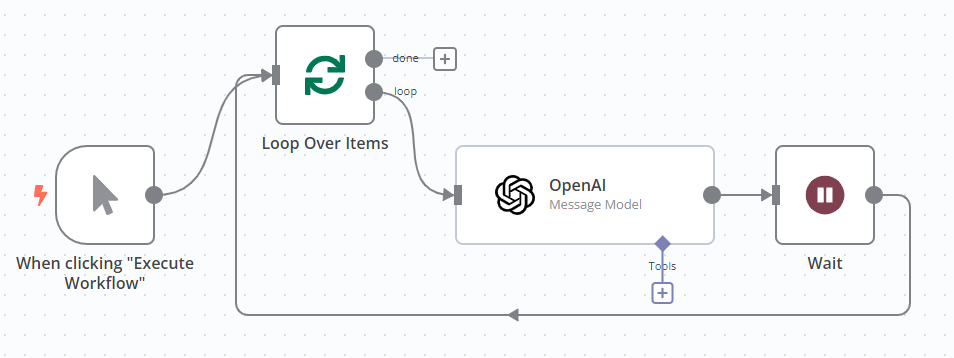
使用“循环处理项目”节点批量处理输入项目,并使用“等待”节点在每个请求之间添加暂停。
🌐 Use the Loop Over Items node to batch the input items, and the Wait node to introduce a pause between each request.
- 在调用 API 的节点之前添加“遍历项目”节点。有关如何配置该节点的信息,请参阅 遍历项目。
- 在调用 API 的节点之后添加等待节点,并将其连接回“遍历项目”节点。有关如何配置该节点的信息,请参考 等待。
例如,要处理使用 OpenAI 时的速率限制:
🌐 For example, to handle rate limits when using OpenAI:
处理 HTTP 请求节点中的速率限制(Handle rate limits in the HTTP Request node)#
HTTP 请求节点内置了用于处理速率限制和大量数据的设置。
🌐 The HTTP Request node has built-in settings for handling rate limits and large amounts of data.
批处理请求(Batch requests)#
使用批处理选项可以发送多个请求,从而减少每个请求的大小,并在请求之间引入暂停。这相当于使用“循环处理项目”和“等待”功能。
🌐 Use the Batching option to send more than one request, reducing the request size, and introducing a pause between requests. This is the equivalent of using Loop Over Items and Wait.
- 在 HTTP 请求节点中,选择 添加选项 > 批处理。
- 设置 每批次项目数:这是每个请求中包含的输入项目数量。
- 设置 批处理间隔(毫秒) 以在请求之间引入延迟。例如,如果你使用的 API 允许每秒一次请求,请将 重试间隔(毫秒) 设置为
1000,以允许等待 1 秒。
结果分页(Paginate results)#
当 API 需要发送超过单次响应能够处理的数据时,会对其结果进行分页。有关 HTTP 请求节点中分页的更多信息,请参阅 HTTP Request 节点 | 分页。
🌐 APIs paginate their results when they need to send more data than they can handle in a single response. For more information on pagination in the HTTP Request node, refer to HTTP Request node | Pagination.