使用 n8n-node 工具(Using the n8n-node tool)#
n8n-node 工具是用于开发 n8n 社区节点的官方命令行工具。你可以使用它来搭建新的节点、构建项目,并在开发过程中运行你的节点。
🌐 The n8n-node tool is the official CLI for developing community nodes for n8n. You can use it to scaffold out new nodes, build your projects, and run your node as you develop it.
使用 n8n-node,你可以创建符合已验证社区节点指南的节点。
🌐 Using n8n-node, you can create nodes that adhere to the guidelines for verified community nodes.
获取 n8n 节点(Get n8n-node)#
无需安装即可运行 n8n-node(Run n8n-node without installing)#
你可以使用你的包管理器通过 @n8n/create-node 初始化器 直接创建一个 n8n-node 项目,而无需安装:
🌐 You can create an n8n-node project directly without installing by using the @n8n/create-node initializer with your package manager:
1 | |
这会在本地设置初始项目文件(作为在本地安装 n8n-node 并显式运行 new 命令 的替代方法)。之后,你可以通过项目目录中的包管理器脚本运行程序运行其余的 n8n-node 命令(例如,npm run dev)。
🌐 This sets up the initial project files locally (an alternative to installing n8n-node locally and explicitly running the new command). Afterward, you run the rest of the n8n-node commands through your package manager's script runner inside the project directory (for example, npm run dev).
全局安装 n8n-node(Install n8n-node globally)#
你可以使用 npm 全局安装 n8n-node:
🌐 You can install n8n-node globally with npm:
1 | |
通过键入以下命令验证是否可以访问该命令:
🌐 Verify access to the command by typing:
1 | |
命令概览(Command overview)#
n8n-node 工具提供以下命令:
🌐 The n8n-node tool provides the following commands:
new#
new 命令会为新节点创建文件系统结构和元数据。该命令会初始化与 在不安装的情况下运行 n8n 节点 中所述相同的结构。
🌐 The new command creates the file system structure and metadata for a new node. This command initializes the same structure as outlined in run n8n-node without installing.
调用时,它会以交互方式提示你输入有关项目的详细信息,以便自定义你的起始代码。你需要提供项目名称、选择节点类型,并选择最符合你需求的起始模板。n8n-node 工具将创建你的项目文件结构,并可选择性地安装初始项目依赖。
🌐 When called, it interactively prompts for details about your project to customize your starting code. You'll provide the project name, choose a node type, and select the starting template that best matches your needs. The n8n-node tool will create your project file structure and optionally install your initial project dependencies.
了解更多关于如何在 创建新节点部分 中使用 new 命令的信息。
🌐 Learn more about how to use the new command in the creating a new node section.
build#
build 命令会编译你的节点并复制所有必需的资源。
🌐 The build command compiles your node and copies all the required assets.
了解更多关于如何在搭建你的节点部分中使用 build 命令的信息。
🌐 Learn more about how to use the build command in the building your node section.
dev#
dev 命令使用你的节点运行 n8n。它会监视你的项目目录,并在检测到更改时自动重建实时预览。
🌐 The dev command runs n8n with your node. It monitors your project directory and automatically rebuilds the live preview when it detects changes.
了解更多关于如何在 测试你的 n8n 节点部分 使用 dev 命令的信息。
🌐 Learn more about how to use the dev command in the testing your node in n8n section.
lint#
lint 命令会检查当前目录中节点的代码。你可以选择使用 --fix 选项,以尝试自动修复它发现的任何问题。
🌐 The lint command checks the code for the node in the current directory. You can optionally use with the --fix option to attempt to automatically fix any issues it identifies.
在Lint Your Node 部分了解如何使用 lint 命令的更多信息。
🌐 Learn more about how to use the lint command in the lint your node section.
release#
release 命令将你的社区节点包发布到 npm。它使用 release-it 来在发布到 npm 之前清理、检查并干净地构建你的包。
🌐 The release command publishes your community node package to npm. It uses release-it to clean, check and cleanly build your package before publishing it to npm.
在释放节点部分了解如何使用 release 命令的更多信息。
🌐 Learn more about how to use the release command in the release your node section.
创建新节点(Creating a new node)#
要使用 n8n-node 创建一个新节点,请调用 n8n-node new。你可以完全通过交互方式调用此命令,也可以在命令行上提供详细信息。
🌐 To create a new node with n8n-node, call n8n-node new. You can call this command entirely interactively or provide details on the command line.
Create new node without installing
You can optionally create an n8n-node project directly without installing n8n-node by using the @n8n/create-node initializer with your package manager.
In the commands below, substitute n8n-node new with npm create @n8n/node@latest. When using this form, you must add a double dash (--) before including any options (like --template). For example:
1 | |
该命令会提示你输入节点的任何缺失信息,然后生成一个项目结构以帮助你入门。默认情况下,它会接着安装初始项目依赖(你可以通过传递 --skip-install 标志来禁用此功能)。
🌐 The command will prompt for any missing information about your node and then generate a project structure to get you started. By default, it will follow up by installing the initial project dependencies (you can disable this by passing the --skip-install flag).
交互式设置节点详细信息(Setting node details interactively)#
当不带参数调用时,n8n-node new 会以交互方式提示你输入新节点的详细信息:
🌐 When called without arguments, n8n-node new prompts you for details about your new node interactively:
1 | |
这将启动一个交互式提示,你可以在其中定义项目的详细信息:
🌐 This will start an interactive prompt where you can define the details of your project:
- 你的节点叫什么名字? 你的节点名称。这会影响你的项目目录名称、包名称以及 n8n 节点本身。名称必须使用以下格式之一:
n8n-nodes-<YOUR_NODE_NAME>@<YOUR_ORG>/n8n-nodes-<YOUR_NODE_NAME>
- 你正在构建哪种节点? 你想要构建的 节点类型:
- HTTP API:一种低代码、声明式的节点结构,旨在加快 n8n Cloud 的审批速度。
- 其他:一个具有完全灵活性的编程风格节点。
- 你想使用哪个模板? 使用 HTTP API 时,你可以选择一个模板来开始:
- GitHub Issues API:一个包含多种操作和凭据的演示节点。这可以帮助你熟悉节点结构和使用规范。
- 从头开始:一个空白模板,将通过一些进一步的提示引导你完成自定义设置。
当选择 HTTP API > 从头开始时,n8n-node 会询问你以下内容:
🌐 When choosing HTTP API > Start from scratch, n8n-node will ask you the following:
- API 的基础 URL 是什么? 你计划集成的 API 的根 URL。
- 你的 API 使用哪种类型的身份验证? 你的节点应提供的身份验证方式:
- API 密钥:通过头部、查询参数或请求主体发送密钥。
- 承载令牌:使用 Authorization 头部发送令牌(
Authorization: Bearer <token>)。 - OAuth2:使用 OAuth 2.0 流程代表用户或应用获取访问令牌。
- 基本认证:通过 Authorization 头发送经过 base64 编码的用户名和密码。
- 自定义:创建你自己的凭证逻辑。这将创建一个空的凭证类,你可以根据需要进行自定义。
- 无:不需要认证。不要为该节点创建凭证类。
一旦你完成选择,n8n-node 将在当前目录下为你的节点创建一个新的项目目录。默认情况下,它还会安装初始项目依赖(你可以通过传递 --skip-install 标志来禁用此功能)。
🌐 Once you've made your selections, n8n-node will create a new project directory for your node in the current directory. By default, it will also install the initial project dependencies (you can disable this by passing the --skip-install flag).
在命令行中提供节点详细信息(Providing node details on the command line)#
你可以在命令行中提供一些节点详细信息,以避免出现提示。
🌐 You can provide some of your node details on the command line to avoid prompts.
你可以将节点名称作为参数包含在内:
🌐 You can include the name you want to use for your node an argument:
1 | |
节点名称格式
节点名称必须使用以下格式之一:
@<YOUR_ORG>/n8n-nodes-<YOUR_NODE_NAME>n8n-nodes-<YOUR_NODE_NAME>
如果你提前知道要使用的模板,你也可以使用 --template 标志传递该值:
🌐 If you know the template you want to use ahead of time, you can also pass the value using the --template flag:
1 | |
模板必须是以下之一:
🌐 The template must be one of the following:
declarative/github-issues:一个包含多种操作和凭证的演示节点。这可以帮助你熟悉节点的结构和使用规范。declarative/custom:一个空白模板,会通过一些额外提示引导你完成自定义设置。programmatic/example:一种具有完全灵活性的编程风格节点。
构建节点(Building your node)#
你可以在项目的根目录运行 build 命令来构建你的节点:
🌐 You can build your node by running the build command in your project's root directory:
1 | |
n8n-node 将编译你的 TypeScript 文件并打包其他项目资源。你也可以通过包管理器调用 build 脚本。例如,如果你使用的是 npm,效果是一样的:
1 | |
代码检查节点(Lint your node)#
n8n-node 工具还会自动为你的项目创建一个 lint 脚本。你可以通过你的包管理器运行它。例如:
🌐 The n8n-node tool automatically creates a lint script for your project as well. You can run with your package manager. For example:
1 | |
你也可以通过包管理器的脚本运行器运行:
🌐 You can also run through your package manager's script runner:
1 | |
如果你包含 --fix 选项(也可以用 npm run lint:fix 调用),n8n-node 会尝试修复它识别出的问题:
🌐 If you include the --fix option (also callable with npm run lint:fix), n8n-node will attempt to fix the issues that it identifies:
1 | |
在 n8n 中测试你的节点(Testing your node in n8n)#
要在 n8n 中测试你的节点,请在项目的根目录下运行 dev 命令:
🌐 To test your node in n8n, you run the dev command in your project's root directory:
1 | |
与 build 命令一样,你也可以通过你的包管理器运行它。例如:
🌐 As with the build command, you can also run this through your package manager. For example:
1 | |
n8n-node 将编译你的项目,然后通过 npm 启动一个本地 n8n 实例,并加载你的节点。
访问你的 localhost:5678 登录到你的 n8n 实例。如果你打开一个工作流,你的节点会出现在节点面板中:
🌐 Visit your localhost:5678 to sign in to your n8n instance. If you open a workflow, your node appears in the nodes panel:
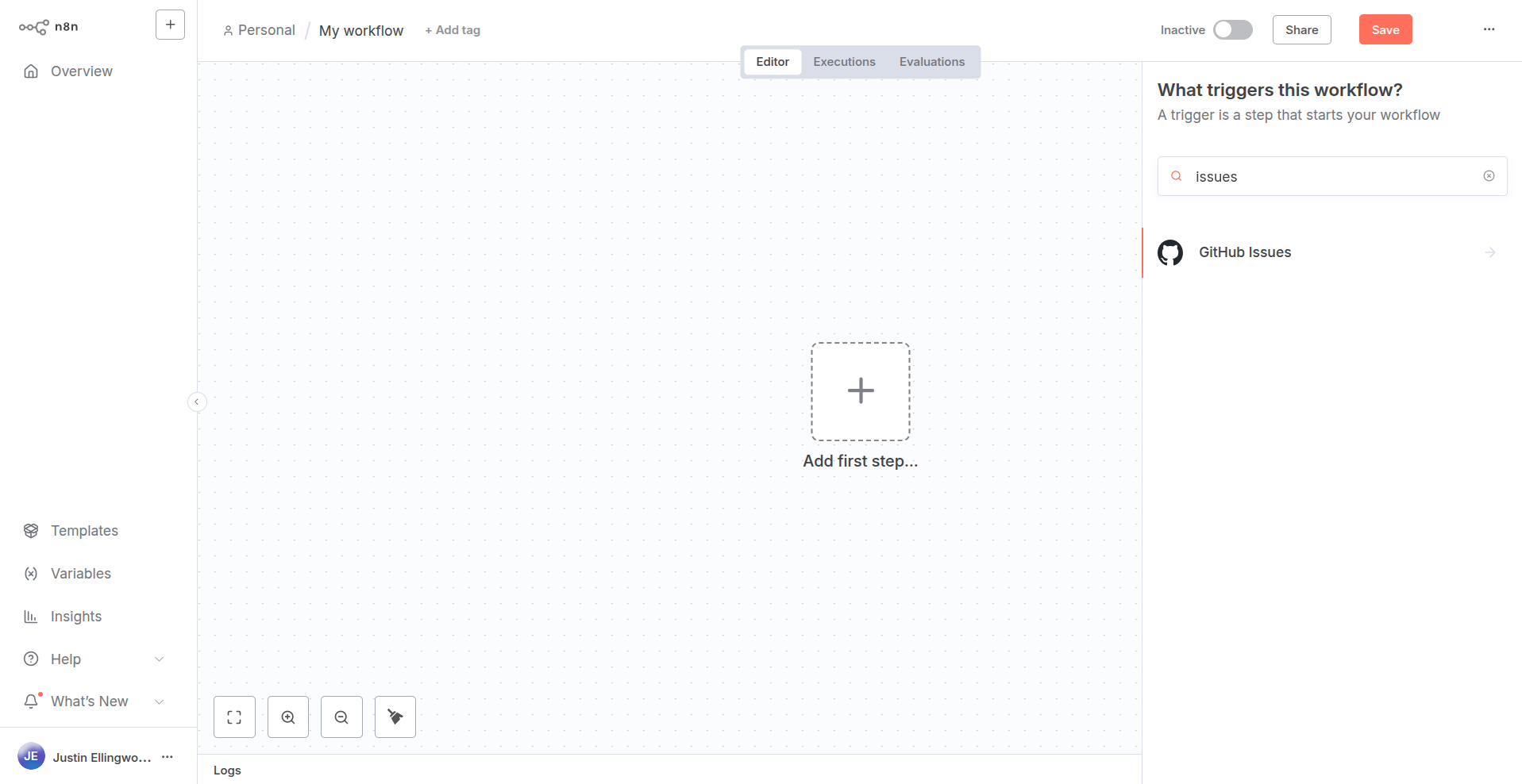
之后,你可以将其添加到你的流程中,并在开发过程中测试节点的功能。
🌐 From there, you can add it to your workflow and test the node's functionality as you develop.
发布你的节点(Release your node)#
要发布你的节点,请在项目目录中运行 release 命令。该命令使用 release-it 来构建并发布你的节点。
🌐 To publish your node, run the release command in your project directory. This command uses release-it to build and publish your node.
登录 npm
要使用 release 命令,你必须使用 npm login 命令登录 npm。否则,n8n-node 将没有权限发布你的项目文件。
1 | |
要运行 npm,请输入:
🌐 To run with npm, type:
1 | |
当你运行 release 命令时,n8n-node 将执行以下操作:
🌐 When you run the release command, n8n-node will perform the following actions:
- 构建节点
- 对文件运行 lint 检查
- 更新变更日志
- 创建 Git 标签
- 创建 GitHub 发布
- 将包发布到 npm