故障排除(Troubleshooting)#
凭据(Credentials)#
错误信息:'类型为 "" 的凭据未知'(Error message: 'Credentials of type "" aren't known')#
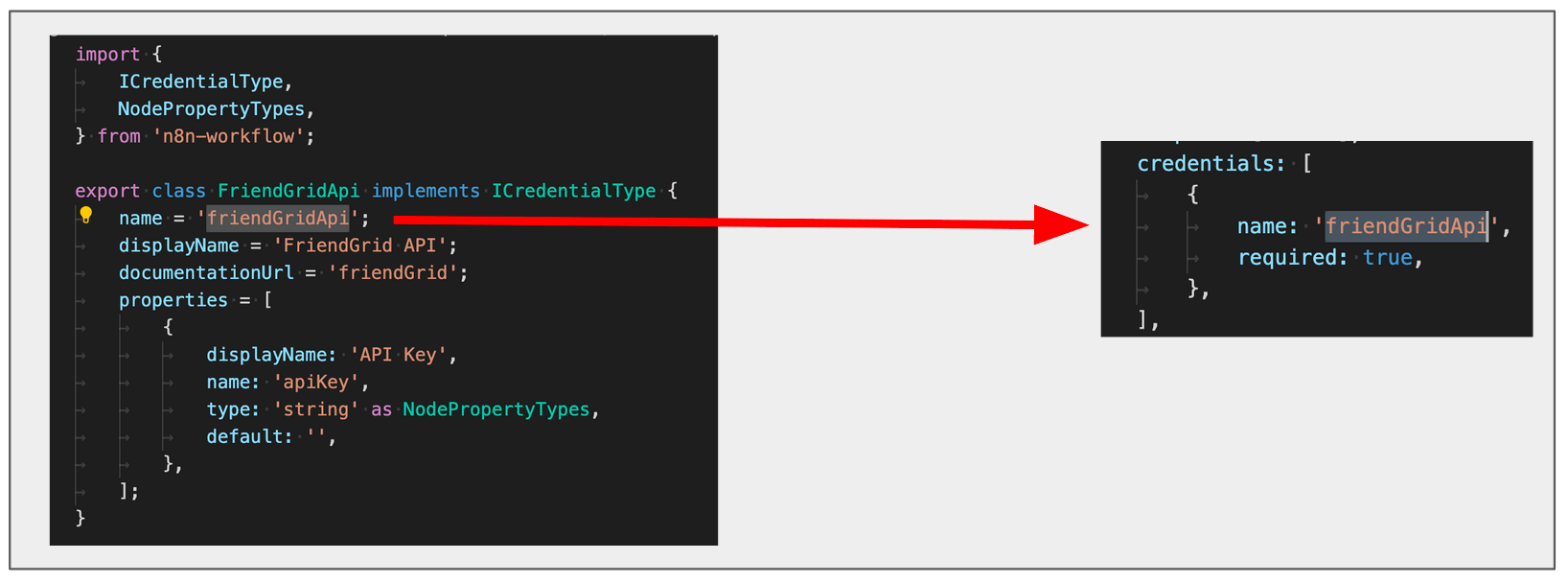
检查凭据数组中的名称是否与凭据类的属性名称匹配。
🌐 Check that the name in the credentials array matches the name used in the property name of the credentials' class.
编辑器界面(Editor UI)#
错误消息:'加载初始化数据时出现问题:无法访问 API 服务器。它可能已宕机'(Error message: 'There was a problem loading init data: API-Server can not be reached. It's probably down')#
- 检查节点文件、节点文件夹和类的名称是否与添加到
packages/nodes-base/package.json的路径匹配。 - 检查
displayOptions属性中使用的名称是否是节点中 UI 元素使用的名称。
节点图标未显示在“添加节点”菜单和编辑器界面中(Node icon doesn't show up in the Add Node menu and the Editor UI)#
- 检查图标是否与节点位于同一文件夹中。
- 检查其格式是否为 PNG 或 SVG。
- 当
icon属性引用图标文件时,请检查它是否包含徽标扩展名(.png或.svg),并且前面加上了file:。例如,file:friendGrid.png或file:friendGrid.svg。
节点图标显示不全(Node icon doesn't fit)#
- 如果你使用 SVG 文件,请确保画布大小为正方形。你可以在这里找到使用 GIMP 更改 SVG 文件画布大小的说明 here。
- 如果你使用 PNG 文件,请确保其尺寸为 60x60 像素。
节点未显示在“添加节点”菜单中(Node doesn't show up in the Add Node menu)#
检查你是否在项目的 package.json 文件中注册了该节点。
🌐 Check that you registered the node in the package.json file in your project.
刷新后,描述属性的更改未显示在 UI 中(Changes to the description properties don't show in the UI on refreshing)#
每次更改描述属性时,都必须停止当前的 n8n 进程(ctrl + c)并重新运行。你可能还需要重新运行 npm link。
🌐 Every time you change the description properties, you have to stop the current n8n process (ctrl + c) and run it again. You may also need to re-run npm link.
Linter 错误地警告文件名大小写错误(Linter incorrectly warning about file name case)#
节点代码检查器对文件名有规定,包括应使用的大小写。Windows 用户在重命名文件时可能会遇到一个问题,即使在重命名文件后,代码检查器仍会继续发出警告。这是由于在重命名文件时更改大小写的已知 Windows 问题导致的。已知问题。
🌐 The node linter has rules for file names, including what case they should be. Windows users may encounter an issue when renaming files that causes the linter to continue giving warnings, even after you rename the files. This is due to a known Windows issue with changing case when renaming files.