n8n v2.0 迁移工具(n8n v2.0 migration tool)#
迁移工具通过识别升级前需要注意的工作流和配置,帮助你准备 n8n 实例以升级到 2.0 版本。
🌐 The migration tool helps you prepare your n8n instance for upgrading to version 2.0 by identifying workflows and configurations that need attention before the upgrade.
您可以在此页面查看 v2 的所有重大更改。
🌐 You can see all breaking changes for v2 on this page.
访问工具(Accessing the Tool)#
导航到 设置 > 迁移报告 查看你的兼容性状态。
🌐 Navigate to Settings > Migration Report to view your compatibility status.
用户角色访问
迁移工具仅适用于全局管理员。
了解你的迁移状态(Understanding Your Migration Status)#
在页面顶部,你将看到:
🌐 At the top of the page, you'll see:
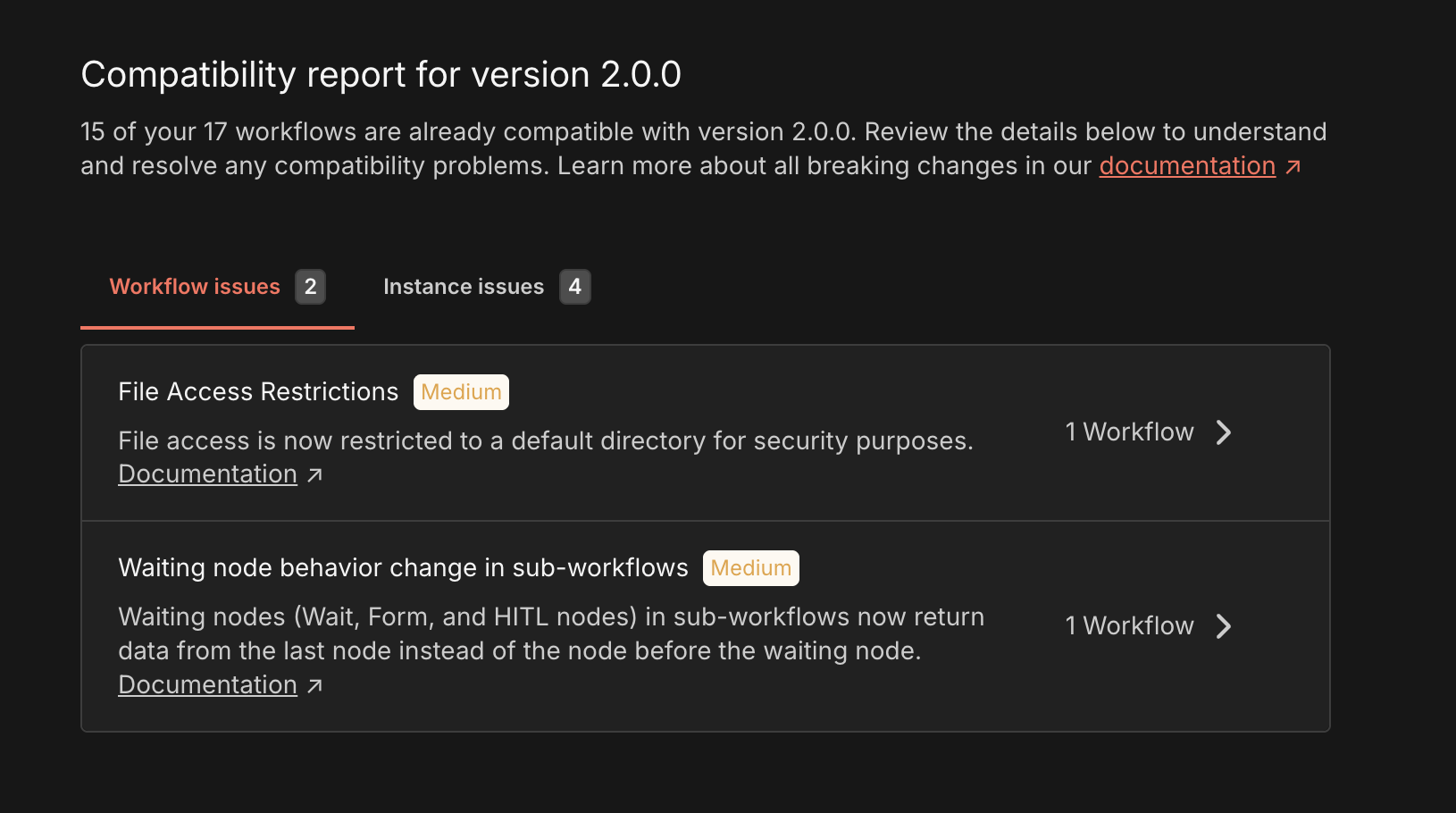
X 个 Y 工作流与 n8n 2.0 兼容
这将告诉你在升级后有多少工作流可以继续正常运行而无需更改。你的目标是解决导致其余工作流不兼容的问题,以及全局实例的问题。
🌐 This tells you how many workflows will continue working without changes after upgrading. Your goal is to address the issues preventing the remaining workflows from being compatible, as well as global instance issues.
查看问题(Viewing Issues)#
该工具将潜在问题分为两类:
🌐 The tool organizes potential problems into two categories:
工作流问题选项卡(Workflow Issues Tab)#
显示会影响你实例中特定工作流程的重大更改。
每个问题你将看到的内容:
🌐 Shows breaking changes that affect specific workflows in your instance. What you'll see for each issue:
- 问题标题: 问题的清晰名称
- 严重性标记(严重/中等/低): 需要多紧急修复此问题
- 关键: 在升级前修复,否则工作流将失败
- 中等: 可能导致意外行为或需要尽快关注
- 低: 不会破坏功能的小改动或弃用
- 描述: 解释正在发生的变化以及其重要性
- 文档链接: 点击查看详细的迁移说明
- 受影响的工作流数量: 有多少个你的工作流存在此问题
工作流问题详情页面(Workflow Issue Detail Page)#
点击 受影响的 X 个工作流程 可查看所有受影响的工作流程。 每个工作流程你将看到的内容:
🌐 Click X workflows affected to see all affected workflows. What you'll see for each workflow:
- 名称: 工作流名称。点击名称可打开工作流编辑器。
- 状态: 工作流是否已发布
- 受影响的节点: 显示所有受此问题影响的工作流节点列表。你可以点击每个节点以在工作流编辑器中打开并查看特定节点视图。
- 执行次数: 工作流的总执行次数
- 上次执行时间: 工作流上次执行的日期
- 最后更新: 工作流最后一次更新的日期
实例问题选项卡(Instance Issues Tab)#
显示影响整个 n8n 实例的配置更改,而不是特定工作流。你将看到每个问题的内容如下:
🌐 Shows configuration changes that affect your entire n8n instance, not specific workflows. What you'll see for each issue:
- 与工作流问题相同的信息(标题、严重性、描述、文档)
- 无工作流计数: 这些是适用于整个实例的全局设置
v2.0 迁移工具会扫描你的 n8n 实例,以识别升级到 v2.0 所需的潜在兼容性问题和配置更改。此参考文档详细说明了工具执行的每项检查,解释了检测到的问题的影响,并提供了准备实例迁移的建议。
🌐 The v2.0 migration tool scans your n8n instance to identify potential compatibility issues and configuration changes required for upgrading to v2.0. This reference details each check the tool performs, explains the impact of detected issues, and provides recommendations to prepare your instance for migration.
了解空状态(Understanding Empty States)#
未发现工作流问题(No Workflow Issues Found)#
你所有的工作流都与 v2.0 兼容。请检查 实例问题 选项卡,以确保你的服务器配置也已准备好。
🌐 All your workflows are compatible with v2.0. Check the Instance Issues tab to ensure your server configuration is also ready.
未发现实例问题(No Instance Issues Found)#
您的实例配置与 v2.0 兼容。请检查 工作流问题 选项卡,以确保所有工作流也已准备就绪。
🌐 Your instance configuration is compatible with v2.0. Check the Workflow Issues tab to ensure all workflows are also ready.
两个标签页均为空(Both Tabs Empty)#
你的 n8n 实例已完全准备好升级到版本 2.0。
🌐 Your n8n instance is fully ready to upgrade to version 2.0.
推荐工作流程(Recommended Workflow)#
初始评估(Initial Assessment)#
- 审核兼容性摘要
- 浏览两个选项卡中的所有问题以了解范围。
按严重性排序(Sort by Severity)#
- 从关键问题开始(它们会破坏工作流程)。
- 移动到中等风险级别(可能会导致问题)
- 最后处理低优先级问题(弃用警告)
修复工作流问题(Fix Workflow Issues)#
- 点击每个问题以查看受影响的工作流程。
- 请阅读文档以获取修复说明
- 根据需要更新每个工作流
- 在开发环境中测试工作流。
解决实例问题(Address Instance Issues)#
- 更新环境变量或服务器配置
- 请遵循每个实例级别更改的文档。
验证你的工作(Verify Your Work)#
- 点击 刷新 重新扫描。如果你看不到任何 刷新 按钮,只需重新加载页面即可重新扫描。
- 确认没有未解决的问题。
- 验证兼容性计数是否与工作流总数匹配
继续升级(Proceed with Upgrade)#
解决所有问题后,即可升级到 n8n 2.0
🌐 After addressing all issues, you're ready to upgrade to n8n 2.0