分支模式(Branch patterns)#
n8n 实例和 Git 分支之间的关系是灵活的。你可以根据需要创建不同的设置。
🌐 The relationship between n8n instances and Git branches is flexible. You can create different setups depending on your needs.
Recommendation: don't push and pull to the same n8n instance
You can push work from an instance to a branch, and pull to the same instance. n8n doesn't recommend this. To reduce the risk of merge conflicts and overwriting work, try to create a process where work goes in one direction: either to Git, or from Git, but not both.
多个实例,多个分支(Multiple instances, multiple branches)#
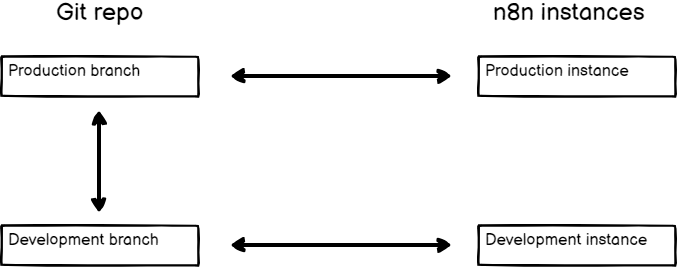
此模式涉及多个 n8n 实例,每个实例都链接到其自己的分支。
🌐 This pattern involves having multiple n8n instances, each one linked to its own branch.
你可以将此模式用于环境。例如,创建两个 n8n 实例,分别用于开发和生产。将它们链接到各自的分支。从你的开发实例向其分支推送工作,进行拉取请求将工作移到生产分支,然后在生产实例中拉取。
🌐 You can use this pattern for environments. For example, create two n8n instances, development and production. Link them to their own branches. Push work from your development instance to its branch, do a pull request to move work to the production branch, then pull to the production instance.
The advantages of this pattern are:
- An added safety layer to prevent changes getting into your production environment by mistake. You have to do a pull request in GitHub to copy work between environments.
- It supports more than two instances.
The disadvantage is more manual steps to copy work between environments.
多个实例,一个分支(Multiple instances, one branch)#
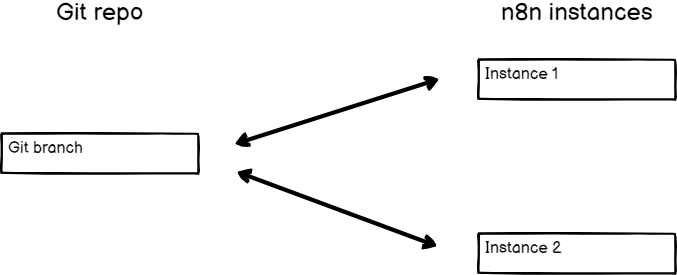
如果你希望在所有地方使用相同的工作流、标签和变量,但要在不同的 n8n 实例中使用它们,请使用此模式。
🌐 Use this pattern if you want the same workflows, tags, and variables everywhere, but want to use them in different n8n instances.
您可以将此模式用于环境。例如,创建两个 n8n 实例:开发环境和生产环境。将它们都连接到同一个分支。从开发环境推送工作,然后在生产环境中拉取它。
🌐 You can use this pattern for environments. For example, create two n8n instances, development and production. Link them both to the same branch. Push work from development, and pull it into production.
当测试 n8n 的新版本时,这种模式也很有用:你可以用新版本创建一个新的 n8n 实例,将其连接到 Git 分支并进行测试,同时你的生产实例保持在旧版本,直到你确认升级是安全的。
🌐 This pattern is also useful when testing a new version of n8n: you can create a new n8n instance with the new version, connect it to the Git branch and test it, while your production instance remains on the older version until you're confident it's safe to upgrade.
The advantage of this pattern is that work is instantly available to other environments when you push from one instance.
The disadvantages are:
- If you push by mistake, there is a risk the work will make it into your production instance. If you use a GitHub Action to automate pulls to production, you must either use the multi-instance, multi-branch pattern, or be careful to never push work that you don't want in production.
- Pushing and pulling to the same instance can cause data loss as changes are overridden when performing these actions. You should set up processes to ensure content flows in one direction.
One 实例,多个分支(One instance, multiple branches)#
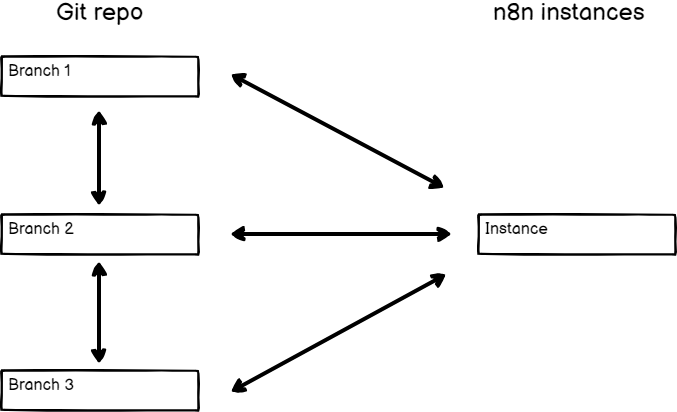
实例所有者可以更改与实例连接的 Git 分支。在这种情况下,完整的设置很可能是多个实例,多个分支的模式,但只有一个实例在分支之间切换。
🌐 The instance owner can change which Git branch connects to the instance. The full setup in this case is likely to be a Multiple instances, multiple branches pattern, but with one instance switching between branches.
这对于复查工作非常有用。例如,不同的用户可以在自己的实例上工作,并将内容推送到自己的分支。审查者可以在审查实例中工作,并在不同分支之间切换以加载不同用户的工作内容。
🌐 This is useful to review work. For example, different users could work on their own instance and push to their own branch. The reviewer could work in a review instance, and switch between branches to load work from different users.
No cleanup
n8n doesn't clean up the existing contents of an instance when changing branches. Switching branches in this pattern results in all the workflows from each branch being in your instance.
一个实例,一个分支(One instance, one branch)#
这是最简单的模式。
🌐 This is the simplest pattern.
